 TraceFind
Domain and Website OSINT: Investigate Who Is Behind a Site
Someone forwards you a text saying a parcel is on hold, with a link to a shop that looks like a household name. Is it real, how old is it, and who else is behind it? Domains are the most public part of the internet, and each step of building one leaves a record. This guide walks through those records in the order we check them, with commands you can paste.
- A domain leaves a trail in six places: registration (RDAP), DNS, mail records, certificate logs, web archives and the page source itself.
- Age is the quickest signal. A shop that claims ten years of trading on a domain registered last week has told you what you need.
- Shared tracking IDs and certificate names link sites run by the same hand, even when each one looks unrelated.
- Most of this is passive. Loading the site yourself is not, so use an archived copy when it matters.
- Registrant names are often hidden now. Treat a name as a bonus and the infrastructure as the evidence.
The tip-off
A reader forwards you a text: "Your parcel is on hold, confirm the fee at shop-example.com". The page behind it looks like a well-known retailer. Your job, as an analyst, a journalist or just the person who gets asked, is to say whether this site is what it claims, and if it is not, who else sits behind it.
You do not need special access. Domains are the most public part of the internet, and almost every step of building one leaves a record somewhere. This guide walks through those records in the order we use them, with commands you can paste into a terminal and a fictional target throughout. For the identity side (who runs it, which emails and handles show up), the same method as in our email guide picks up where this one ends.
The map: six places to look
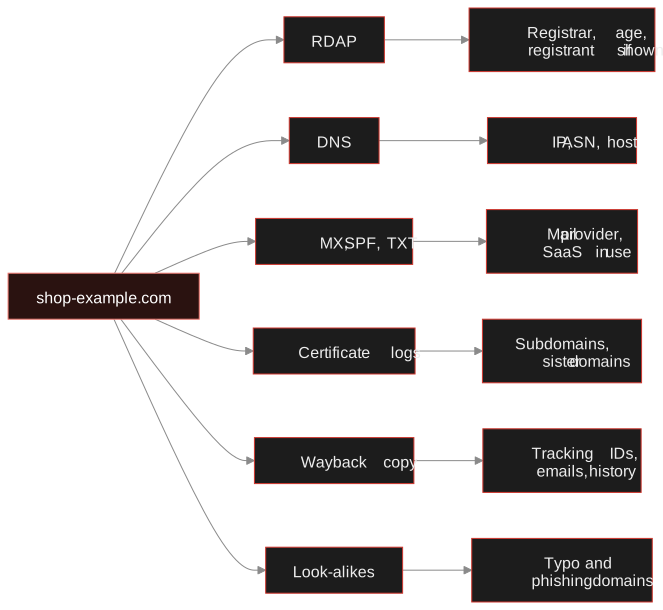
You can run these in any order, but the first two take under a minute and often settle the question, so we start there.
Step 1: Registration data (RDAP, not just WHOIS)
WHOIS is the old text protocol for "who registered this domain". Its modern replacement is RDAP, which returns structured JSON and is what registries now run. Both answer the same questions: when was it registered, through which registrar, when does it expire, and sometimes who is the registrant.
# RDAP via a public redirector, dates only
curl -sL https://rdap.org/domain/shop-example.com | jq '.events'
# classic WHOIS, if you have the client installed
whois shop-example.com | grep -iE 'creat|registrar|expir|updated'
Look at the registration event first. Since the GDPR came in, most registrars redact personal details for private individuals, so do not expect a name and address. The date is rarely hidden, and it is the single most useful field. A mismatch between the story and the date is a finding on its own.
| Field | What it tells you | Watch for |
|---|---|---|
| Registration date | Age of the domain | Days or weeks old, but claims a long history |
| Registrar | Where it was bought | Cheap, bulk-friendly registrars are common for throwaway sites, but also for plenty of honest ones |
| Name servers | Who runs its DNS | A free DNS or CDN service, shared with other domains |
| Status and expiry | Held, locked, renewed | One-year registration with no renewal |
| Registrant | Name, org, email, country | Usually redacted. If shown, check it is not a stolen company name |
Careful: A privacy-protected record is normal, not suspicious. Plenty of legitimate small businesses hide their details. A young domain, a redacted record and a payment form together is the pattern to worry about, not any one of them.
Step 2: DNS, hosting and mail
DNS records say where a site lives and what else the owner has set up. Three lookups cover most of it.
dig +short shop-example.com A
dig +short shop-example.com MX
dig +short shop-example.com TXT
The A record gives the IP address. Look that up and you learn the hosting provider and its network (ASN). Many unrelated sites share one big host, so a shared IP alone proves nothing; a small, unusual host used by several suspicious domains does. The MX records name the mail provider: a shop with no mail setup at all but a "contact us" address is odd. The TXT records often leak the services in use, because SPF lists the senders and verification strings point to tools the owner signed up for.
What you get is infrastructure, not a person. But it gives you things to compare against other domains, which is where it gets interesting.
Step 3: Certificate transparency
Whenever a certificate authority issues a TLS certificate, it is written to public logs. Sites like crt.sh let you search them by name. That has two uses: it dates the site's first HTTPS certificate, and it reveals every hostname that has had a certificate, including subdomains the owner never advertised.
# every name seen on a certificate for the domain
curl -s 'https://crt.sh/?q=%25.shop-example.com&output=json' \
  | jq -r '.[].name_value' | sort -u
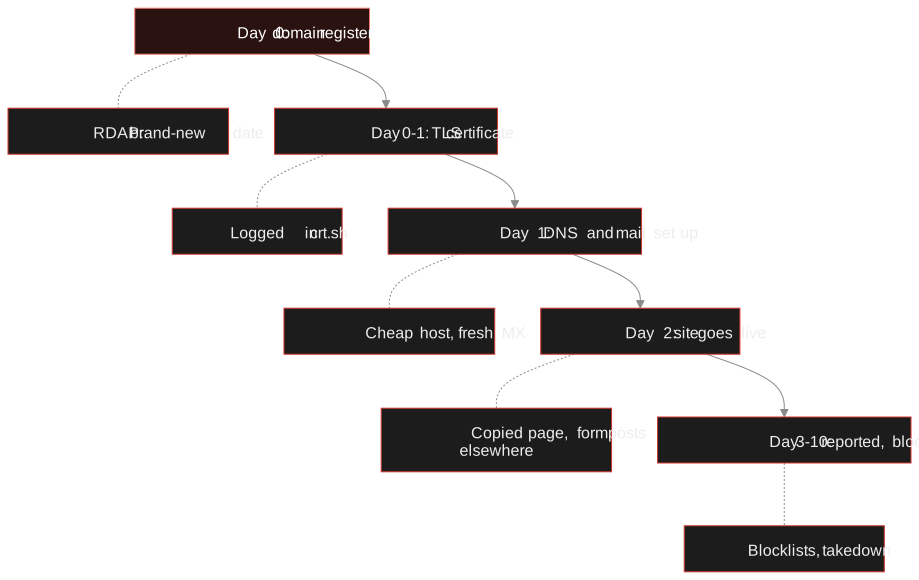
You may see mail., admin., staging. or login. names, and sometimes other brand names on the same certificate, which points to sister sites. Dates matter here too. Put them next to the registration date and you can rebuild how the site was put together.
Step 4: Look at it without touching it
Fetching the live site is not passive. Their server logs your IP, and a site that serves different content to different visitors may show you a clean page. For anything where you want to stay quiet, start from copies other people already made: the Internet Archive's Wayback Machine and public scanners such as urlscan.io.
# earliest and latest archived captures
curl -s 'https://web.archive.org/cdx/search/cdx?url=shop-example.com&limit=3&output=json'
curl -s 'https://archive.org/wayback/available?url=shop-example.com'
An archive with no captures before last week confirms the age. Older captures may show a completely different business, which suggests a bought or hijacked domain. Contact pages, footer text, privacy policies and "about" pages are worth reading in old copies: owners tidy the live site and forget the archive. Capture what you find with a screenshot and the capture URL, since both can vanish.
Tip: When you do need the live page, use a throwaway browser profile, a VPN or an isolated machine, and never log in or enter anything. Assume the owner will see the visit.
Step 5: Shared tracking IDs
Here is the pivot that surprises people. Site owners paste the same analytics snippet, ad publisher ID or chat widget key into every site they build. Those strings sit in the page source in plain sight, and the same ID on two domains is a strong hint that one person or team runs both.
# pull common tracking IDs out of a page you have saved or fetched
grep -oE 'UA-[0-9]{4,10}-[0-9]+|G-[A-Z0-9]{8,12}|pub-[0-9]{16}' page.html | sort -u
Old Universal Analytics IDs (UA-) were retired in 2023, but they remain in the source of sites that were never updated, which makes them good for linking old and new copies of the same operation. Once you have an ID, search for it. Scanner and web-technology services such as urlscan.io and BuiltWith index them, so you can ask "which other domains carry this string?".
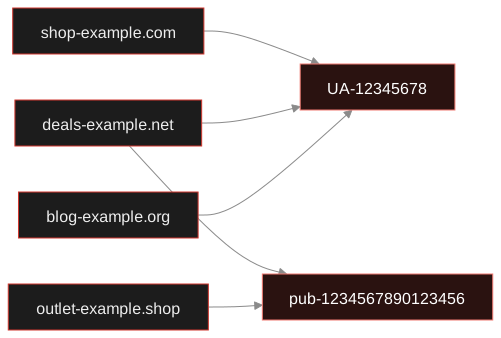
A shared ID is evidence of a connection, not of guilt. Agencies reuse one analytics account across many clients, and templates ship with a demo ID. Check that the domains share more than the ID before you say "same operator".
Step 6: Look-alike domains
If the target imitates a brand, the interesting question is how many siblings it has. Typo variants (examp1e), swapped endings (.shop for .com) and added words (example-support) are registered in batches. Searching certificate logs for the brand name, or running a permutation tool such as dnstwist, will list candidates, and the registration dates will cluster if they came from one buyer.
For reporting, most registrars and hosting providers have an abuse contact in their RDAP record, and browsers and security vendors accept reports of phishing pages directly.
Connect the domain to a person. TraceFind does not search domains, but once you have an email address, a username or a phone number from the records above, the email, username and phone searches take over, and the investigation canvas keeps the links in one place.
Search an emailA worked example
The text message points to shop-example.com, claiming to be Example Corp's outlet. A journalist runs the six checks in about twenty minutes.
RDAP. Registered four days ago, registrar a low-cost bulk seller, registrant redacted. Example Corp's real domain is eleven years old.
DNS. Hosted on a small VPS provider that is not Example Corp's. No mail records except a forwarding service.
Certificates. First certificate issued the same hour as registration. The same certificate also lists deals-example.net.
Archive. One capture, from yesterday: a copy of Example Corp's checkout page whose payment form posts to a third domain.
Trackers. An analytics ID that also appears on deals-example.net and outlet-example.shop, both registered the same week.
Result. Three sister domains, one operator, all days old and all imitating a company that has been trading for a decade. That is enough to report to the registrar, the host and the real company, with the dates as proof. It is not enough to name a person, and the story does not claim to.
Notice what carried the case: dates and shared infrastructure, not a name. That is typical, and it is why a redacted registrant record is a speed bump rather than a wall.
Domains are cheap to register and expensive to hide completely.
Limits and conduct
RDAP and WHOIS data can be stale or false. CDNs hide real hosting behind their own IPs. Certificate logs show names, not intent. Archives miss sites that block crawlers. Each finding needs the same grading you would give any other lead: confirmed, likely, possible. Our investigation workflow shows how we record that.
Legal: Reading public records is fine. Probing a server for weaknesses, scanning ports you do not own or trying admin pages is not OSINT and can be a crime. Keep to published records and archived copies, have a lawful purpose, and see the legal and ethics guide.
Frequently asked questions
What is the difference between WHOIS and RDAP?
WHOIS is the older plain-text protocol for domain registration data. RDAP is its structured, JSON-based replacement that registries now run. Both return dates, registrar and name servers, and often redact personal details.
Can I find out who owns a website?
Sometimes. Many registrars hide the registrant for privacy, so you often learn infrastructure instead of a name: the registration date, hosting, mail setup, certificates and shared tracking IDs. Those can link several sites to one operator even when no name is shown.
How can I tell how old a domain is?
Check the registration event in its RDAP or WHOIS record, then compare it with the first certificate in crt.sh and the earliest capture in the Wayback Machine. A site that is days old but claims a long history is a strong warning sign.
What is certificate transparency and why does it help?
Certificate authorities publish every TLS certificate they issue to public logs. Searching those logs shows when a site first used HTTPS and which subdomains and related domain names have had certificates, including ones the owner never advertised.
Does visiting a suspicious site alert its owner?
The server can log your IP address and other details, and some sites show different content to different visitors. For sensitive checks, start from archived copies or public scan results, and use an isolated browser if you must load the live page.
Does TraceFind search domains?
No. TraceFind searches emails, usernames and phone numbers. Use the methods in this guide for the domain, then search any email, username or phone number you find with TraceFind and link everything on the investigation canvas.
Keep reading
-
 Guides
How to Find Accounts Linked to an Email Address
Pivot from one email to accounts, breaches, usernames and profiles, then grade every finding. With a worked fraud case.
-
 Investigations
OSINT Investigation Workflow: One Email to a Full Picture
A fictional walk-through from one email address to a documented, sourced report, with pivots and link analysis along the way.
-
 Guides
Is OSINT Legal? Ethics and GDPR for Online Investigations
Where the legal and ethical lines run in open source investigations, and the habits that keep your work defensible.