 TraceFind
How to Find Accounts Linked to an Email Address
A new customer wants a €2,400 payout, and all you have is the address they signed up with. Is it a real person with years of history, or an identity made last Tuesday? This is the method we use to answer that from one email address: where to pivot, what each hit really proves, and how to grade it before you write anything down.
- An email address opens four doors: deliverability, registrations, breach records and avatars or Google account details.
- Breach dates tell you how long an address has existed; registrations tell you where it is used.
- The real value is the pivot: usernames from breaches and the local part lead to profiles you can check.
- Grade every finding as confirmed, likely or possible. A single matching username is only "possible".
- Everything here is passive. Nobody is emailed or notified, and you never touch the account itself.
Before you start: write down the question
Every good email investigation starts with one sentence on a sticky note. "Is this applicant's address a real, long-standing personal address?" leads to five focused checks. "What is this person's whole online life?" leads to hours of collecting things you can't justify keeping, which is wasteful and, under the GDPR, hard to defend.
So name the decision the research feeds (approve the payout, escalate the case, verify a source) and stop when you can make it. If the address belongs to someone else, make sure you have a lawful reason; our OSINT legal and ethics guide covers what that means day to day.
Throughout this guide we use the fictional address jane.doe@example.com.
The pivot map
Here is the whole method on one page. You start at the address, fan out into three kinds of source, collapse back into a handful of usernames and profile details, and then verify before you conclude.
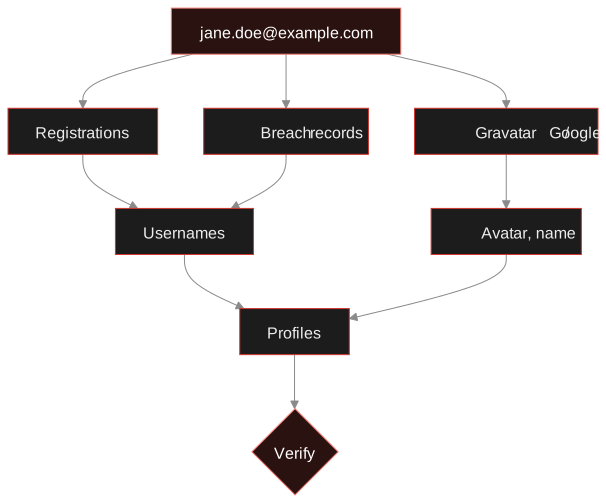
The steps below follow the diagram from top to bottom. In practice you'll run the first four at once, which is exactly what a combined email search does.
Step 1: Check that the address is real
There's no point mapping accounts for an address that can't receive mail. A deliverability check tells you whether the domain has MX records, whether the mail server accepts this mailbox (where it's willing to say), whether the domain is a known disposable provider, whether it's a role account like info@, and whether it's a catch-all domain that accepts anything.
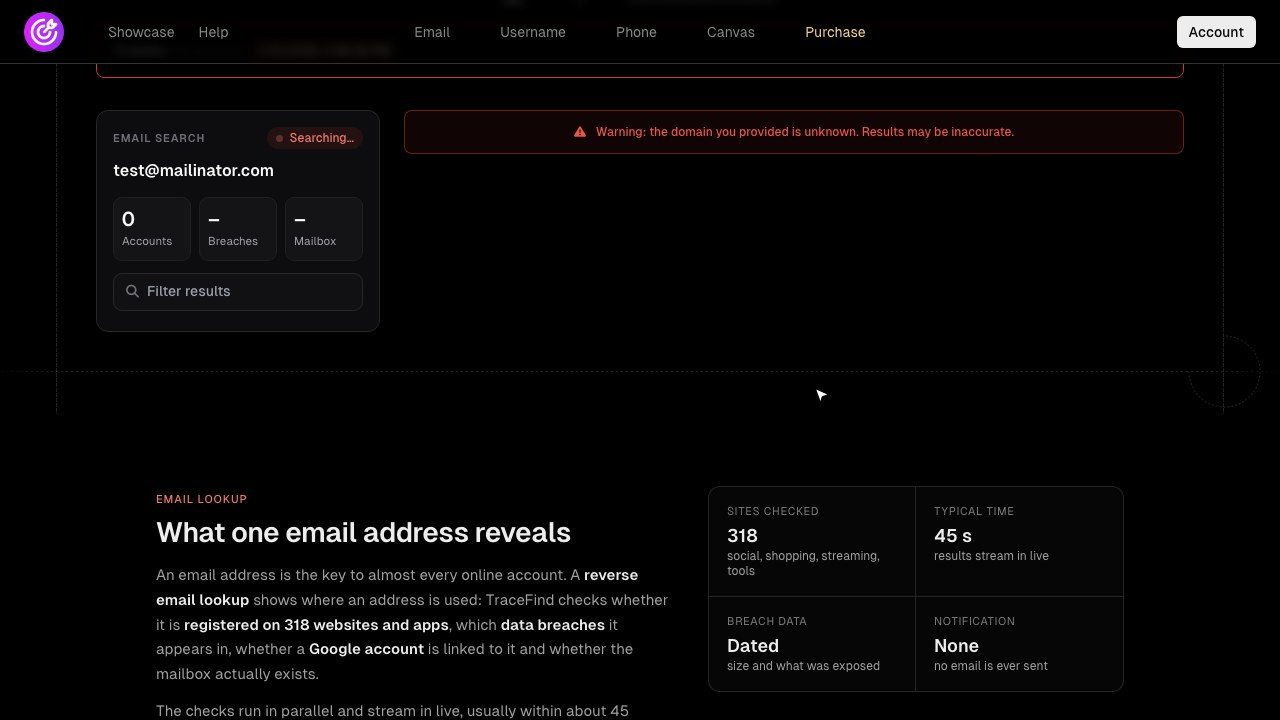
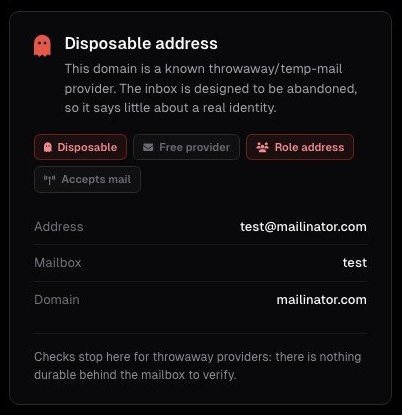
A disposable or catch-all result doesn't end the investigation, but it changes how much weight later findings get. The mechanics, including the SMTP conversation, are in how to verify an email address without sending mail.
Step 2: Check where the address is registered
Many sites reveal whether an email is already in use. Sign-up forms say "this email is already registered", and password reset pages behave differently for known and unknown addresses. Open source tools such as holehe automate this across many sites, and TraceFind's email search does it for 296 sites. Done properly it's passive: no reset email is sent and the account owner sees nothing.
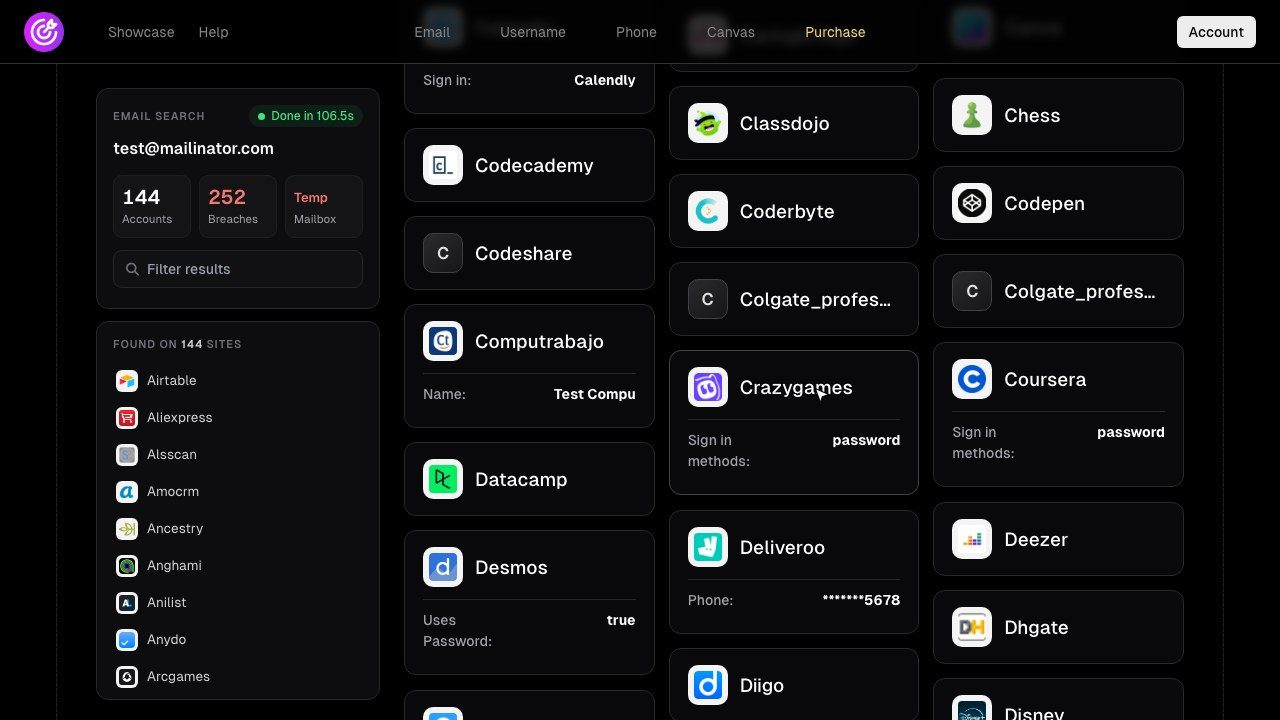
What a registration hit does and doesn't tell you:
- Presence, not activity. An account was created with this address at some point. It may have been dormant for a decade.
- Context. Developer platforms, a fitness app and a marketplace paint a different picture from gaming and streaming sites.
- Pivots. Some sites expose a partial username, a display name or the last digits of a phone number during the check.
Legal: Never go further than the check itself. Triggering a real password reset, attempting a login or using a recovery flow to receive codes is interacting with someone else's account. That's outside legitimate OSINT and illegal in most countries.
Step 3: Look the address up in breach data
Breach records answer two questions registration checks can't: when the address was in use and which data was attached to it. A breach lookup returns the breached service, the breach date and the exposed data types, such as email, username, name, phone number, IP address or password hash. Have I Been Pwned is the best-known free source; TraceFind searches more than 16 billion breach records from several sources in the same pass as the registration check.
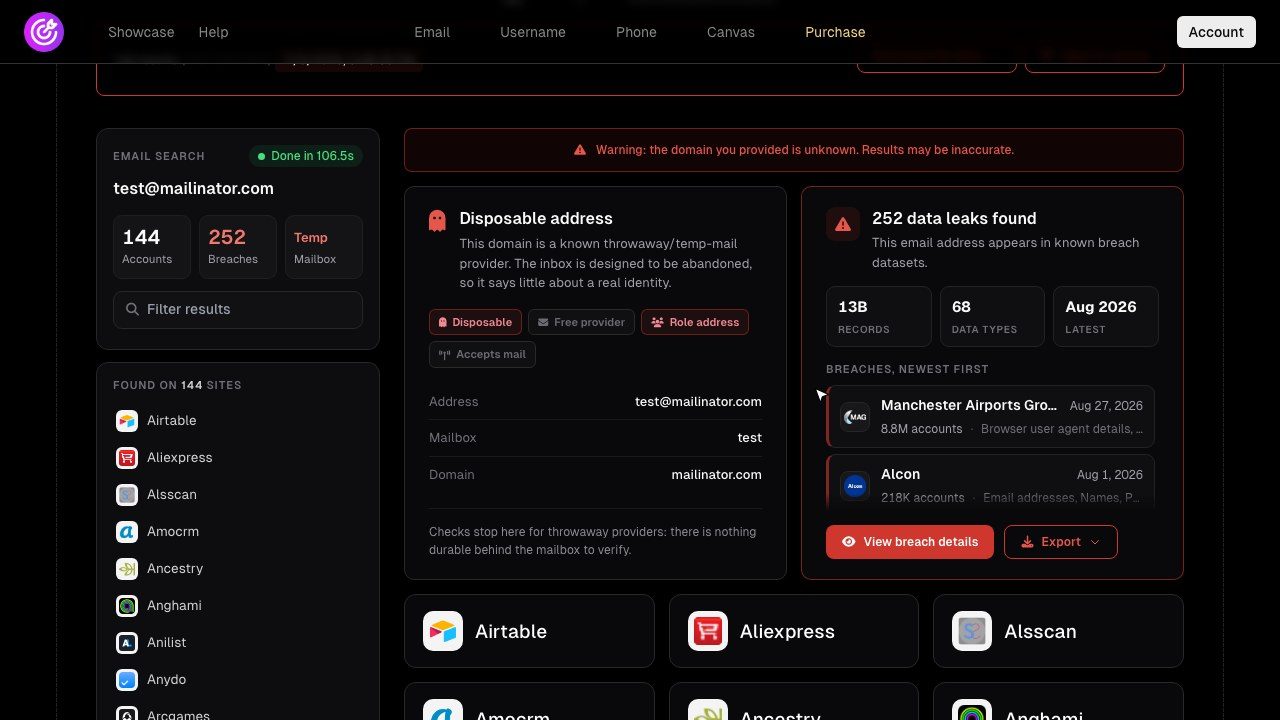
For an investigator, three things in that breach card matter:
- Dates. An address in a breach from several years ago existed then. That is strong evidence against a freshly made identity.
- Linked usernames. Breaches often pair the email with the username used on that service, a reliable input for a username search.
- Services. The list of breached sites is a second view of where the person had accounts.
Don't use leaked passwords, hashed or not, to access anything. If you're checking your own address, read what to do after a data breach instead.
Step 4: Check avatars and Google account details
Gravatar links a profile picture, and optionally a public profile, to an email address. The avatar URL is built from a hash of the trimmed, lowercased address (historically MD5, now also SHA-256), so you can check it yourself:
# hash the normalised address
printf '%s' 'jane.doe@example.com' | tr 'A-Z' 'a-z' | shasum -a 256
# then open https://gravatar.com/avatar/<hash>?d=404
# a 404 means no Gravatar is set for that address
If an avatar exists, the same image often turns up on forums, code hosts and comment sections, which makes it a good link between accounts. A reverse image search can surface more.
Google accounts. Gmail addresses, and many custom domains on Google Workspace, belong to a Google account, and some details such as a public profile picture can be visible. TraceFind's email search shows linked Google account details where they're public.
Step 5: Read the domain and the local part
The part after the @ often says more than the part before it.
| Domain type | What to check |
|---|---|
| Large free provider (Gmail, Outlook and similar) | Little to learn from the domain; focus on the local part and registrations. |
| Company domain | The company site, public team pages and press releases. It tells you the employer. |
| Personal custom domain | WHOIS/RDAP (often privacy-protected now), DNS, certificate history on crt.sh, old versions in the Wayback Machine. |
| Disposable provider | Treat the identity as unverified and look for any other identifier. |
The local part is worth a look too. jane.doe suggests a real name; jdoe-dev is a handle that is probably reused as a username elsewhere. Try the handle as a username before you assume anything about it.
Run steps 1 to 4 in one go TraceFind's email search checks 296 sites for registrations, looks the address up in 16B+ breach records, shows public Google account details and tests the mailbox, in about 45 seconds.
Search an emailStep 6: Pivot to usernames and profiles
By now you usually have one to three candidate usernames: from the local part, from breach records, from registration details. Run each through a username search, which checks many sites for a profile with that exact handle. TraceFind's username search covers about 1,000 sites and pulls profile fields such as display name, bio and avatar where a site exposes them.
This is where cases get crowded, and a list stops being enough. Putting the address, the usernames and the profiles on an investigation canvas shows you at a glance which findings hang off which identifier. Our username OSINT guide goes deeper on this hop.
Step 7: Grade every finding before you conclude
The most common email OSINT mistake is treating every hit as confirmed. jdoe-dev on a code host might be Jane, or one of the many other J. Does who had the same idea. We grade each finding with three questions, in this order:
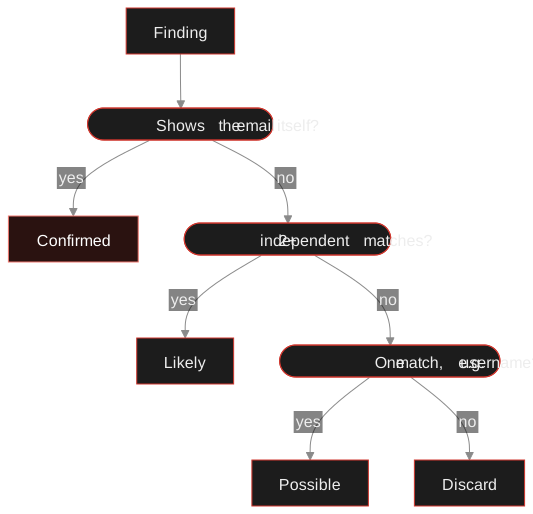
| Grade | What it takes | Example |
|---|---|---|
| Confirmed | The platform shows the email, or the profile links to something you already confirmed | Profile links to the website on Jane's own domain |
| Likely | Two or more independent attributes match | Same username and same avatar as the Gravatar |
| Possible | A single attribute matches | Same username, nothing else in common |
"Independent" matters. A username and a display name derived from it count as one attribute, not two. An avatar, a location in the bio, a linked website or the same writing style are separate signals.
Tip: Record the source, the time and the grade of every finding as you go. Pages change and profiles get deleted. TraceFind saves each search as a report you can export as PDF, JSON, CSV or TXT, which covers the search itself; take your own screenshots or archive copies of profiles you visit.
A worked case: the €2,400 payout
Example Corp's marketplace flags a new seller account asking for an early payout of €2,400. The account was opened nine days ago with jane.doe@example.com. The fraud analyst's question: is this a real, established person?
1. Deliverability. Mailbox confirmed, not disposable, not a role address. A good start, but it only proves the inbox exists.
2. Registrations. Eleven sites, including a code host, a running app and two shops. One shop card shows a masked phone number ending in 00. Nothing about it is unusual for a real person.
3. Breaches. Two hits, from 2019 and 2022. The 2019 breach pairs the address with the username jdoe-dev. The address has existed for at least six years. Confirmed that it is long-standing.
4. Pivot. A username search for jdoe-dev finds a code host profile with the same avatar as the Gravatar and a bio that names the same city as the seller account. Two independent matches: likely the same person.
Decision. The analyst approves the payout with a note listing each finding, its source and its grade. Total time: about fifteen minutes, and Jane was never contacted.
Now flip it. If the same check had come back with a throwaway inbox, zero registrations and no breach history at all, none of that proves fraud, but it does mean the identity has no past you can see. That's the moment to ask for more verification rather than pay out.
A long breach history is boring, and boring is exactly what a real person looks like.
Try it on an address you're allowed to check Free accounts include 3 searches with a preview of the counts. Credits unlock the full records and exports.
Open the email searchMistakes we see most often
- Decide the question first and stop when you can answer it
- Use breach dates as evidence of age
- Require two independent matches before "likely"
- Write down source, time and grade
- Treat a username match as identity
- Read a registration as "active account"
- Touch login or reset flows
- Keep data you no longer need for the case
Frequently asked questions
Can I find accounts linked to an email address for free?
Partly. You can check breaches on Have I Been Pwned, look for a Gravatar by hashing the address, and run open source tools such as holehe for registration checks. TraceFind runs these checks together; a free account includes 3 searches with a preview that shows counts only.
Does the person know when I search their email?
Not with passive checks. Registration and breach lookups do not send email to the address or notify the account owner. TraceFind searches are passive and never contact the person being looked up.
Does a registration hit mean the account is active?
No. It only shows that an account was created with that address at some point. Look for recent public activity on the profile before you assume it is in use.
Why does a disposable address matter so much?
A throwaway inbox is built to be abandoned, so it ties the person to nothing durable. Combined with no registrations and no breach history, it is one of the strongest signs of a freshly made identity. It is not proof of fraud on its own: some careful people use throwaway addresses for privacy.
How should I record email OSINT findings?
Write down the source, the time and the confidence grade of each finding, and keep a screenshot or archived copy, because profiles change and get deleted. TraceFind saves every search as a report you can export as PDF, JSON, CSV or TXT.
Is it legal to look up someone else's email address?
Looking up public information is generally legal, but you need a legitimate purpose, such as fraud prevention, security or journalism. In the EU and UK the GDPR also requires a lawful basis and data minimisation. Never use the results to access accounts or harass anyone.
Keep reading
-
 Guides
Is OSINT Legal? Ethics and GDPR for Online Investigations
Where the legal and ethical lines run in open source investigations, and the habits that keep your work defensible.
-
 Tutorials
How to Verify an Email Address Exists Without Sending Mail
MX lookups, SMTP RCPT probing, catch-all detection and disposable checks: how email verification works and where it stops being reliable.
-
 Privacy
How to Check If Your Email Was in a Data Breach
Find out which breaches exposed your email, how to read the results, and the exact steps to take afterward.