 TraceFind
What an IP address lookup can and cannot tell you
An IP address turns up in an email header, a server log or a login alert, and the first question is always the same: who is this? An IP lookup answers several useful questions about the address. It never answers that one directly, and knowing why saves a lot of wrong conclusions.
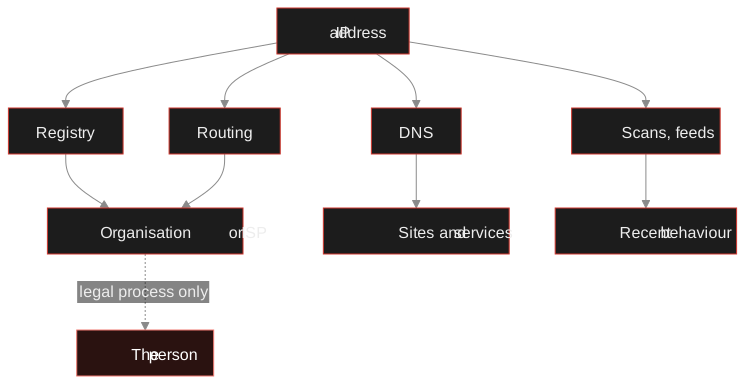
- An IP lookup tells you which organisation the address is assigned to, which network announces it, what hostnames and services are on it, and whether threat feeds have seen it misbehave.
- It does not tell you which person used it. That link lives in the provider's records and is released only through legal process.
- "Location" is the location of the network's registration or a geolocation estimate, often a city or just a country, and often wrong for mobile, VPN and cloud addresses.
- Labels such as hosting type and threat tags are hints from individual sources. Read which source said it.
- In TraceFind, type the IP into the search box. The lookup is free for signed-in accounts.
A lookup on a famous address
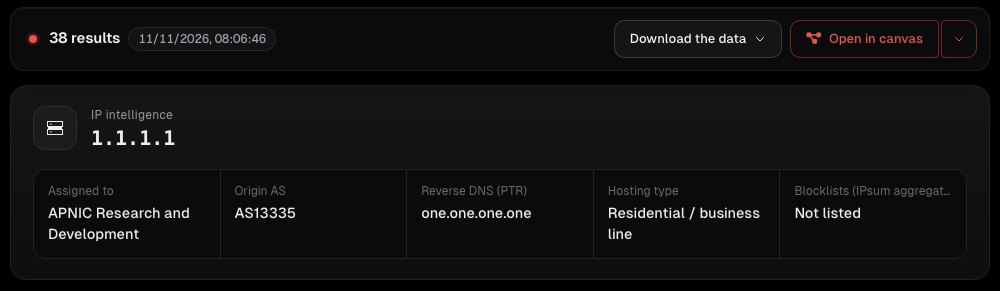
We will read a real lookup on 1.1.1.1, Cloudflare's public DNS resolver. It belongs to no private person, it is used by millions of people, and its records hold a few surprises that make it a good teacher. Every part of the report below works the same way for an address from your own logs.
Four layers of information
An IP address sits in four sets of public records, kept by different people for different reasons. A lookup reads each of them.
1. The registry: who it is assigned to
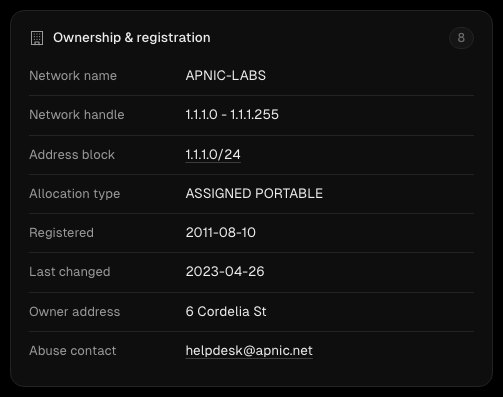
Every public IP belongs to a block that a regional registry (RIPE, ARIN, APNIC, LACNIC or AFRINIC) assigned to an organisation. Ownership & registration shows that record: the block, the holder, when it was registered and the abuse contact.
The abuse contact is the practical part. If an address is attacking your server or sending you phishing, that is where a report goes, and the provider is the one who can act on it.
Here the holder is APNIC's research lab, not Cloudflare. That is not an error: APNIC lent the block to Cloudflare for a joint research project. Records describe who holds an address on paper, which is not always who runs the service on it.
2. Routing: which network announces it
The origin AS is the network that tells the rest of the internet "send traffic for this block to me". For 1.1.1.1 that is AS13335, Cloudflare. For an address from your logs it will usually be an internet provider, a mobile carrier, a cloud host or a VPN company, and that alone tells you a lot about what kind of user you are looking at.
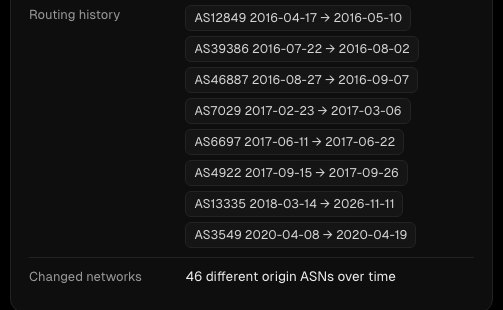
The routing history shows who announced the address in the past. A long, stable history with one network is normal. A block that changed hands recently, or one announced briefly by unrelated networks, deserves a second look: hijacked and recycled address space is a known abuse pattern.
3. DNS: names on the address
Reverse DNS (the PTR record) is the name the network gives the address, here one.one.one.one. Provider names often encode the customer type and region, for example a name containing "dsl", "cable", "mobile" or a city code. Co-hosted domains and passive DNS show websites that have pointed at the address. A handful of domains suggests a dedicated server; thousands, as here, mean shared hosting, a CDN or a service like a DNS resolver, and then the address tells you little about any one of them.
4. Scans and threat feeds: what it has been doing
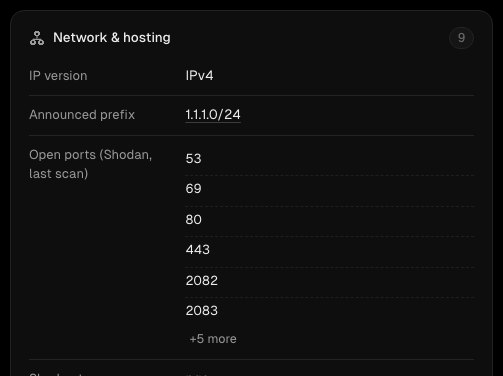
Open ports show which services answer on the address: 53 is DNS, 80 and 443 are web, 22 is remote login, 3389 is Windows remote desktop. A home connection with remote desktop open to the world is a security problem; a web server with 80 and 443 is just a web server.
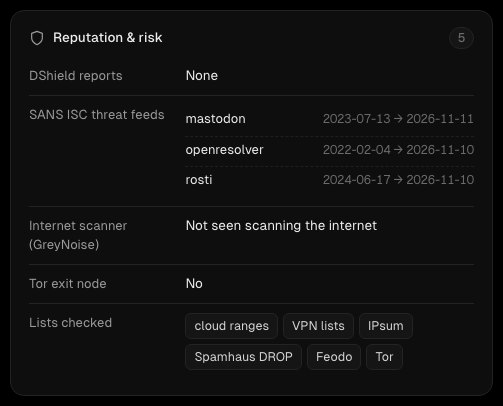
Reputation & risk collects threat data: reports to DShield, tags from SANS ISC feeds, whether GreyNoise has seen the address scanning the internet, whether it is a Tor exit node, and membership of lists such as Spamhaus DROP, Feodo (botnet servers), IPsum, cloud ranges and VPN lists. Read the tags, not just the fact that there are some. On 1.1.1.1 the SANS feeds say "openresolver" (it answers DNS for anyone, by design) and "mastodon"; neither means it attacked anyone.
Look up an IP address Owner, network, hosting, open ports and threat feeds in one report. Free for signed-in accounts.
Look up an IPWhy labels can be wrong
Look at the summary again: hosting type: residential / business line. For Cloudflare's resolver that is plainly wrong. The classification comes from a source that guesses the type of a network from its records, and an unusual research block confuses it.
This is the norm, not an exception. Geolocation, hosting type and VPN detection are estimates by third parties, updated at different speeds. A mobile user's address may geolocate to the carrier's headquarters hundreds of kilometres away; a VPN exit shows the VPN's data centre; an address reassigned last month may still carry its old label. Use labels to decide what to check next, never as a conclusion.
Careful: never treat an IP's location as someone's address. At best it is the provider's region; for mobile networks, VPNs and cloud services it can be another city or country entirely.
Where IP addresses come from: an email header
The most common source for most people is a suspicious email. Its headers record the servers the message passed through, with their IP addresses. Our free email header analyzer reads them for you and points out the sending server.
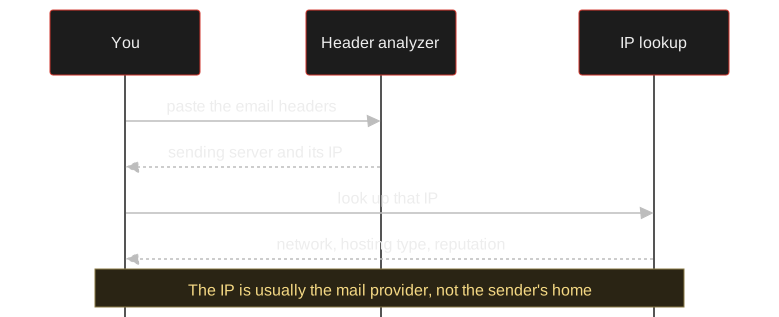
Expect the IP to belong to a mail provider: Gmail, Outlook and most others do not include the sender's own address. That is still useful. A message claiming to come from your bank, sent from a cheap virtual server with no relation to the bank's network, is a phishing email whatever its logo says.
Pivots: the connections
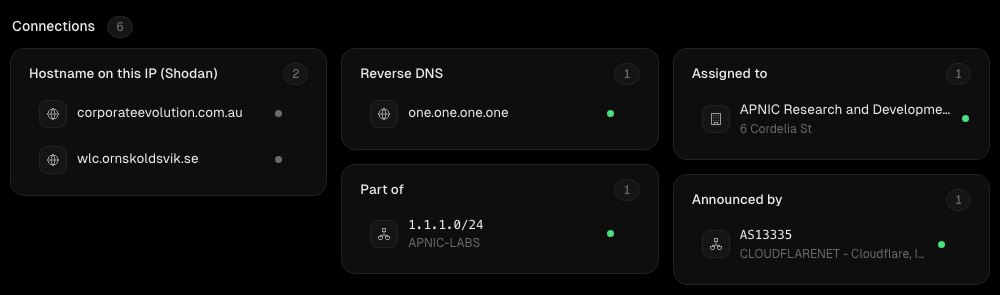
The Connections block turns the report into next steps. Each connection can be looked up in turn: the block or the AS as a network, which shows everything that network announces, and a hostname as a domain. Open in other tools links to AbuseIPDB reports, urlscan.io, RIPEstat, Shodan, Censys and GreyNoise for the same address. Open in canvas puts the IP and all its connections on a graph, which is the easiest way to see that three suspicious login addresses all sit in the same small hosting network.
What it cannot tell you, and why that is good
The record that links an address to a subscriber at a given moment belongs to the internet provider. It is personal data, and in most countries it is released only to law enforcement with a legal basis. No public lookup, including ours, can tell you who used an address. Services that claim to "find the person behind any IP" are guessing, or selling you a city.
If an IP is part of a crime against you, report it with the time and the evidence: to the abuse contact in the registry record, and to the police. If you are investigating a case, our legal and ethical guide covers what you may do with what you find, and the domain and website OSINT guide continues from hostnames to the sites behind them.
Frequently asked questions
Can an IP address lookup find a person?
No. A lookup shows the organisation an address is assigned to and the network that routes it. Which customer used it at a given time is recorded only by the internet provider and is released through legal process, usually to law enforcement.
How accurate is IP geolocation?
It is an estimate. For home broadband it is often right to the region or city; for mobile networks, VPNs and cloud servers it can point to a data centre or headquarters in another city or country.
What does the abuse contact in an IP lookup do?
It is the address the network holder publishes for abuse reports. If an IP attacks your server or sends phishing, report it there with timestamps and evidence; the provider is the one who can act.
Does TraceFind scan the IP address?
No. Open ports come from Shodan's existing scan data, and the other fields from registries, routing tables, DNS and threat feeds. Nothing contacts the address itself.
Why does a threat feed list an address that is not malicious?
Feeds tag addresses by behaviour, such as answering DNS for anyone or running a particular service. A tag says what was observed, not that the owner did anything wrong. Read the tag and its source.
Is the IP lookup free?
Yes. IP, domain, network, wallet, URL and hash lookups are free for signed-in TraceFind accounts, with a rate limit instead of a charge.
Keep reading
-
 Guides
Is OSINT Legal? Ethics and GDPR for Online Investigations
Where the legal and ethical lines run in open source investigations, and the habits that keep your work defensible.
-
 Guides
Domain and Website OSINT: Investigate Who Is Behind a Site
Date, host and link a suspicious site using RDAP, DNS, certificate logs, archives and shared tracking IDs.
-
 Guides
Free Platform Lookups: User IDs, Profiles and Linked Accounts
180+ free tools that turn a username, ID or link on one platform into the account behind it, with IDs that survive renames.