 TraceFind
Is this website legit? How to check a site with a domain lookup
The shop has the trainers everyone else sold out of, 40 percent cheaper, and a checkout that only takes bank transfer. Before you pay, spend two minutes on the website's domain. Its own public records often tell a very different story from its About page.
- A domain lookup reads public records about a website: when it was registered, who it is registered through, its mail setup, scam-list entries and what the site looked like in the past.
- The strongest warning sign is a mismatch: a shop "trading since 2009" on a domain registered six weeks ago.
- A hidden owner is normal (privacy rules redact most registrations) and proves nothing on its own. Not being on a scam list proves nothing either; new scam sites are not listed yet.
- When something does not fit, pay only with buyer protection or walk away. A domain lookup cannot make an unsafe payment safe.
- In TraceFind, type the domain into the search box. The lookup is free for signed-in accounts.
Why the domain tells you more than the website
Anyone can write "established 2009, 50,000 happy customers" on a page. It costs nothing to claim. The domain's records are different: the registration date is set by the registry, certificates are logged publicly the moment they are issued, and archive services keep copies of what the site showed in earlier years. A scammer can fake the shop window, but not the history of the building.
A lookup on TraceFind collects those records into one report. To show what each part means we use our own domain, tracefind.info, since it is the one site we can describe without guessing. You can run the same lookup on any domain.
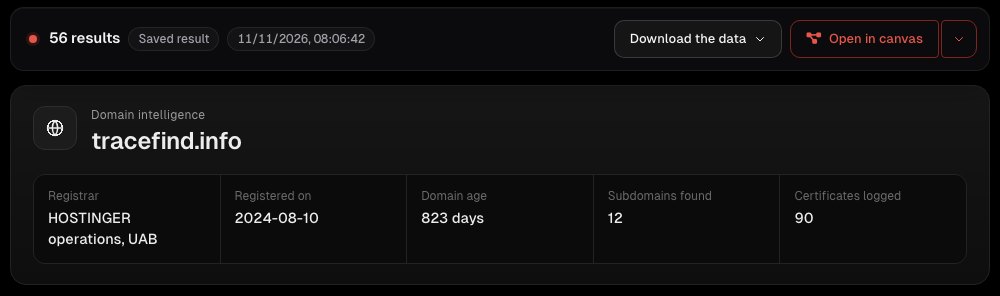
The five checks below are in the order that catches the most problems for the least effort.
Check 1: age against the story
Read the registered on date and the domain age, then compare them with what the site says about itself. Under Ownership & registration you also see when the registration expires and when it was last changed.
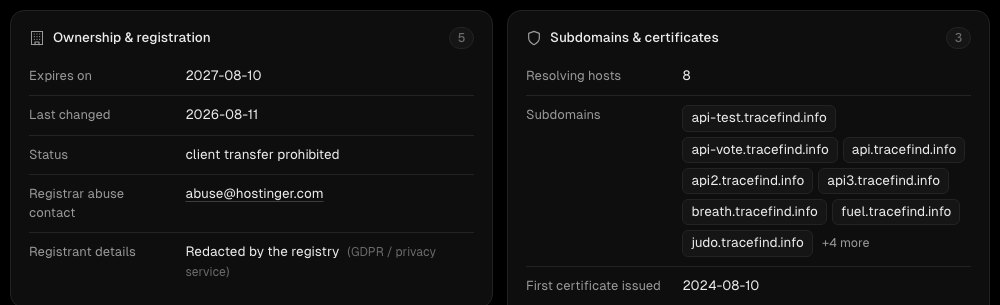
- A shop claiming years of trading on a domain a few weeks old is the classic fake-shop pattern. Real businesses do move to new domains, but they say so, and their old domain still exists.
- A one-year registration that expires soon is cheap and common, but on a "long-established" shop it fits poorly with the story.
- The first certificate date (under Subdomains & certificates) is when the site first served HTTPS. A domain registered years ago whose first certificate is from last month was probably parked until recently.
About the hidden owner: "Redacted by the registry (GDPR / privacy service)" is what almost every registration looks like today. Since 2018 registries hide personal registrant data by default. A hidden owner is not a warning sign; a company whose legal notice names nobody, on a site that sells to you, is.
Check 2: scam and phishing lists
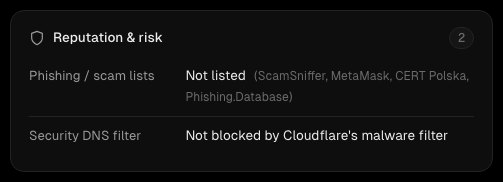
Reputation & risk checks the domain against public phishing and scam lists and against a security DNS filter that blocks known malware sites. A hit here is a clear stop: do not enter anything on that site.
The reverse is not true. Fake shops typically live for a few weeks, and the lists catch them after the first victims report. A brand-new shop that is "not listed" is simply not known yet. That is why check 1 comes first.
Check 3: can it even receive mail?
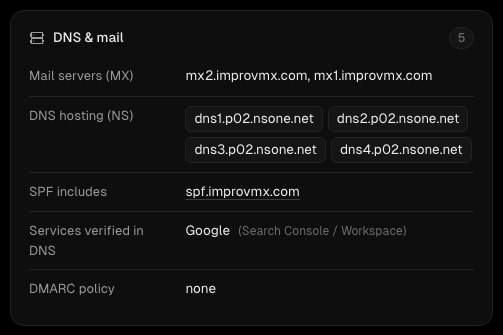
A real business answers email. Under DNS & mail look at three lines:
- Mail servers (MX): none at all means the domain cannot receive email, so the "contact us" address on the site goes nowhere.
- SPF and DMARC: records that say which servers may send mail for the domain, and what to do with forgeries. Missing ones are common on small sites (ours included, as the screenshot shows), so treat them as a weak signal. On a large retailer they would be odd.
- Services verified in DNS: the owner proved control of the domain to Google, Microsoft or similar. It shows someone set the domain up with some care.
Check a site before you pay Type the domain into the search box. Domain lookups are free for signed-in accounts and take a few seconds.
Look up a domainCheck 4: what the site used to be
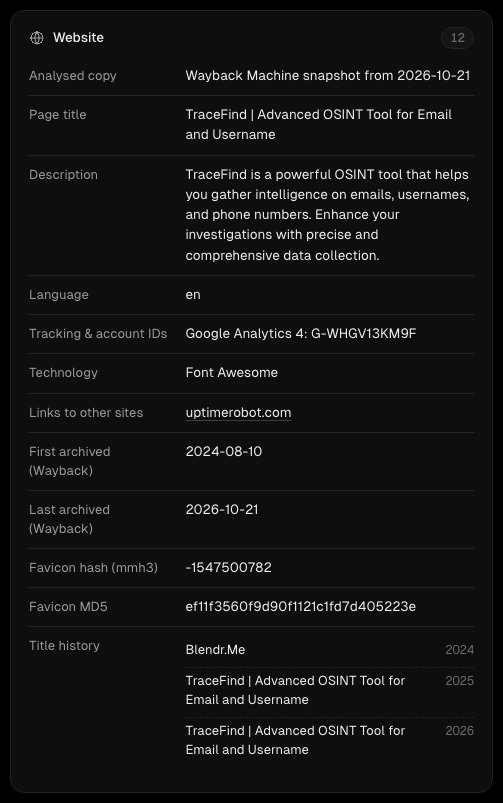
The Website card analyses an archived copy of the site (from the Wayback Machine), not the live page, so the lookup never touches the site itself. It shows the page title and description, language, the technology it uses, the tracking IDs on it, links to other sites, and when the site was first and last archived.
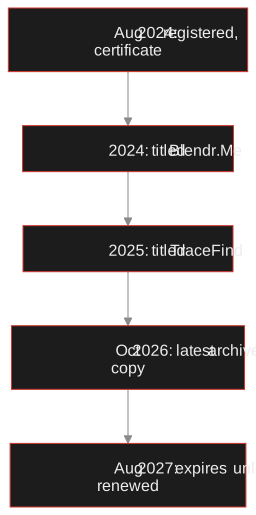
The most revealing line is the title history: the page title in each year it was archived. On our own domain it reads "Blendr.Me" in 2024, then "TraceFind" from 2025. That is a real change of use, and the lookup shows it without anyone having to say so.
For a shop, the patterns to look for:
- No archive history at all for a site that claims to be years old.
- A title history that jumps between unrelated things: a dentist's practice, then a casino, then a trainer outlet. Expired domains with some old reputation are bought and reused precisely because they look established.
- A language that does not match the market the shop claims to serve.
Check 5: what it is connected to
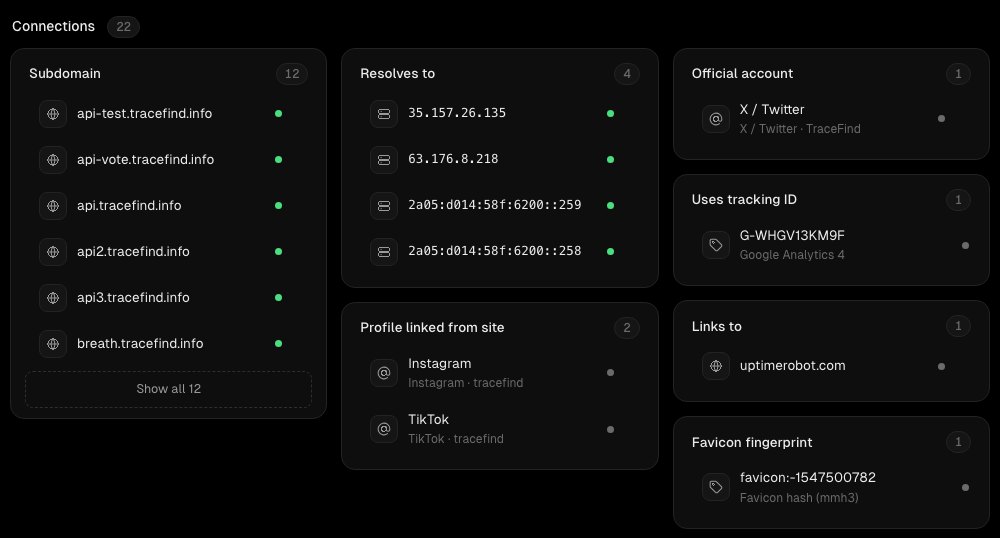
Connections lists everything the lookup tied to the domain: subdomains, the IP addresses it resolves to, social profiles the site links to, tracking IDs and a favicon fingerprint. Two are especially useful for spotting networks of fake shops:
- Tracking IDs such as a Google Analytics ID are tied to one owner's analytics account. The same ID on a dozen different "shops" means one operator runs all of them.
- The favicon fingerprint finds other servers showing the same icon. Below the connections, Open in other tools links straight to Shodan and FOFA searches for it, and to crt.sh, urlscan.io and BuiltWith.
Social profiles linked from the site deserve a look too. A shop whose Instagram was created last week, with bought followers and no comments, fits a pattern; one with years of posts and real customers in the comments does not. A username search on the shop's handle shows where else it exists.
Deciding what to do
- Domain age fits the story
- An archive history that matches what the site is
- Working mail setup, verified services
- Social profiles with real, long activity
- Weeks old, claims years
- Any phishing or scam list hit
- Title history from an unrelated business
- Same tracking ID as other shops with different names
None of these is proof on its own. Small, honest shops start on new domains every day. What a lookup gives you is a reason for more care, and the right response to that is almost always the same: pay by card or a service with buyer protection, never by bank transfer, crypto or gift card to a shop you cannot verify. If the shop only accepts those, that is your answer.
Checking a person rather than a shop, such as a seller on a marketplace or a landlord? Check before you pay covers that, and the domain and website OSINT guide goes deeper into each source for investigators.
What a domain lookup cannot tell you
It cannot tell you who is behind a site when the registration is redacted, and it cannot see the site's bank account or its warehouse. It reads public records, so a careful operator with an aged domain and clean records will pass every check here. And it never visits the live site: the analysis is of an archived copy, which keeps you safe from whatever the live page does, but may be out of date by weeks.
Frequently asked questions
How can I tell if a website is legit?
Compare the domain's registration date with what the site claims, check it against phishing and scam lists, look at its mail setup and its archived history, and look for shared tracking IDs. A site weeks old that claims years of trading is the clearest warning sign.
Is a hidden domain owner a red flag?
No. Since 2018 registries redact personal registrant details by default, so almost every domain shows a hidden owner. What matters is whether the business names itself in its legal notice and whether the rest of the records fit.
The site is not on any scam list. Is it safe?
Not necessarily. Scam shops are usually added to lists only after the first victims report them, and many live for just a few weeks. Treat not listed as unknown, not as safe.
Does a domain lookup visit the website?
No. TraceFind reads public records and an archived copy of the site from the Wayback Machine. The live site is never contacted, so the lookup cannot trigger anything on it.
Is the domain lookup free?
Yes. Domain lookups are free for signed-in TraceFind accounts. They are rate-limited rather than charged, and repeat lookups come from the cache.
What should I do if a shop looks suspicious?
Pay only with a card or a service that offers buyer protection, or do not buy. Never pay a shop you cannot verify by bank transfer, cryptocurrency or gift cards.
Keep reading
-
 Tutorials
How to read a username search result
Profiles, details and stable IDs: how to read a username result and tell the same person from a namesake.
-
 Guides
Check Before You Pay: Vetting a Seller, Landlord or Marketplace Contact
A calm ten-minute routine to vet an online seller, landlord or marketplace contact before you send money.
-
 Guides
Domain and Website OSINT: Investigate Who Is Behind a Site
Date, host and link a suspicious site using RDAP, DNS, certificate logs, archives and shared tracking IDs.