 TraceFind
How to read a username search result
A username search answers a narrow question: on which of about 1,000 sites does this exact handle exist? It does not answer the question you usually care about, which is whether those accounts belong to the same person. This guide shows how to get from the first answer to the second using what the result page gives you.
- "Profiles" counts sites where the handle exists. "With details" counts the ones that also showed a name, bio, picture or IDs, and those are the cards worth reading.
- A handle is not a person. Common handles are shared by strangers, and in our own demo two of the nine matches clearly belong to someone else.
- Match on things that are hard to copy by accident: a link from one profile to another, the same photo, the same unusual bio, consistent dates.
- Account IDs (TikTok, Telegram, Facebook and others) stay the same when a handle is renamed. Write them down; they are how you find the account again.
A real result, including the strangers
We searched for tracefind, our own handle. It is a good example for one reason: not every match is ours. The search found 9 profiles in 42 seconds. Telegram, TikTok, Mastodon and Threads are TraceFind's. A Facebook profile and an X account under the same or a similar name belong to other people, and we blurred their details in the screenshots. A few more matches (PayPal, Tripadvisor, WordPress) show too little to say either way.
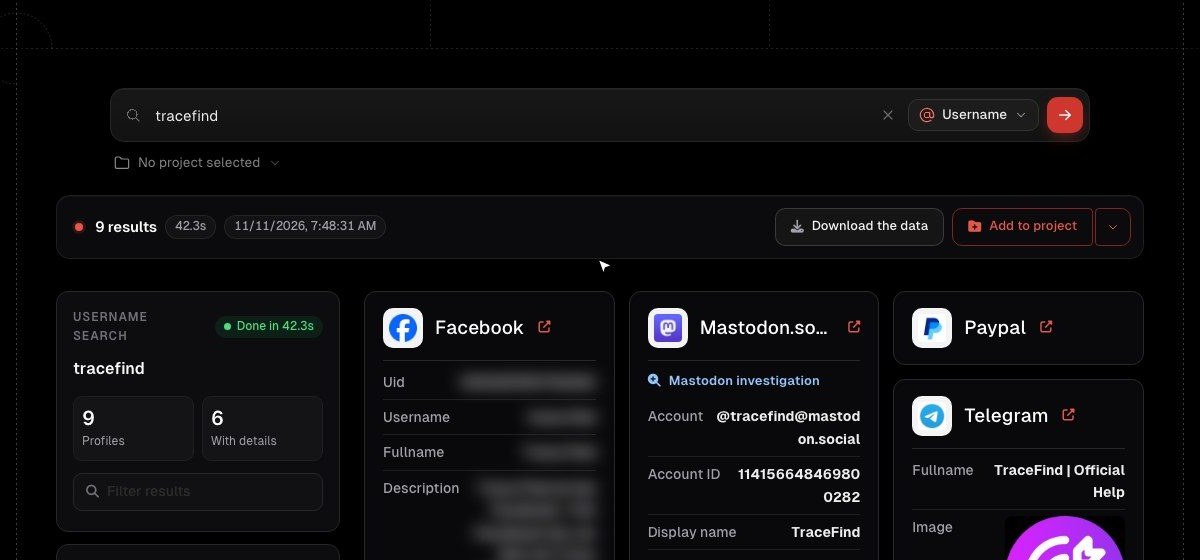
Profiles and "with details"
The summary card shows two numbers. Profiles is the count of sites where an account with exactly this handle exists. With details is the subset where the profile also exposed something about its owner: a display name, a bio, a profile picture, a location, account IDs, creation dates or follower counts.
The difference matters. A profile without details only proves the handle is taken on that site, by somebody, possibly years ago. It is a weak signal on its own. Profiles with details are the ones you can compare, so start there. On our result that is 6 of 9.
While the search runs, cards appear in the order the sites answer. When it finishes, the list is sorted alphabetically so you can scan it. The site list in the left column and the filter box work the same way as in the email result.
What is on a profile card
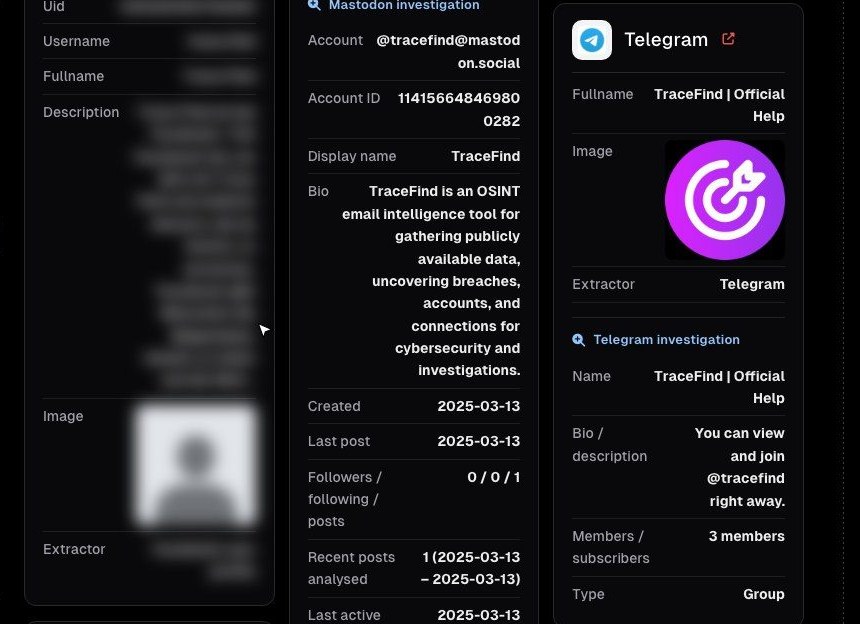
A card can carry several kinds of information. Read them in this order:
- The link. The arrow next to the site name opens the profile. Look at it yourself before you rely on it; profiles change and the card is a snapshot from the search.
- Identity fields: display name, full name, bio, location, website. These are what the owner chose to say about themselves.
- The picture. A distinctive avatar reused across sites is one of the better signals; a default silhouette tells you nothing.
- Dates and activity: when the account was created, when it last posted, followers and following. A profile created yesterday with no posts is different from one active for six years.
- IDs: numeric account IDs, user IDs, channel types. Boring to look at and very useful later.
Some platforms get an investigation section, as on the Mastodon and Telegram cards above. That is a second, platform-specific lookup that reads more than the public page shows: the exact account address on its server, the account ID, recent activity, or whether a Telegram handle is a person, a bot, a channel or a group. Here it tells us something useful straight away: TraceFind's Telegram handle is a group with 3 members, not a personal account.
Same person, or a namesake?
This is the real work. A handle like tracefind is fairly unusual, and still a stranger on Facebook calls themselves something similar. For short or common handles (alex92, jdoe) most matches will belong to different people.
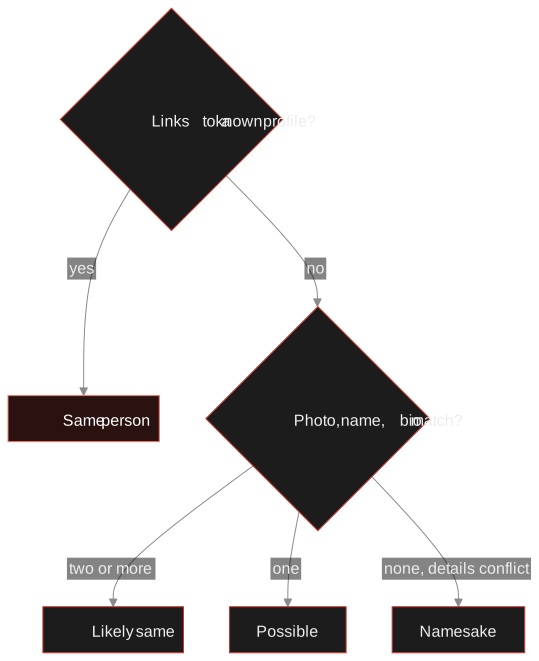
Signals, from strongest to weakest:
- A link between the profiles. The Instagram bio links the website, the website links the TikTok, the GitHub profile lists the same blog. People link their own accounts; strangers do not.
- The same photo. Reverse-search it if you are unsure. The same face in different photos is good too; the same stock image is not.
- An unusual bio, phrase or project repeated across sites.
- Consistent dates and places: accounts created in the same period, the same city, the same language.
- The handle itself is the weakest signal of all. It is the thing you searched for, so every result has it.
Conflicts count just as much. In our result the two strangers' profiles give a city on another continent and are written in another language. That alone is enough to set them aside.
Careful: two profiles with the same handle and the same default avatar are not "likely the same person". They are two profiles with no evidence either way. Keep them apart until something links them.
Search a handle About 1,000 sites in under a minute, with the details each profile exposes. Use it on your own handles first: it is a quick audit of what you left behind.
Search a usernameIDs that survive a rename
A handle can change in seconds. On many platforms the account's numeric ID cannot. TikTok, Telegram, Facebook, X, Discord, Reddit, GitHub and Mastodon all have an ID that stays the same when the user renames themselves, and the profile cards show it when the platform exposes it.
Write it down next to the handle. If the account is renamed next month, a search for the old handle finds nothing, but the ID still leads to the same account. For investigations that run over weeks this is the difference between losing a lead and keeping it. The GitHub OSINT guide and the Telegram OSINT guide show how each platform's IDs work.
Where to go from the result
- Search the variations. People change one character when their handle is taken:
jdoe-dev,jdoe_dev,jdoedev. The username OSINT guide covers how to generate the useful ones. - Pivot from the details. A website in a bio becomes a domain lookup; an email in a profile becomes an email search. Type them into the same search box.
- Put it on the canvas. Open in canvas (or Add to project) places every profile as an entity linked to the handle, with names, photos and locations as their own linked entities. Delete the namesakes there and keep the ones you graded.
- Save what you saw. Download the data keeps the result as a PDF report or as JSON, CSV or TXT. Profiles change; your record of what they showed on the day should not.
What a username result cannot tell you
A site missing from the result is not proof the person has no account there. They may use a different handle, the site may hide profiles from logged-out visitors, or it may have blocked the check that day. A found profile is not proof of who runs it. And a username search never contacts anyone: the owners of the profiles are not notified. If you are checking yourself, the digital footprint guide shows what to clean up first; if you are checking someone else, read the legal and ethical guide before you start.
Frequently asked questions
What is the difference between profiles and profiles with details?
Profiles counts the sites where an account with exactly this handle exists. With details is the subset that also exposed a name, bio, picture, IDs or dates, which are the profiles you can actually compare.
Are all profiles with the same username the same person?
No. Popular and short handles are shared by many unrelated people. Treat each profile as unknown until something links it to the others, such as a link between profiles, the same photo or the same unusual bio.
Why does a profile have an investigation section?
For some platforms TraceFind runs a second, platform-specific lookup that reads more than the public profile page, such as the account ID, recent activity or whether a Telegram handle is a person, bot, channel or group.
What should I do if the account was renamed?
Use the account ID from the profile card. On TikTok, Telegram, Facebook, X, Discord, Reddit, GitHub and Mastodon the ID stays the same after a rename.
Is the account owner notified of a username search?
No. The search only checks whether public profiles exist and reads what they show. Nobody is contacted or notified.
Keep reading
-
 Tutorials
GitHub OSINT: What a GitHub Profile Reveals
What a GitHub profile, its commits and its public keys reveal, and how developers can keep their own email address out of public history.
-
 Tutorials
Telegram OSINT: Investigating Users, Channels and Groups
How to read public Telegram pages for users, channels and groups, analyze a channel's network, and understand which privacy settings apply.
-
 Guides
Username OSINT: How to Find Accounts From a Username
Enumerate accounts from one handle, weed out false positives and prove that two profiles belong to the same person.