 TraceFind
How to Verify an Email Address Exists Without Sending Mail
Your welcome campaign bounced 14% and the sending provider is already asking questions. A test message would have told you, too late and in public. DNS and a short SMTP conversation tell you most of the same thing beforehand, without sending anything. Here is how, layer by layer, and where the answers stop being trustworthy.
- You can check an address in four layers (syntax, MX, SMTP, classification) without sending a single message.
- The SMTP check stops after
RCPT TO, so nothing is delivered and the owner sees nothing. - Catch-all domains, greylisting and big providers that accept everything make the mailbox answer unreliable. Treat those as "unknown", not "valid".
- Disposable and role addresses pass every technical test and still deserve a second look.
- "Valid" means deliverable. It does not mean the address belongs to a real, long-standing person.
The bounce that cost you a week
Picture the Monday morning. Your welcome campaign went out on Friday, 14% of it bounced, and the sending provider has put the account under review. Nobody checked the list. A third of the bad addresses are plain typos (gmial.com), the rest were mailboxes that had never existed.
A test message is the obvious way to find out whether an address works, but it is slow, the recipient can see it, and the bounce arrives hours later. Most of the answer is available beforehand from DNS and a short, polite SMTP conversation. This tutorial walks through it, layer by layer, and is honest about where the answers stop being trustworthy.
One boundary first. Verification answers a narrow question: will a mail server accept a message for this address right now? It does not say who owns the address or whether anyone reads it. For that you need registration and breach checks, covered in our email OSINT guide. We use the fictional address jane.doe@example.com throughout, and the terminal output is illustrative.
Layer 1: Syntax, kept deliberately dumb
Reject obviously malformed input first: a missing @, spaces, a domain without a dot, consecutive dots. Do not try to implement the full RFC 5322 grammar. It allows forms no real provider issues, and an over-strict regex will reject valid addresses such as plus tags (jane.doe+news@example.com), which is how you lose real customers. A simple check plus the DNS step below catches nearly every typo that matters.
Layer 2: Does the domain accept mail?
A domain that can receive mail publishes MX (mail exchanger) records in DNS. Look them up with dig or nslookup:
$ dig +short MX example.com
10 mx1.example.com.
20 mx2.example.com.

$ dig +short MX gmial.com
# (nothing) : the domain does not exist, probably a typo
How to read the result:
| You see | It means |
|---|---|
| One or more MX records | The domain accepts mail. The lowest number is the preferred server. |
A null MX (a single record 0 ., RFC 7505) | The domain explicitly refuses mail. The address cannot work. |
| No MX record | Standards allow a fallback to the A or AAAA record, so delivery is technically possible, but a domain without MX rarely runs a mailbox. High risk. |
| NXDOMAIN | The domain does not exist. Usually a typo. |
These two layers alone would have saved that Friday campaign from the typo third of its bounces. The rest needs the mailbox itself.
Layer 3: Ask the mail server, then hang up
To check the mailbox you connect to the MX server and start a normal SMTP transaction, but stop before any message is sent. The server's reply to RCPT TO says whether it would accept mail for that recipient. The diagram shows the whole conversation, including the extra probe that detects catch-all domains.
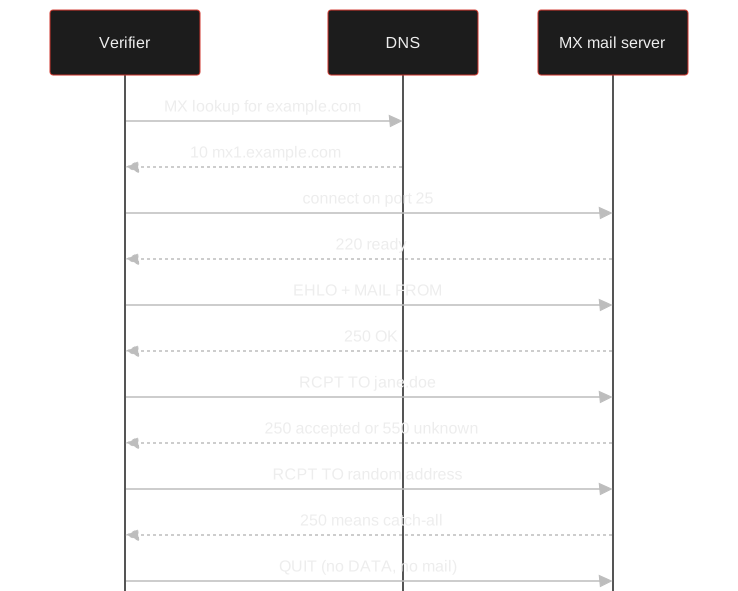
By hand, with nc, it looks like this:
$ nc mx1.example.com 25
220 mx1.example.com ESMTP
EHLO verifier.example.org
250-mx1.example.com
250 STARTTLS
MAIL FROM:<probe@example.org>
250 2.1.0 Ok
RCPT TO:<jane.doe@example.com>
250 2.1.5 Ok
RCPT TO:<no-such-user-x7q2@example.com>
550 5.1.1 User unknown
QUIT
221 2.0.0 Bye
Two recipients, two different answers: the server knows Jane and does not know no-such-user-x7q2. That difference is what makes the first answer meaningful. Here is how to read each reply code:
| Reply | Meaning | What to conclude |
|---|---|---|
| 250 | Recipient accepted | Valid, unless the domain is catch-all (see below) |
| 550, 551, 553 | Recipient rejected | Mailbox most likely does not exist |
| 552 | Mailbox full or over quota | Exists but may be abandoned |
| 421, 450, 451, 452 | Temporary failure | Unknown; often greylisting or rate limiting, retry later |
| Connection refused or timeout | No answer | Unknown; usually a blocked port or IP reputation |
Where SMTP probing lies to you
RCPT probing is useful and far from definitive. Five things break it, and you will meet all of them:
- Port 25 is often blocked. Many residential ISPs and cloud providers block outbound port 25. Run probes from infrastructure that is allowed to talk SMTP. Your laptop timing out is usually this.
- Greylisting. Some servers reject first contact from an unknown sender with a 4xx code and accept a retry minutes later.
- Accept-then-bounce. Some large providers accept every recipient during the session and bounce later, or never. A 250 from them proves little.
- Reputation and rate limits. Many probes from one IP look like address harvesting. Servers throttle or block the source, and the IP can end up on blocklists. Keep volumes low and cache results.
- Anti-enumeration. Security-conscious servers deliberately answer the same for valid and invalid recipients.
Careful: Probe responsibly. Identify your server honestly in EHLO, use a valid MAIL FROM on a domain you control, never send DATA, and do not hammer one server. Checking addresses you have a reason to check is routine. Mass enumeration of guessed addresses is abusive and can break laws and provider terms.
Skip the manual SMTP session TraceFind's email search runs the MX and SMTP checks for you, flags disposable providers, role accounts and catch-all domains, and adds registrations and breach data in the same search.
Verify an emailLayer 4a: Catch-all domains
A catch-all (or accept-all) domain takes mail for any local part. Organisations set this up so misspelled addresses still reach someone. For verification it means a 250 reply is meaningless: the server would have said yes to anything.
Detecting it is simple. Probe a random local part that cannot plausibly exist, like no-such-user-x7q2@example.com in the session above. If the server accepts that too, mark every address on the domain "unknown", not "valid".
Layer 4b: Disposable and role addresses
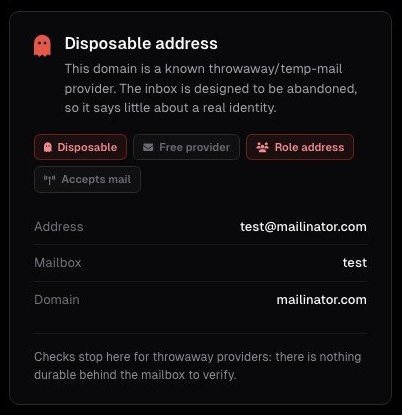
Disposable addresses come from services that hand out temporary inboxes for minutes or hours. They are fully deliverable, so every SMTP check passes, but they tell you the person does not plan to be reachable later. Detection relies on a maintained list of disposable domains, and new domains appear constantly, so the list has to stay current. For sign-up abuse and fraud this is one of the most useful single signals you can get. The same idea applies to phone numbers, covered in how to detect disposable phone numbers.
Role addresses such as info@, sales@, support@, admin@ or noreply@ reach a function, not a person. They are valid, but a personal account registered with one deserves a second look, and marketing to them tends to perform poorly.
Putting the layers into one verdict
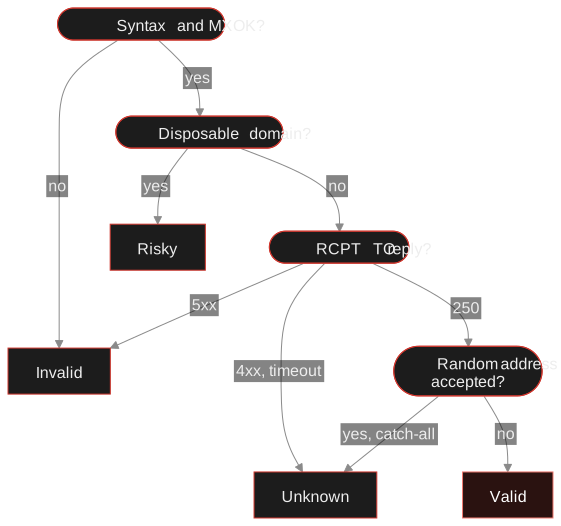
Four outcomes are enough. Run the checks in order and stop at the first that decides:
- MX present
- RCPT accepted
- Not catch-all, not disposable
- A real person owns it
- Anyone reads it
- It is the address they claim as theirs
If you need to know whether the address belongs to a real, long-standing identity, check registrations and breach history next. An address that shows up in breach records from years ago has been in use for a long time; see how to check if an email was in a data breach. If you have a whole list to check rather than one address, bulk email lookup does the same search for every row of a CSV.
A sign-up form receives five addresses. sam@gmial.com fails at the MX step: invalid, and you can even suggest gmail.com. tmp48213@example.net has MX and a 250, but the domain is on the disposable list: risky. info@example.org is deliverable and a role address: fine for a company, odd for a personal account. anyone@example.edu gets a 250, and so does the random probe: catch-all, so unknown. Only jane.doe@example.com gets a 250, a rejection for the random address, and a clean classification. Valid, and the only one of the five you can say that about.
Unknown is a legitimate answer. Rounding it up to valid is how bounce rates climb.
Frequently asked questions
Can you verify an email address without sending an email?
Yes, in most cases. An MX lookup confirms the domain accepts mail, and an SMTP session that stops after the RCPT TO command shows whether the server accepts the mailbox. Catch-all domains and some large providers make the mailbox result inconclusive.
Does SMTP verification notify the address owner?
No. The session ends before any message data is sent, so nothing is delivered. Server administrators may see the connection in their logs.
What is a catch-all email domain?
A catch-all domain accepts mail for any address at that domain, valid or not. Because the server accepts everything, SMTP checks cannot confirm that a specific mailbox exists, so results should be treated as unknown.
Why does my SMTP check time out?
The most common cause is that outbound port 25 is blocked by your ISP or cloud provider. Other causes are greylisting, rate limiting and IP reputation filters on the receiving server.
Is a valid result enough to trust an address?
No. Valid only means a server will accept mail for it. A disposable inbox is valid, and so is an address created yesterday. Use registrations and breach history to judge whether an address is long-standing.
Keep reading
-
 Guides
How to Find Accounts Linked to an Email Address
Pivot from one email to accounts, breaches, usernames and profiles, then grade every finding. With a worked fraud case.
-
 Tutorials
How to Detect Disposable and Temporary Phone Numbers
Spot receive-SMS and VoIP numbers in signups, combine the signals sensibly and decide what to do with a hit.
-
 Privacy
How to Check If Your Email Was in a Data Breach
Find out which breaches exposed your email, how to read the results, and the exact steps to take afterward.