 TraceFind
Username OSINT: How to Find Accounts From a Username
A moderator sends you one thing: a handle, jdoe-dev, attached to a string of abusive reports. No email, no phone, no name. That is more than it sounds like, because people reuse handles for years. This guide shows how to turn one username into a list of candidate accounts, throw out the false hits, and prove which profiles really share an owner.
- Usernames are public by design and people reuse them, which makes a handle the cheapest pivot you have.
- Tools guess whether an account exists from status codes and page text. When a site changes, they report hits that are not there, so test a random control name first.
- A hit proves an account with that handle exists, nothing more. Linking it to your subject takes two independent signals.
- Try a short, deliberate list of variations (separators, suffixes you have seen, the part of an email before the @) instead of hundreds of permutations.
- Lookups are passive. The owner is not notified, but you still need a lawful purpose.
Why a handle is such a good starting point
Email addresses are usually private and phone numbers are rarely published. Usernames are the opposite: they sit in profile URLs, mentions, commit histories and forum signatures. And because a good handle takes effort to claim, many people pick one once and carry it from site to site.
That habit is what makes username research quick. Security teams use it to see what an attacker alias left behind, trust and safety teams use it to link abusive accounts, journalists use it to check a source, and plenty of people run their own old handles to see what is still out there. The technique is simple. Doing it accurately is where the work is.
How enumeration works
Most platforms put the username in a predictable address, such as https://example-forum.com/u/jdoe-dev. Enumeration means requesting that address (or an equivalent API endpoint) on many sites and deciding, site by site, whether an account exists. Sites answer that question in different ways, and each way needs its own rule:
| How the site answers | What the rule looks for | How fragile it is |
|---|---|---|
| Status code | 200 for a profile, 404 for none | Sturdy, until a site starts returning 200 for everything |
| Page text | A phrase like "this page doesn't exist" on a 200 page | Breaks when the wording or language changes |
| Redirect | Unknown names bounce to the homepage or a search page | Breaks when a login wall is added |
| API response | JSON with an explicit "not found" field | Sturdy, but APIs get restricted |
Open source tools such as Sherlock and Maigret encode these rules for hundreds of sites, and Maigret also parses profile pages for extra identifiers. They are a good way to learn the technique. Whatever you use, the result is only as good as the detection rule behind each site.
Why you get false positives, and how to cut them
Sites change their markup, add bot protection or start serving the same page to everyone. When that happens, a rule that worked last month reports every username as found. A list of 80 hits can look impressive and still be mostly noise.
The usual causes:
- A login wall or cookie banner that answers 200 for any address.
- Rate limiting or a CAPTCHA served in place of the profile.
- Reserved or squatted names: the account exists, but it belongs to the platform or to a stranger.
- Very short or common handles such as
alexoradmin, which exist almost everywhere.
The fix is a control check. Search a string nobody would register, then see which sites claim to know it.
# 1. search your real handle
jdoe-dev          -> 41 hits
# 2. search a random control string
qz7xk2v9_nobody   -> 6 hits
# those 6 sites say "found" for anything: drop them from step 1
Then open every remaining hit and confirm the page loads with real user content. The diagram shows the order we work in.
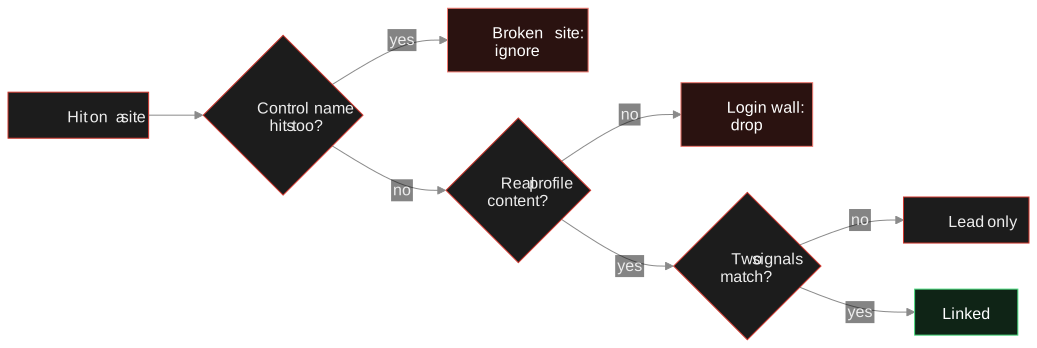
Careful: A hit only proves that an account with that handle exists. It does not prove the account belongs to the person you are researching. Treat every hit as a lead until you have verified it.
Searching handle variations
People rarely get the same handle everywhere. If jdoe was taken, they may have registered jdoe-dev, j.doe, jdoe92 or thejdoe. Build a short, deliberate list instead of hundreds of random permutations:
- Separators: none, underscore, dot and hyphen. Some sites do not allow dots or hyphens, so a miss there means little.
- Suffixes you have already seen: if one profile uses
-devor a number, try the same suffix elsewhere. - Prefixes: the, real, its and iam are common when the base name is taken.
- The local part of an email: if you know
jane.doe@example.com,jane.doeis a strong candidate. Our email OSINT guide covers the other direction.
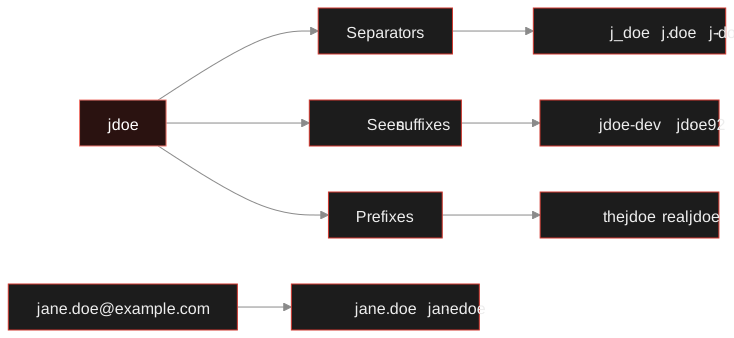
Every variation multiplies the work of verifying hits, so start with the ones you have evidence for. Profiles often name each other in their bios, which tells you exactly which variant to search next.
Proving it is the same person
This is the step that separates research from guesswork. Two accounts called jdoe-dev are only connected if you can point to evidence. Look for overlapping attributes and be honest about how strong each one is:
| Signal | Strength | What to check |
|---|---|---|
| Explicit cross-link | Strong | One profile links to the other, or the bio names the other handle. |
| Same avatar | Medium to strong | Identical image, ideally confirmed with a reverse image search. Stock or meme avatars are weak. |
| Same display name and location | Medium | The combination of name, city and profession, not any one of them. |
| Matching bio wording | Medium | Copied phrases, the same personal website or the same project names. |
| Similar activity times and topics | Weak to medium | Posting hours, time zone, interests, language. |
| Same handle only | Weak | Proves nothing alone, least of all for common names. |
Our rule is two independent signals before accounts count as linked, with the signals written down next to the link. "Independent" matters: a display name derived from the handle is the same signal twice. If you are building a report, keep a confidence level on each link so a reader can tell solid connections from plausible ones. The guide to fake profiles and sockpuppets covers the opposite problem, accounts that pretend to be connected or to be someone else.
A matching handle is where the work starts, not where it ends.
The moderator's handle is jdoe-dev. A first pass finds 41 hits; the control name qz7xk2v9_nobody hits on 6 sites, so those go. Of the remaining 35, nine load a real profile.
The code host profile has an avatar, a bio ("backend dev, coffee, Berlin") and a link to jdoe.example.com. A forum profile uses the same avatar and the same bio wording. That is two independent signals: likely the same person. A gaming profile with the same handle but no avatar, no bio and no link stays a possible and does not go in the report.
The personal site lists jane.doe@example.com, which becomes the next pivot into an email search. Nobody was contacted along the way.
What to pull from a verified profile
Once a hit is verified, the profile is the next source. Record what the site shows publicly:
- Display name, bio, location and website link
- The avatar image, saved so you can compare it across sites
- The account creation date, if shown, to see how long the handle has been in use
- Linked accounts and contact details the owner chose to publish
Some platforms expose far more through public APIs. A GitHub profile can show organisations, repositories and commit metadata; the GitHub OSINT guide shows what that contains and how to read it responsibly.
Check a handle across about 1,000 sites. TraceFind runs the enumeration against a site list that is health-checked daily, pulls name, bio and avatar where a site exposes them, and starts a deeper investigation automatically for platforms like GitHub, Reddit or Steam.
Search a usernameThe same workflow in TraceFind
-
Run the username search
Enter
jdoe-dev. TraceFind checks about 1,000 of the most-used sites. Because the site list is health-checked daily, sites whose detection has broken drop out instead of reporting false hits. -
Read the cards, not just the list
Where a site exposes them, the result card shows name, bio and avatar next to the hit, which makes the avatar and bio comparison from the table above quick.
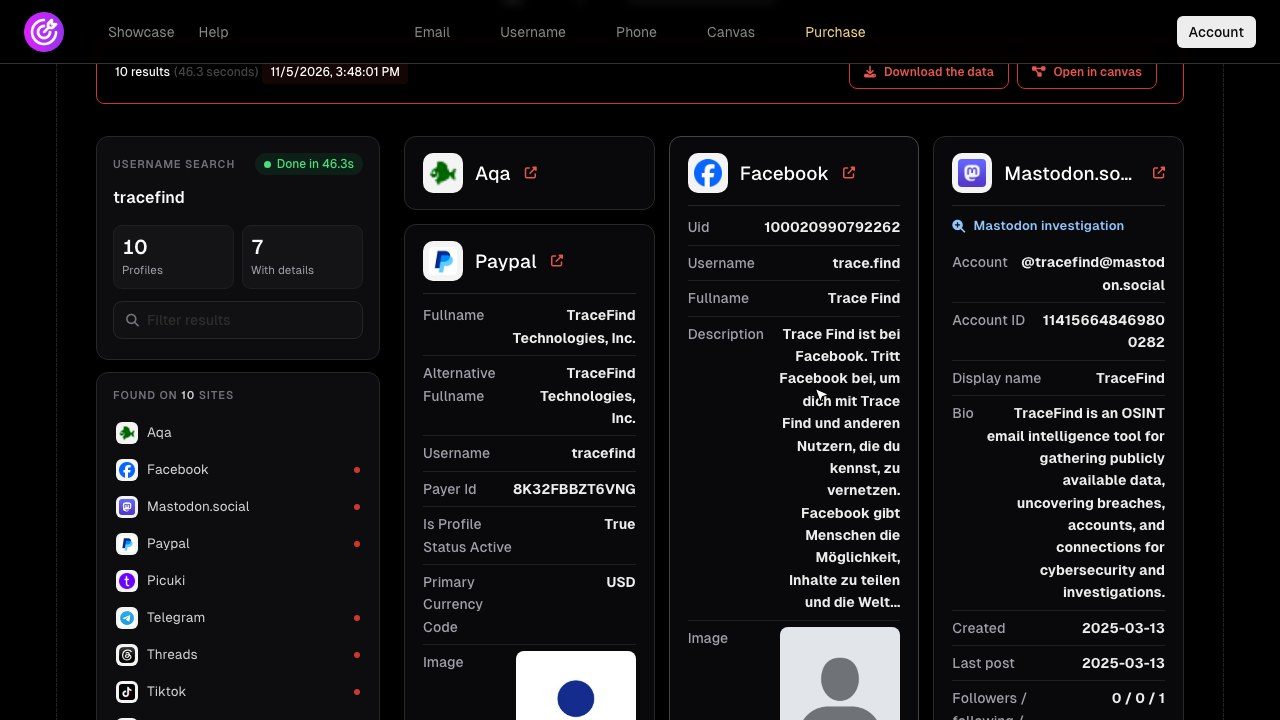
A demo search for the handle tracefind: 10 profiles, 7 with details, in 46 seconds. The cards with a name, a bio and an avatar are the ones you can actually compare. -
Let the platform investigation run
For hits on GitHub, Discord, TikTok, Reddit, Telegram, Strava, Bluesky, Mastodon, Steam, Keybase, Hacker News, YouTube and GitLab, a deeper investigation runs automatically and pulls the account's public details. The Mastodon card above shows one.
-
Pivot on what you found
If a profile lists an email address, run an email search to see which of 296 sites have an account registered to it and whether it appears in breach records.
-
Put the verified links on the canvas
Add the accounts to the investigation canvas, link them to the person and note the evidence for each link. The investigation workflow article walks through that step.
Legal and ethical limits
Legal: Public profiles are public, but collecting them into one picture is still processing personal data. In the EU and UK the GDPR applies to professional use, so you need a lawful basis such as legitimate interest in fraud prevention or security, a clear purpose and a limit on what you keep. Never use username research to stalk, harass or expose anyone, and never try to log in to or recover an account that is not yours. More in the legal and ethical OSINT guide.
The technique works in reverse too. If you are checking your own exposure, search your old handles, then delete or lock down the accounts you no longer use. Shrinking your digital footprint has the full routine.
Frequently asked questions
Is a username search enough to identify a person?
No. A username hit only proves that an account with that handle exists. To link it to a specific person you need independent evidence, such as cross-links between profiles, the same avatar or matching bio details.
Why do some username tools report hits on sites where the person has no account?
Usually because the site changed its pages, added a login wall or started rate limiting, so the detection rule reports every name as found. Running a random control username and checking each hit by hand removes most of these false positives.
Which username variations should I try?
Start with separators (underscore, dot, hyphen), suffixes and numbers you have already seen on the subject's other profiles, common prefixes such as "the" or "real", and the local part of any known email address.
How many independent signals do I need before I call two accounts the same person?
We want at least two independent signals, for example the same avatar and matching bio wording, and we write them down. A shared handle alone is only a lead.
Does TraceFind notify the account owner when I search their username?
No. TraceFind lookups are passive and never notify the person being looked up. You are still responsible for having a legitimate purpose and a lawful basis for the research.
Keep reading
-
 Guides
How to Find Accounts Linked to an Email Address
Pivot from one email to accounts, breaches, usernames and profiles, then grade every finding. With a worked fraud case.
-
 Investigations
How to Spot Fake Profiles and Sockpuppet Accounts
Practical checks for fake profiles and sockpuppets: account age, reused photos, username patterns and inconsistent details.
-
 Tutorials
GitHub OSINT: What a GitHub Profile Reveals
What a GitHub profile, its commits and its public keys reveal, and how developers can keep their own email address out of public history.