 TraceFind
Employee Breach Monitoring: Catch Leaked Logins Early
On a Tuesday morning the helpdesk gets three password-reset requests from the sales team, then a fourth from finance. Nobody was phished and nothing on your network was breached. A conference app your staff signed up to with their work addresses was, six weeks ago, and someone is now trying those passwords against your webmail. This guide is for the security, IT or HR person who wants to find out about that before the helpdesk does.
- Most account takeovers from breaches happen because an employee reused a password, not because your systems failed.
- Check your own company addresses against breach data, including shared mailboxes and ex-employees who still receive mail.
- Separate what the security team needs (a risk signal) from what the employee needs (service, data type, what to do).
- Keep breach details out of email bodies. A secure link is safer than a message that says which password leaked.
- In the EU and UK this is processing of personal data: document the basis, tell staff, and involve a works council where one exists.
Why a leaked password at someone else's company is your problem
A breach at a third-party service is not a breach of your systems, but it can turn into one within days. When a conference platform, a SaaS trial or an online shop loses its user database, the records often include work email addresses, passwords or password hashes, names and job titles. If an employee reused that password for a company account, the attacker does not need to break in. They log in.
The same data feeds phishing. A message that knows an employee's name, role and the service they used is far more convincing than a generic one, which is why leaked credentials sit near the top of most incident response checklists.
How credential stuffing works
Credential stuffing is the automated testing of leaked email and password pairs against other services. It depends on one human habit: password reuse. The chain is short, and the diagram shows where it can be cut.

Defenses come in layers. Multi-factor authentication stops most stuffing attempts outright. Rate limiting and bot detection slow them down. NIST's digital identity guidelines (SP 800-63B) recommend checking new passwords against lists of known compromised values. Breach monitoring adds the missing piece: knowing which of your people are exposed, and when.
What to monitor, and what a finding tells you
A program for a company watches the email addresses on its own domains and reports when they appear in breach data. Start with an honest inventory. Include shared mailboxes and role addresses such as support@, which are often attached to dozens of services. Include former employees' addresses that still receive mail, because they may still have live accounts somewhere.
For each address, four details decide what you do next:
| Detail | Why it matters |
|---|---|
| Breach date | Separates fresh exposure from an old incident that was already handled |
| Exposed data types | A leaked password needs a reset; a leaked phone number calls for phishing awareness |
| Source service | Shows whether a work address was used for a work tool or a personal sign-up |
| Affected address | Lets the right person act |
A hit proves that an address appeared in a breach. It does not prove the password was reused or that anyone tried it. Treat it as a reason to check, not as evidence of compromise.
Run a first sweep of your domain
Before you design a program, find out how big the problem is. Export your address list from your directory (one address per line, or a CSV with an email column) and run it through TraceFind's bulk search. It accepts a CSV or TXT file of up to 1 MB with up to 500 entries, skips duplicates and invalid lines, and tells you the maximum credit cost before you press start.
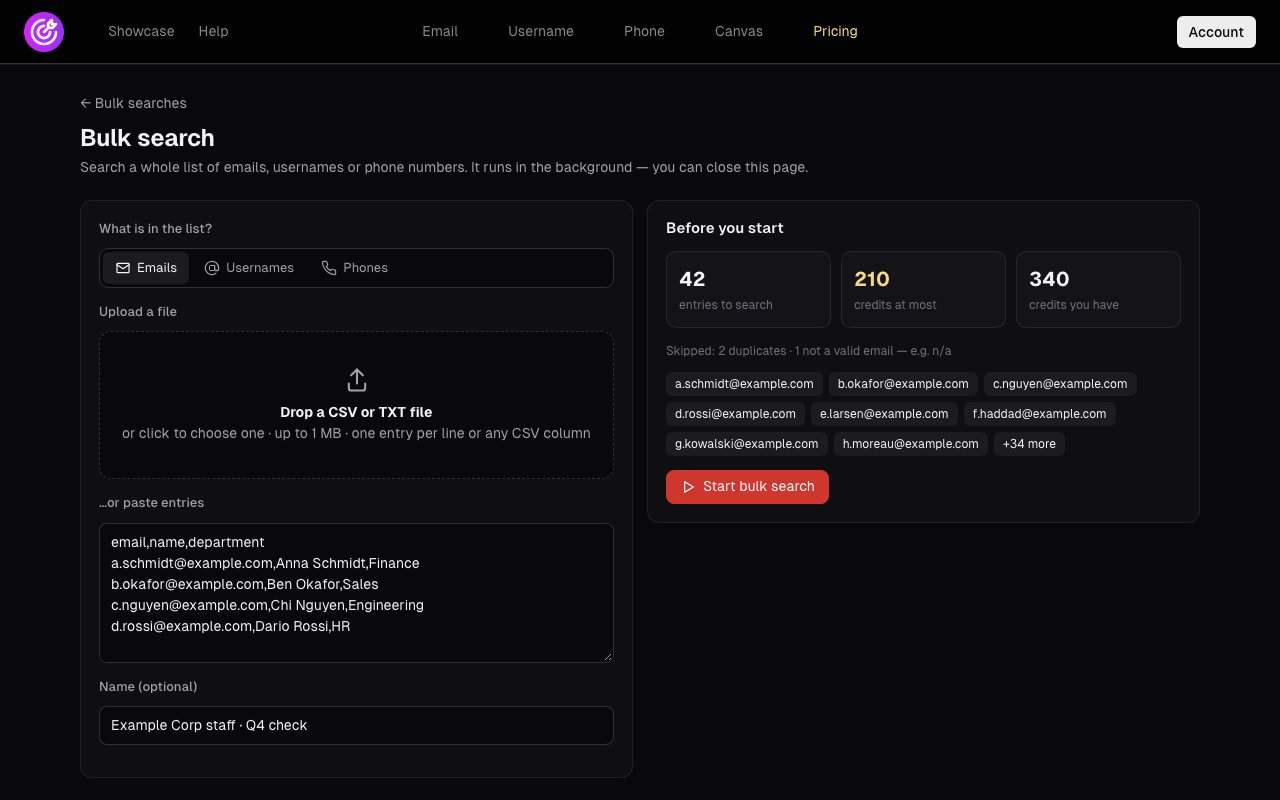
Each address costs 5 credits, and an address that turns up nothing is refunded, so the real cost is usually below the maximum. At 0.25 EUR per credit, 42 addresses is at most 52.50 EUR. The job runs on our servers, so you can close the tab and you get a dashboard alert when it finishes.
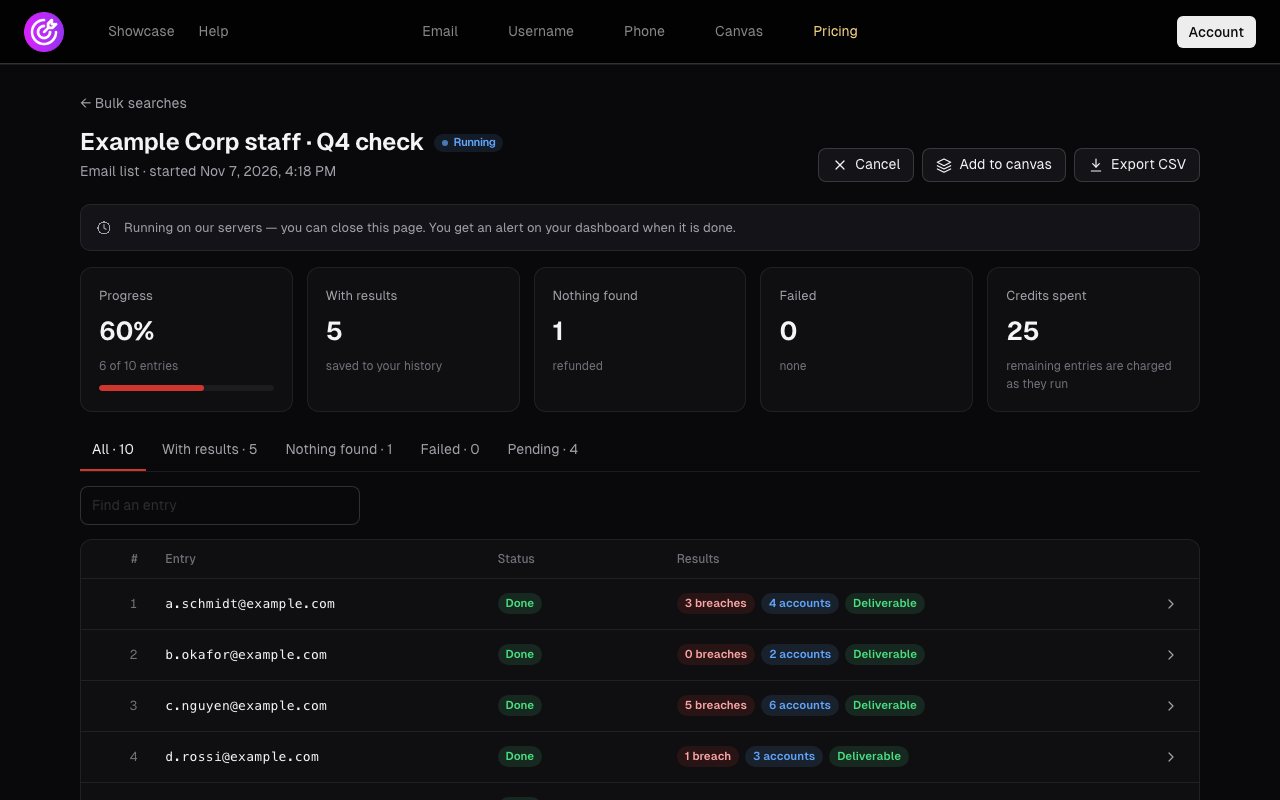
Example Corp, 42 staff addresses. The sweep finishes in a few minutes. Thirty-one addresses have at least one breach, eleven have none. Of the thirty-one, nine appear in a breach from the last twelve months that exposed passwords, and five of those breaches are the same conference platform.
That is the useful shape of the data: not 31 problems but one source, one date range and nine people. The security lead sends the nine a reset request and checks sign-in logs for those nine accounts. The other 22 get a short awareness note and nothing more.
Tip: Run the same sweep again every quarter and compare. New breach dates on old addresses are your signal. A one-time sweep tells you where you stood on one day.
Notifying people without creating a second leak
Breach data is personal data, and it can be embarrassing. A finding might reveal that an employee used their work address for a dating site, a health forum or a political group. Administrators do not need to know that to protect the company, and in many cases they should not.
| Who | What they need to see |
|---|---|
| Security team | A risk signal: how exposed the account is, whether it changed, whether the person has acted |
| The employee | The specifics: which service was breached, which data leaked and when, and what to do about it |
Notifications should also avoid putting breach specifics into email bodies. Email is forwarded, stored and searched, so a message saying "your password from Service X was leaked" is itself sensitive data sitting in an inbox. A secure link keeps the details in one controlled place.
Careful: Plain-text passwords in breach data are never something an administrator has to see. "This address appeared in a breach that exposed passwords" is enough to trigger a reset.
How TraceFind Business approaches it
TraceFind Business provides employee breach monitoring for company email addresses, built around that separation. A Score Only privacy mode keeps breach specifics away from administrators, so the security team sees a risk score rather than the details of each person's exposure. Employees receive a secure link instead of breach details in the email, and see the specifics only after following it. Underneath is the same lookup as the rest of TraceFind: more than 16 billion breach records from multiple sources, with dates and exposed data types.
Monitor your company addressesWant employee breach monitoring for your company? Get in touch at contact@tracefind.info.
ContactGDPR and employee consultation
In the EU and UK, checking employee email addresses against breach data is processing of personal data and needs a lawful basis. Many organizations rely on legitimate interests under Article 6(1)(f) GDPR, with the security of systems and accounts as the interest. That requires a balancing test showing the processing is necessary and proportionate. Points that usually support the balance:
- Minimize. Monitor company addresses only, never employees' private addresses, and keep administrator visibility to what is needed.
- Be transparent. Tell staff in your privacy notice or IT policy what is checked, why, and who sees what.
- Limit retention. Keep findings only as long as it takes to resolve them.
- Assess. Write down a legitimate interests assessment and consider whether a data protection impact assessment fits your setup.
- Involve employee representatives. In Germany, for example, a works council has co-determination rights over technical systems suitable for monitoring employees. Bring it in early.
Legal: This is general information, not legal advice. Your data protection officer or counsel should confirm the approach for your jurisdiction. Our legal and ethical OSINT guide covers the broader principles.
A response playbook for findings
Decide in advance what happens when a finding arrives, so responses are consistent and quick. The branch that matters most is whether a password was in the leaked data.
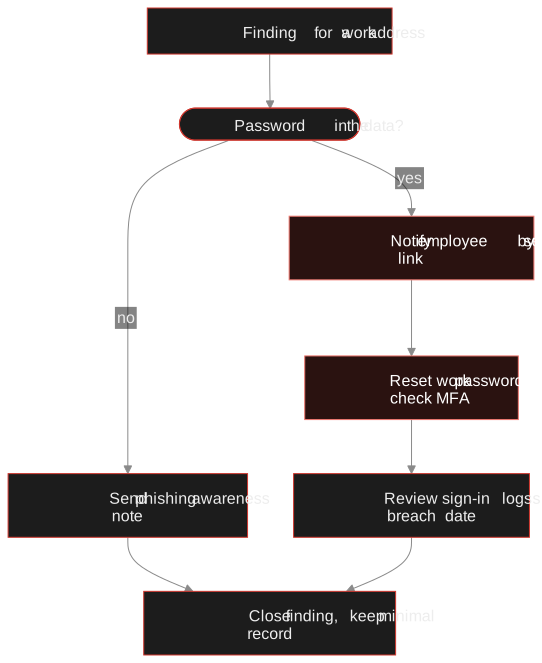
Triage by data type and date
Recent breaches that exposed passwords come first. Old, already-handled incidents go to the bottom.
Notify through the secure channel
Ask the employee to change the password on the breached service and anywhere they reused it.
Reset and check MFA
Force a reset of the company password if there is any chance of reuse, and confirm multi-factor authentication is active.
Read the sign-in logs
Look at the account around and after the breach date for unusual locations or failed attempts.
Raise phishing awareness
If names, phone numbers or roles were exposed, warn the person to expect convincing messages.
Close and keep little
Record that it was resolved, and keep only a minimal record.
Over time the findings show where training helps most, such as discouraging work addresses for personal sign-ups. Encourage staff to check their personal exposure too, with our guide to shrinking your digital footprint, and for a single address see how to read a breach check. To watch specific addresses automatically, breach monitors and alerts cover the scheduled version.
Start with one sweepPaste or upload your address list into bulk search, see the cost first, and find out how exposed your domain is.
Open bulk searchFrequently asked questions
What is employee breach monitoring?
It is the ongoing check of a company's employee email addresses against data breach records, so the security team learns when credentials or personal data tied to work accounts have leaked and can respond.
Is monitoring employee emails for breaches allowed under GDPR?
It can be, typically on the basis of legitimate interests in account security, provided it is necessary, proportionate, transparent to employees and limited to company addresses. Check with your data protection officer and, where required, your works council.
Should administrators see which breaches each employee was in?
Often they do not need to. A risk score is usually enough for the security team, while the employee gets the specifics. TraceFind Business offers a Score Only mode for this.
Does breach monitoring replace multi-factor authentication?
No. Multi-factor authentication blocks most credential stuffing, while breach monitoring tells you which accounts are exposed so you can reset passwords and watch for phishing. They work best together.
How many addresses can I check at once?
A TraceFind bulk search takes a CSV or TXT file of up to 1 MB with up to 500 entries. Each address costs 5 credits, and addresses that turn up nothing are refunded.
Does a breach hit mean an employee's account was compromised?
No. It means the address appeared in a breach. It becomes a risk when the leaked password was reused on a company account without multi-factor authentication, which is why you check sign-in logs after a reset.
Keep reading
-
 Guides
Is OSINT Legal? Ethics and GDPR for Online Investigations
Where the legal and ethical lines run in open source investigations, and the habits that keep your work defensible.
-
 Privacy
How to Find and Shrink Your Digital Footprint
A step-by-step self-audit: find what your email, usernames and phone number expose, then remove old accounts and clean up after breaches.
-
 Privacy
How to Check If Your Email Was in a Data Breach
Find out which breaches exposed your email, how to read the results, and the exact steps to take afterward.