 TraceFind
How to Find and Shrink Your Digital Footprint
Type your own name and city into a search engine and read the first two pages. Most people find at least one thing they had forgotten: a forum account from 2011, a club roster with their phone number, a profile photo they never meant to be public. You cannot erase a digital footprint, but you can measure it and make it much smaller. This is a self-audit you can finish over a weekend.
- Your footprint has four layers: accounts, content you published, data others hold about you, and leaked data. Each needs a different fix.
- Audit the way an outsider would: from your email addresses, usernames and phone numbers.
- You can delete accounts and opt out of data brokers. You cannot delete data from breach collections, but you can make it useless.
- Repeat it every few months. A one-off cleanup decays.
What your footprint is made of
Splitting it into layers matters because the fix for each is different. Deleting an account does nothing about a data broker listing, and an opt-out does nothing about a password that leaked in 2019.
- Accounts you created: social profiles, forums, shopping sites, old apps. Many are forgotten but still online.
- Content you published: posts, reviews, photos, code, comments.
- Data others hold about you: data brokers, people-search sites, public records, mentions by friends or employers.
- Leaked data: records from data breaches that circulate long after the incident.
The audit below follows the same identifiers an investigator would use: your email addresses, usernames and phone number. Looking at yourself the way an outsider would is the fastest way to see what matters.
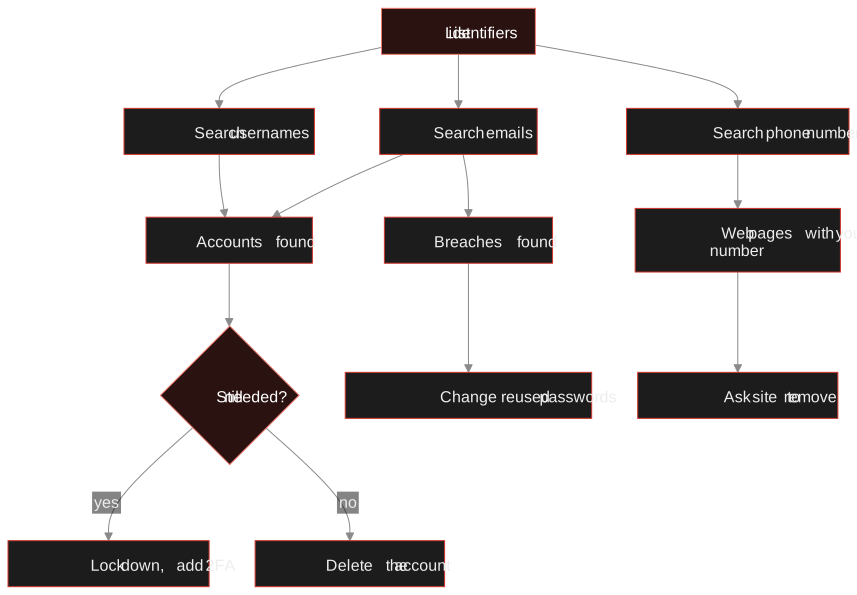
Step 1: List your identifiers
Write down every identifier you have used, not just the current ones:
- Every email address, including old school, work and "throwaway" addresses
- Every username or handle, including variations like
johndoe_dev,johndoeandjohn.doe - Current and previous phone numbers
- Name spellings, nicknames and maiden names
Your password manager is a good source, since it remembers sites you have long forgotten. So is your inbox: search it for "welcome", "verify your email" and "your account".
Step 2: Search your email addresses
Email links the most accounts, so start there. For each address, check three things.
- Where it is registered. TraceFind's email search checks 296 sites for an account registered to the address. Each hit is an account you still use, can delete, or did not create, which is worth investigating.
- Which breaches include it. The lookup covers more than 16 billion breach records from multiple sources, with the date of each breach and the data types exposed. How to check if your email was in a data breach explains how to read them.
- What it links to. TraceFind also shows public details of a Google account linked to the address, a reminder of how much one address can connect.
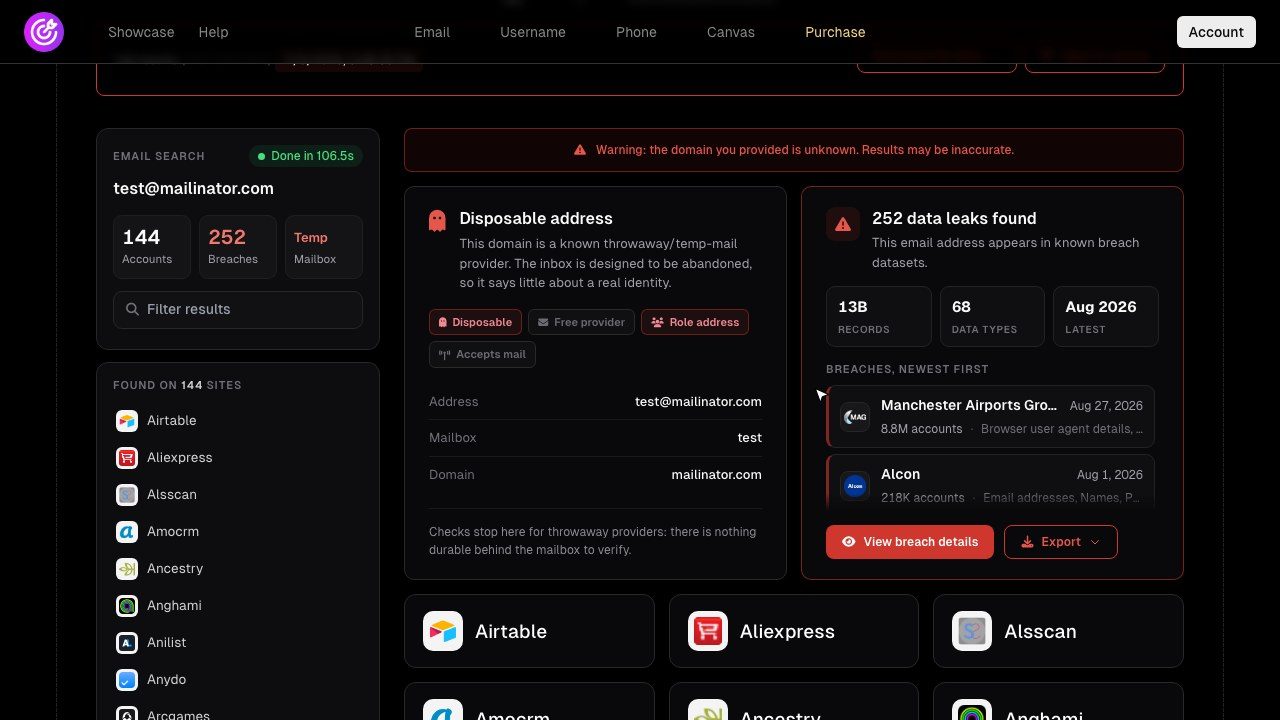
A search for jane.doe@example.com shows accounts on a photo site, a fitness app and a forum, plus two breaches: one exposed email and password hashes, the other exposed name, phone number and date of birth.
The second breach is the one to think about. It tells Jane that her phone number and birth date are in circulation, so she should expect convincing scam calls and be careful with any "verify your identity" message. The first tells her which password to change, and everywhere else she used it.
Step 3: Search your usernames and phone number
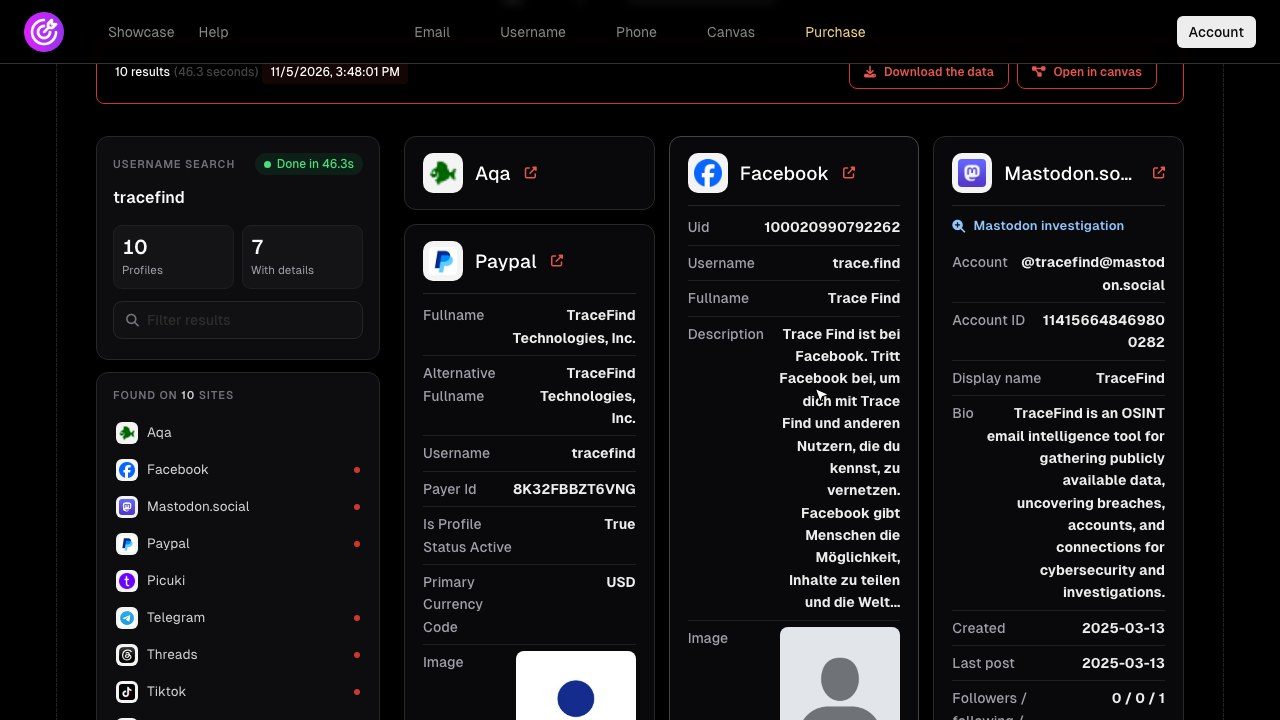
Run each handle through the username search. It checks about 1,000 of the most-used sites, health-checked daily so broken sites drop out instead of producing false hits, and extracts profile fields such as name, bio and avatar where a site exposes them. Look specifically for:
- profiles that show your real name next to a handle you thought was anonymous
- the same avatar across sites, which links accounts as reliably as a shared name
- bios that mention your employer, city or school
Then search your phone number with the phone search. It shows whether the number is linked to WhatsApp, Telegram, Signal, Facebook or Instagram, along with carrier and line type, and lists web pages where the exact number appears. Those pages are often old classified ads, club member lists or business directories you can ask to update.
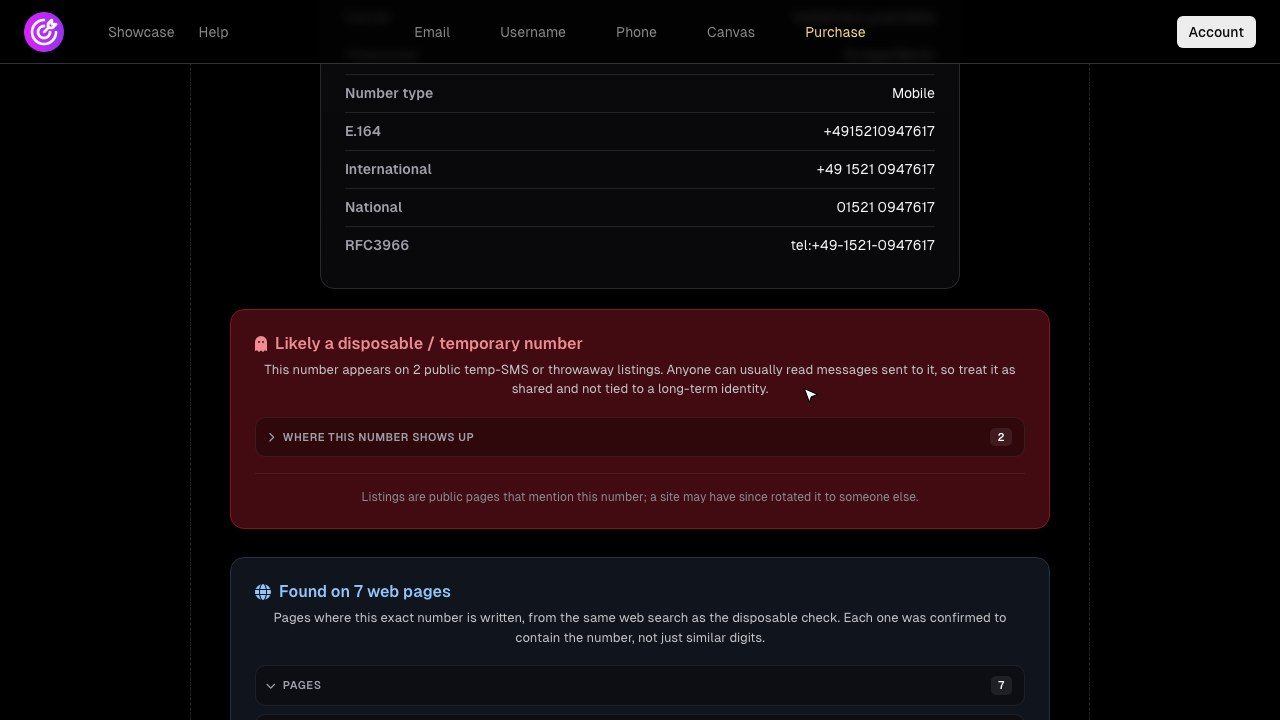
Tip: TraceFind lookups are passive. Searching your own details does not notify any of the sites involved. A free account includes 3 searches with a preview that shows counts only, which is often enough to see whether a full audit is worthwhile.
Where to spend your time first
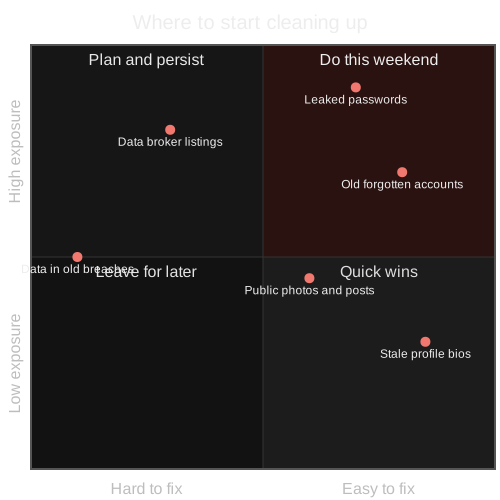
You will end up with a long list, and not every item is worth the same effort. Leaked passwords and forgotten accounts are cheap to fix and carry real risk. Data in old breaches is expensive to touch (you cannot) and mostly stale. Rank before you start.
Start with your emailSee which of 296 sites have an account for your address and which breaches exposed it.
Check your emailStep 4: Deal with data brokers and people-search sites
Data brokers compile profiles from public records, marketing data and other sources, and people-search sites publish them. They are a major part of most people's footprint, especially in the US.
Find your listings
Search your name with your city in a regular search engine and note the people-search sites that list you.
Use each site's opt-out
Most have one, usually linked in the footer as "Do not sell" or "Opt out". Keep a record of the date and the confirmation.
Use your legal rights
In the EU and UK, the GDPR gives you the right of access (Article 15) and the right to erasure (Article 17) in many cases. Several US states, including California, give residents rights to know about and delete personal information held by businesses.
Repeat
Brokers refresh their data, and removed listings can come back.
Google also offers a "Results about you" tool to request removal of search results containing your contact details. It removes the search result, not the page itself, so combine it with opt-outs at the source.
Step 5: Delete or lock down old accounts
Work through the accounts from steps 2 and 3 and sort them into three groups.
| Group | Action |
|---|---|
| Still in use | Review privacy settings, remove phone number and birth date where optional, enable two-factor authentication |
| No longer needed | Download anything you want to keep, then use the site's account deletion option, not just "deactivate" |
| No deletion option | Replace personal details with neutral ones, remove content, and send a deletion request to the site's privacy contact |
Pay special attention to accounts that publish location or routines. Fitness apps are the usual example; our fitness app privacy guide covers the settings worth changing. If you write code, check what your Git commits expose with the tips in the GitHub OSINT guide.
Step 6: Breach hygiene
You cannot remove your data from breach collections once it is out. What you can do is make it useless.
- Change any password that appeared in a breach, and every other site where you reused it. Attackers try leaked pairs on many sites, which is called credential stuffing.
- Use a password manager so every site gets a unique, random password.
- Turn on two-factor authentication, preferably an authenticator app, security key or passkey rather than SMS, for email, banking and social accounts first.
- Watch for targeted phishing. Breaches that exposed your name, phone number or address make convincing scam messages easier to write.
- Use email aliases for new sign-ups, so a future breach exposes an alias you can switch off.
Keep it small over time
A calendar reminder to repeat the email, username and phone searches every few months is the low-tech way. The automatic way is a TraceFind monitor: it re-runs a search on a schedule and alerts you when something new appears, such as a new breach. Each check costs 5 credits and is refunded when it finds nothing, and you can keep up to 20 monitors.
Before signing up somewhere new, ask whether the service really needs your main email address and real phone number. The smallest footprint is the one you never create.
Frequently asked questions
How do I see my own digital footprint?
List every email address, username and phone number you have used, then search each one. Email and username searches show where accounts exist, and a breach lookup shows which leaks include your data.
Can I remove my data from data breach collections?
No. Once breach data circulates it cannot be recalled. You can make it useless by changing exposed passwords, ending password reuse and enabling two-factor authentication.
How do I get removed from people-search sites?
Use each site's opt-out process and keep confirmation records. In the EU and UK you can also send erasure requests under GDPR, and several US states provide deletion rights. Recheck regularly, as listings can reappear.
Is deactivating an account the same as deleting it?
Usually not. Deactivation often hides a profile while keeping the data. Look for an explicit delete account option, and download anything you want to keep first.
Does searching my own email or username alert the sites?
No. TraceFind lookups are passive and do not notify the sites involved or contact anyone.
How often should I repeat the audit?
Every few months is a reasonable rhythm. A TraceFind monitor can repeat an email, username or phone search daily, weekly or monthly and alert you when something new appears.
Keep reading
-
 Privacy
How to Check If Your Email Was in a Data Breach
Find out which breaches exposed your email, how to read the results, and the exact steps to take afterward.
-
 Privacy
Fitness App Privacy: What Your Strava Profile Shows Strangers
What a stranger can see on your Strava profile, and the privacy controls that keep your routes, home and routines to yourself.
-
 Tutorials
GitHub OSINT: What a GitHub Profile Reveals
What a GitHub profile, its commits and its public keys reveal, and how developers can keep their own email address out of public history.