 TraceFind
GitHub OSINT: What a GitHub Profile Reveals
A candidate says they are a senior engineer with ten years of open source behind them, and gives you a GitHub link. Five minutes on that profile can confirm the story, undermine it, or hand you a work email nobody meant to publish. This guide covers what a GitHub account exposes, how to read it without over-reading it, and, for developers, how to stop giving it away.
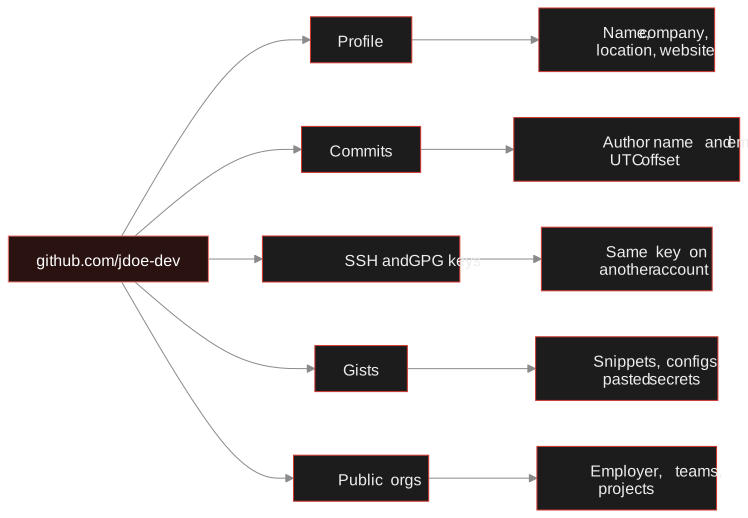
- A GitHub account ties together a handle, a name, an employer, keys and years of timestamped activity, all public.
- The numeric account ID never changes, so record it: it lets you recognise the account after a rename.
- Adding
.patchto a commit URL shows the author name and email the committer configured. It is a lead, not a verified identity. - Commit time zones can check a claim ("based in Berlin") but must never be used to locate a person.
- Developers can fix most of this with a noreply address and two settings.
Why GitHub matters in an investigation
A GitHub account is rarely just a code store. A security team checking which developer accounts belong to the company, a trust and safety analyst testing a "senior engineer" persona, or a journalist confirming who maintains a project all get something useful from it: a real or semi-real name, an employer, a website and a long, dated activity trail.
It is also a place where accuracy matters. Git metadata is set by whoever makes the commit, so it can be wrong, stale or deliberately misleading. Treat everything below as leads to corroborate. Before you start, be sure you have a legitimate purpose and a lawful basis; the legal and ethical OSINT guide explains what that means under the GDPR.
What the public profile shows
The profile page and the public REST API expose the same core fields. For the fictional account jdoe-dev you request one address:
# public profile as JSON
curl -s https://api.github.com/users/jdoe-dev

# public organisation memberships
curl -s https://api.github.com/users/jdoe-dev/orgs
The fields worth reading:
- id: a numeric account ID that never changes, even when the user renames the account. Write it down so you can recognise the same account under a new handle.
- created_at: when the account was opened. A profile claiming ten years of open source work but created last month deserves a second look.
- name, company, location, blog: free text the user filled in. Self-reported, but people reuse the same wording elsewhere, which makes these good search pivots.
- public_repos, followers, following: rough signs of how active and connected the account is.
Organisation memberships only appear if the user made them public, so an empty list proves nothing. The languages across someone's repositories give a quick sense of their skills and can help separate two people who share a name.
Commit emails and the .patch trick
Every Git commit records an author name and email. GitHub's web interface hides the email, but the raw commit does not. Add .patch to any commit URL and you get the commit as plain text:
https://github.com/jdoe-dev/example-repo/commit/<sha>.patch

From 3f2a9c1e... Mon Sep 17 00:00:00 2001
From: Jane Doe <jane.doe@example.com>
Date: Tue, 14 Jul 2026 22:41:07 +0200
Subject: [PATCH] Fix pagination in export
Three things to take from those header lines:
- The email is whatever the committer typed into
git config user.email: a work address, a personal one, or a GitHub noreply address. - The name can differ from the profile. People often commit under their legal name while using a handle on the profile.
- The date carries a UTC offset (
+0200here), taken from the committer's machine.
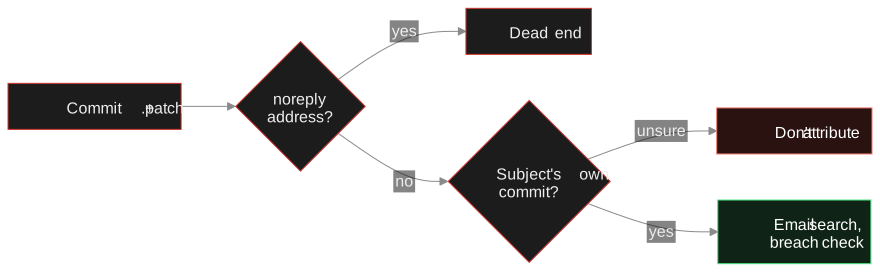
Careful: Only use commits from the user's own repositories, or commits you can clearly attribute to them. In a fork or a shared repository the author may be someone else entirely, and pinning their email on your subject is the classic mistake. Anyone can commit under any name and address, so confirm the email independently, for example with an email investigation, before relying on it.
SSH and GPG keys
GitHub publishes each user's public SSH keys at https://github.com/jdoe-dev.keys and public GPG keys at https://github.com/jdoe-dev.gpg. Public keys are meant to be public, so this is not a leak, but it is handy for correlation:
- The same SSH public key on two accounts strongly suggests one person or one machine controls both.
- A GPG key can carry user IDs with names and emails that differ from the profile.
- The number and type of keys hints at how many machines someone uses, though you should not read much into it.
Compare keys by full value or fingerprint, never by the comment at the end of an SSH key line. That comment is free text anyone can edit.
Reading activity time zones
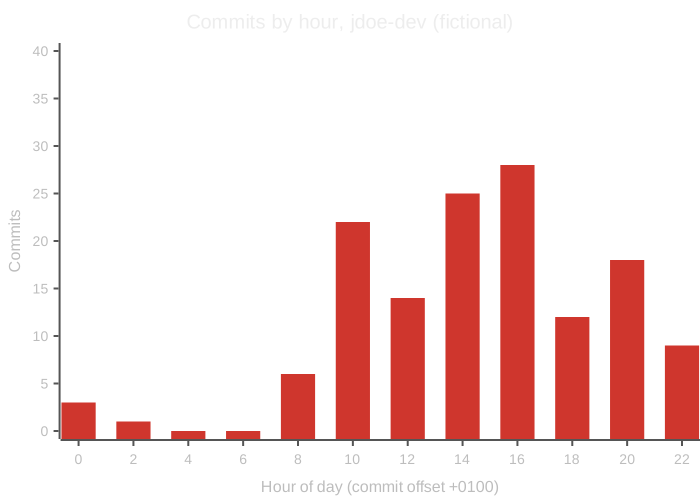
The UTC offsets in commit timestamps, and the hours someone usually commits, point to a likely time zone. Collect the Date lines from a set of the user's own commits and plot them by hour. This is the shape you are looking for:
| Signal | What it can suggest | Caveat |
|---|---|---|
| Consistent offset, e.g. +0200 | Machine clock set to a zone with that offset | Servers, CI systems and VMs often use UTC |
| Offset flips between +0100 and +0200 | A region that observes daylight saving | Travel produces the same pattern |
| Commits cluster 09:00 to 18:00 local | Work-hour activity | Rebases and amended commits keep or reset dates |
| Late-night clusters | Hobby or side-project work | Says little about where the person is |
Use this to sanity-check claims. A profile that says "Based in Berlin" while every commit carries -0700 is worth a question. Do not use it to pin down where someone physically is: a time zone covers millions of people, and treating it as a location is both inaccurate and the wrong use of the technique.
The candidate's link points to jdoe-dev. The API shows account ID 12345678, created in 2016, company "Example Corp", location "Berlin". That matches the CV. A commit in their own repository shows jane.doe@example.com and a +0100 offset, with commits clustered from 08:00 to 17:00 on weekdays. Consistent.
Then one of the "ten years" fails: the repositories listed as the candidate's flagship project are forks, and the commits the candidate claims are authored by someone else. The profile is real; the claim is partly not. The recruiter asks about it instead of rejecting on a hunch.
Doing this at scale
By hand, all of the above is a dozen API calls and a spreadsheet. TraceFind's GitHub investigation pulls the public profile in one step: numeric ID, creation date, company, location, blog, SSH keys, organisations, languages, and the names and emails used in the user's own public commits. When a username search or an email search finds a GitHub profile, the investigation starts on its own and the details appear with the result. Lookups are passive: the account owner is not notified.
Each finding can go onto the investigation canvas as a linked entity, so a commit email becomes a node you can pivot from into an email search.
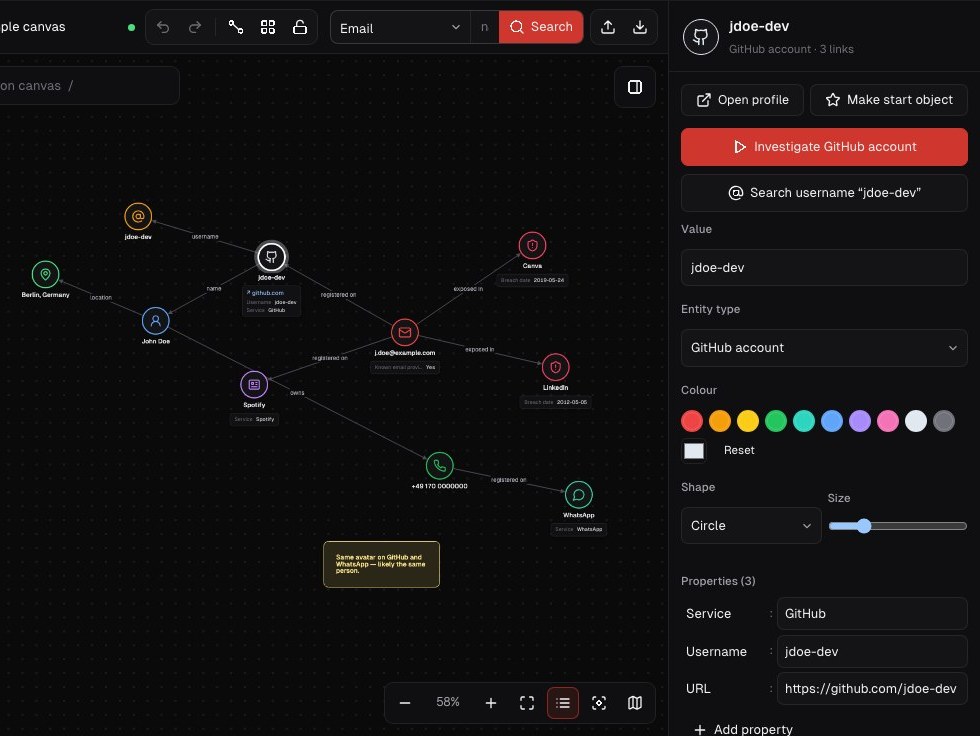
Start from a username. Search a handle across about 1,000 sites and get GitHub profile details automatically when an account turns up.
Run a username searchIf you are the developer: what to change
If you read this with some unease, the fixes are short and GitHub documents them well.
-
Use your noreply address
Every account has one in the form
ID+username@users.noreply.github.com. In your email settings, turn on Keep my email addresses private, then set it locally too:bashgit config --global user.email "12345678+jdoe-dev@users.noreply.github.com" -
Block pushes that expose your email
Also enable Block command line pushes that expose my email. GitHub then rejects a push containing commits made with your private address, which catches the day you forget to configure a new laptop.
-
Separate work and personal identities
Use Git's conditional includes so repositories under a work directory use your work identity and everything else uses the noreply address. A weekend project then never carries your employer's domain.
-
Review what is already public
- Open a few
.patchfiles from your older repositories and see which emails appear - Hide public organisation memberships you do not want listed
- Remove SSH keys you no longer use (good hygiene anyway)
- Keep the location and company fields vague
- Open a few
Rewriting history to change the author email changes every commit hash and breaks other people's clones, and forks keep the original commits. For most people the practical choice is to switch to the noreply address going forward and accept that old commits stay. For a wider self-audit, see how to find and shrink your digital footprint.
Frequently asked questions
Can you find someone's email address from their GitHub account?
Often, yes. Appending .patch to a commit URL shows the author name and email from the commit. It only reveals what the person configured in Git, which may be a GitHub noreply address, and it should be verified independently.
How do I hide my email address on GitHub?
Enable Keep my email addresses private and Block command line pushes that expose my email in your GitHub email settings, and set your local git user.email to your ID+username@users.noreply.github.com address.
Does GitHub notify a user when someone views their profile or keys?
No. Public profiles, .patch files and .keys pages are ordinary public pages, and TraceFind lookups are passive, so the account owner is not notified.
Do commit timestamps reveal where a developer lives?
No. A UTC offset only suggests the time zone setting of the machine that made the commit. It is useful for checking whether a claim is consistent, not for locating a person.
What stays the same if a GitHub user renames their account?
The numeric account ID. Record it from the API response and you can recognise the account later under a new handle.
Keep reading
-
 Guides
Is OSINT Legal? Ethics and GDPR for Online Investigations
Where the legal and ethical lines run in open source investigations, and the habits that keep your work defensible.
-
 Guides
How to Find Accounts Linked to an Email Address
Pivot from one email to accounts, breaches, usernames and profiles, then grade every finding. With a worked fraud case.
-
 Guides
Username OSINT: How to Find Accounts From a Username
Enumerate accounts from one handle, weed out false positives and prove that two profiles belong to the same person.