 TraceFind
Infostealer Infections: When Malware, Not a Breach, Leaked Your Logins
Most people know the data breach story: a website gets hacked, your password leaks, you change it. An infostealer infection is different and worse. Malware on your own computer copied every password, cookie and card your browser had saved, all at once. The email search now shows these infections next to the breaches. Here is how to read them and what to do first.
- An infostealer is malware that copies everything a browser has saved: passwords, session cookies, autofill, sometimes crypto wallets.
- The email search now has an Infostealers tab, built from Hudson Rock's index of stolen logs.
- It shows when the device was infected, the device and system, how many logins were taken and where the malware sat. The passwords themselves stay censored.
- Fix it in this order: clean the device, then change passwords and end sessions from a clean one, starting with email.
What an infostealer does
The usual way in is a download that promised something for free: a cracked game, a "premium" plugin, a fake installer from an ad, a file in a Discord message. It runs once, often while the real program installs. In seconds it reads the password stores and cookie jars of every browser on the machine, packs them into a log and uploads it. Many families delete themselves afterwards, so an antivirus scan a week later may find nothing.
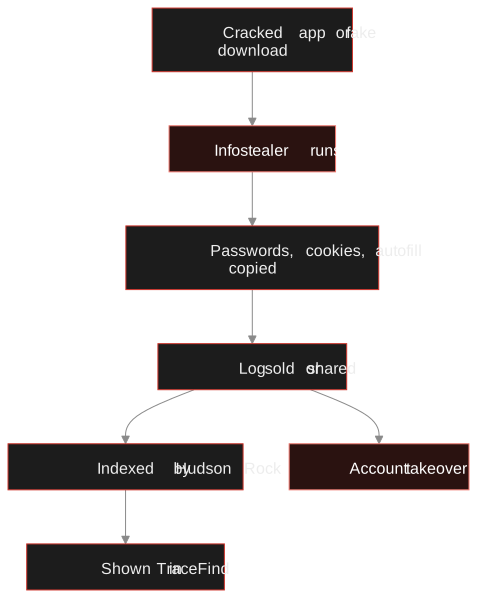
The log is then sold, often in bulk, or posted for free to build a reputation. Buyers search logs for the logins they care about: email accounts, banks, crypto exchanges, company VPNs. Session cookies are the prize, because a fresh cookie can open an account without the password or the second factor.
Why it is worse than a breach
- One website's database leaks
- Your password for that site, often hashed
- Fix: change that password and any reuse of it
- Your devices are fine
- Your own device was compromised
- Every saved login on every site, in clear text, plus live cookies
- Fix: clean the device first, then change everything
- Can bypass two-factor authentication through cookies
A breach is someone else's problem that became yours. An infection starts on your own computer.
If you have read how to check an email for breaches, the infection result will look familiar but needs a different response, and a faster one.
Reading the Infostealers tab
Run an email search for the address. When Hudson Rock knows of an infection on a device that used it, the breach card gets an Infostealers tab marked in red, and the infection count appears in the numbers at the top. Each infection is one card:
| Field | What it tells you |
|---|---|
| Infected (date) | When the log was taken. Every password saved on the device before this date is exposed. |
| Device and System | The computer name and operating system. Usually enough to know which of your machines it was, or that it was not yours at all. |
| Network | The IP address at the time, as Hudson Rock reports it. Home, office or travel? |
| Antivirus | What was installed when it happened. A reminder that one scanner is not a guarantee. |
| Saved logins | How many personal and corporate logins the log holds. A corporate count means work accounts were on the device. |
| Malware file | Where the malware ran from, which often names the download that did it. |
| Logins and passwords seen | A few examples, censored by Hudson Rock at the source, so you can recognise them without the passwords being shown. |
TraceFind never shows the stolen passwords in clear text. The point of the tab is to tell you that an infection happened and where, so you can act, not to republish what was stolen.
Check your own address.New accounts get 3 free previews; a preview shows how many breaches were found.
Run a breach checkWhat to do, in this order
Order matters. Changing passwords on a machine that is still infected hands the new ones straight to the attacker.
-
Identify the device
Match the computer name, operating system and date to your machines. A device you do not recognise may belong to someone who used your email on a shared or work computer, which changes who has to act.
-
Clean it, or reinstall
Run a full scan with an up-to-date scanner, and if the infection is recent or the malware path points to something still installed, back up your files and reinstall the system. Remove the program the malware came with.
-
From a clean device, secure your email first
Your mailbox resets every other password, so it comes first: new password, sign out of all sessions, check forwarding rules and recovery details for anything you did not set.
-
Change every password saved on that device
Not only the ones shown as examples: the log holds everything. Banking, payment, social and work accounts next, then the rest. End active sessions wherever the site lets you, because a stolen cookie survives a password change on some sites.
-
Tell your employer if work logins were in it
A corporate count above zero means VPN, SSO or company tool logins were on the device. Your IT or security team needs to know; this is how many company intrusions begin. The employee breach monitoring guide explains the company side.
-
Watch for the next one
Set up a monitor for the address. It re-checks on its own and alerts you when a new breach or infection appears.
How to avoid the next infection
- Do not install cracked software, game cheats or "free premium" tools. They are the most common carrier by far.
- Download programs from the vendor's own site, not from ads or search result links that only look like it.
- Keep passwords in a password manager rather than the browser, and lock it when you are not using it.
- Use passkeys or hardware keys where you can: a stolen password is useless without them, though a stolen session cookie may still work until it expires.
- Keep work and personal browsing apart, ideally on different devices.
For investigators
An infection on a target's address is a strong signal of account compromise, which matters when you are judging whether a message really came from them. It is also a reason for care: a log-derived login is stolen data, and using it to access an account is illegal almost everywhere. Note the infection, its date and the device type, and stop there. The legal and ethical guide covers where the line runs.
Frequently asked questions
What is an infostealer?
Malware that runs once on a computer, copies the passwords, session cookies, autofill data and crypto wallets saved in its browsers and apps, and uploads them to the attacker. The copy is called a log, and logs are sold or shared in bulk.
How is an infostealer infection different from a data breach?
A breach leaks one website’s data. An infection leaks everything saved on one device: every login for every site, plus cookies that can skip two-factor authentication. Changing one password does not fix it; the device has to be cleaned first.
Where does TraceFind get infostealer data?
From Hudson Rock, which indexes infostealer logs. Logins and passwords are censored at the source, so TraceFind shows that an infection happened, when, and on what kind of device, not the stolen passwords themselves.
My result shows an infection from years ago. Am I still at risk?
Possibly. Passwords you have not changed since that date are still in the log, and so are accounts you forgot about. Treat every password saved on that device before the infection date as known to attackers.
Can I be warned about new infections?
Yes. An email monitor re-checks the address and alerts you when a new breach or infection appears, so you do not have to repeat the search.
Keep reading
-
 Privacy
How to Check If Your Email Was in a Data Breach
Find out which breaches exposed your email, how to read the results, and the exact steps to take afterward.
-
 Guides
Employee Breach Monitoring: Catch Leaked Logins Early
How leaked employee credentials put company accounts at risk, and how to monitor and respond while respecting employee privacy and GDPR.
-
 Tutorials
Set Up Breach Monitoring and Alerts for an Email, Username or Phone
Schedule repeat checks of an email, username or phone number, and get told when a new breach or account turns up.