 TraceFind
 API Tutorial: Run Searches and Fetch Reports from Code
Your CRM has a column of new signups and a support lead who keeps asking, "is this email real?" You could paste each one into a search box, or you could write forty lines that look every new address up and drop the summary into the ticket. This tutorial walks through the TraceFind API from an empty account to a script that runs searches, handles the awkward cases, and pulls PDFs, using only the endpoints and limits that exist today.
- The API runs the same email, username and phone searches as the site: JSON over HTTPS with a Bearer token.
- One call starts a search. With
"wait": 90it usually returns the finished result; otherwise you poll every few seconds. - A search costs 5 purchased credits and is free when it finds nothing or fails. Reading history, reports and the account is free.
- Limits: 60 requests a minute per token, 5 running searches per account, 10 active tokens.
Before the first request
You need three things: purchased credits (API searches never use the free sign-up credits), a token, and somewhere safe to keep it.
Buy credits
At least 5, enough for one search. Credits do not expire.
Create a token
Go to Account, then API. Name the token after the tool that will use it, pick a scope and copy the token. It is shown once, because only a SHA-256 hash is stored. Lost it? Revoke it and create a new one.
Keep it out of your code
Put it in an environment variable. Tokens start with
tf_live_.
# the API base URL is shown on the API docs page
export TRACEFIND_API="{API base URL}"
export TRACEFIND_TOKEN="tf_live_..."
There are two scopes. Search can do everything, including starting searches that spend credits. Read can do everything except that, which makes it the right choice for dashboards and backups. Use one token per tool (up to 10 active) so you can revoke one without touching the others.
Careful: Keep tokens on your server. Never put one in a web page, mobile app or public repository: anyone who holds it can spend your credits. The API never accepts or returns your account ID, so a leaked token cannot be used to take over the account, but it can still burn credits.
Check that the token works
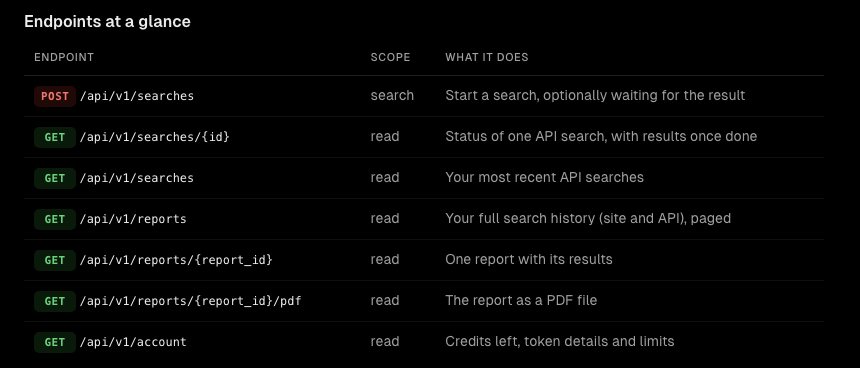
The account endpoint is free and tells you whether the token is valid, how many searches your credits cover, and the limits that apply.
curl -s "$TRACEFIND_API/api/v1/account" \
-H "Authorization: Bearer $TRACEFIND_TOKEN"{
"credits": 135,
"searches_left": 27,
"search_cost": 5,
"token": {"name": "CRM sync", "scope": "search", "expires_at": null},
"limits": {"requests_per_minute": 60, "running_searches": 5}
}A missing, wrong, revoked or expired token returns 401 with a WWW-Authenticate: Bearer header and a JSON body such as {"detail": "This API token is invalid or has been revoked."}.
Start a search
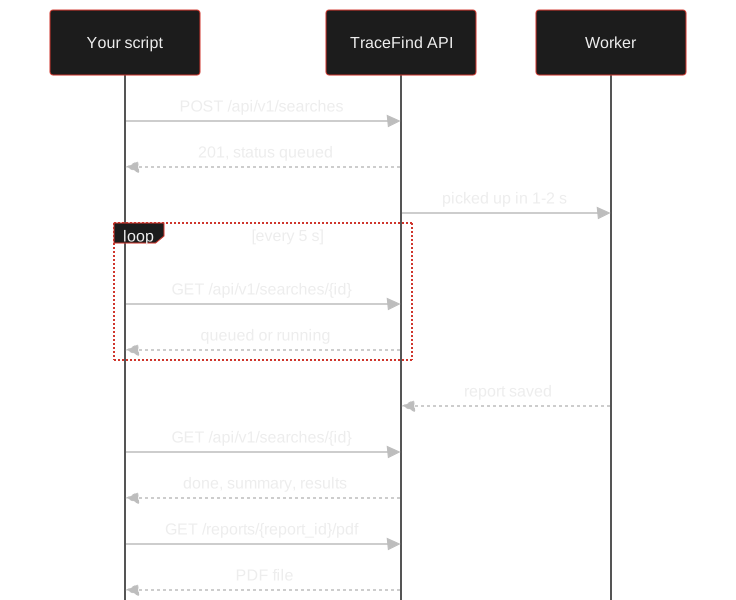
An API search is queued, picked up by a worker within a second or two, and saved to your history as a report when it finishes. The flow below is the one every client follows, whatever the language.
The request body has three fields:
| Field | Type | Notes |
|---|---|---|
type | string, required | email, username or phone (case-insensitive) |
query | string, required | 1 to 320 characters. Phones in international format (+4915100000000; spaces and dashes are fine). Usernames: 2 to 64 characters of letters, digits, ., _, - |
wait | integer | Seconds (0 to 120) to hold the request until the search finishes. Default 0 returns at once with "status": "queued". Set your HTTP timeout a little higher than this. |
Here is an email search that waits up to 90 seconds. Most searches finish well inside that: roughly 45 seconds for an email, 30 for a username and 15 for a phone number.
curl -s -X POST "$TRACEFIND_API/api/v1/searches" \
  -H "Authorization: Bearer $TRACEFIND_TOKEN" \
  -H "Content-Type: application/json" \
  -d '{"type": "email", "query": "jane.doe@example.com", "wait": 90}'
If you leave out wait, the response is 201 Created with a search object like this:
{
  "id": "4CQL0DSL4KCC",
  "type": "phone",
  "query": "+4915100000000",
  "status": "queued",
  "created_at": "2026-11-01T12:34:05.118000+00:00",
  "finished_at": null,
  "found": false,
  "report_id": null,
  "summary": null,
  "error": null,
  "credits_spent": 0
}
Poll for the result
If the search is still running after wait (or you did not use it), poll GET /api/v1/searches/{id} every 3 to 5 seconds until status is no longer queued or running. The statuses mean:
| status | Meaning |
|---|---|
queued, running | Waiting for a worker (usually a second or two), or searching |
done | Finished. found says whether anything turned up; results holds it |
failed | Did not finish; see error. Nothing is charged; start it again |
waiting_for_credits | Credits ran out before it could start; it continues once you buy credits |
cancelled | Stopped before it ran |
Here is the whole thing in Python, which handles the wait, the polling loop and a sensible reading of an email result:
# pip install requests
import os, time, requests

API = os.environ["TRACEFIND_API"] + "/api/v1"
HEADERS = {"Authorization": f"Bearer {os.environ['TRACEFIND_TOKEN']}"}

def search(kind, query):
    r = requests.post(f"{API}/searches", headers=HEADERS, timeout=130,
                      json={"type": kind, "query": query, "wait": 90})
    r.raise_for_status()
    s = r.json()
    while s["status"] in ("queued", "running"):
        time.sleep(5)
        s = requests.get(f"{API}/searches/{s['id']}", headers=HEADERS, timeout=30).json()
    return s

s = search("email", "jane.doe@example.com")
print(s["status"], s["summary"])
for item in s.get("results", []):
    if item["type"] == "social":
        print("account:", item["name"], item["url"])
    elif item["type"] == "leaks":
        print("breaches:", [b.get("Name") for b in item["data"]])
The Node 18+ version is the same shape, using built-in fetch:
// Node 18+, as an ES module
const API = `${process.env.TRACEFIND_API}/api/v1`;
const headers = {
  Authorization: `Bearer ${process.env.TRACEFIND_TOKEN}`,
  'Content-Type': 'application/json',
};

let res = await fetch(`${API}/searches`, {
  method: 'POST',
  headers,
  body: JSON.stringify({ type: 'username', query: 'jdoe-dev', wait: 90 }),
});
if (!res.ok) throw new Error((await res.json()).detail);
let s = await res.json();
while (['queued', 'running'].includes(s.status)) {
  await new Promise((r) => setTimeout(r, 5000));
  s = await (await fetch(`${API}/searches/${s.id}`, { headers })).json();
}
console.log(s.status, s.summary);
Reading the response
A finished search carries a summary with a few headline numbers, and a results list for the detail. The summary fields depend on the search type:
| Search | summary fields |
|---|---|
hits, breaches, accounts, breach_names (up to 8), account_names (up to 8), deliverable (true, false or null) | |
| username | hits, profiles, sites (up to 12 names) |
| phone | hits, messengers (for example ["WhatsApp", "Telegram"]), country, carrier |
Each entry in results has a type, and a type only appears when that check returned something. For email you may see social (an account on a site, with name, url and details in others), leaks (breaches, in data), google, email_verify and domain_validation. A username search returns username entries (a profile with sitename, url, tags and extracted profile data). A phone search can return lookup, whatsapp, telegram, signal, facebook, instagram (each with data.exists), temp and mentions.
The API is forward compatible: new result types and fields may be added to /api/v1 at any time, but fields are not removed or renamed within v1. Ignore what you do not recognise rather than failing on it.
Two fields drive billing logic in your own code. found is false when nothing turned up, in which case the search was free. credits_spent is 5 when something was found and 0 otherwise.
Errors and limits
Errors use standard status codes and a JSON body with a human-readable detail string that is safe to log. The ones you will meet:
| Status | When | What to do |
|---|---|---|
| 400 | Unknown type, or the query is not a valid email, username or phone | Fix the input; do not retry |
| 401 | No token, or it is wrong, revoked or expired | Check the header; create a new token |
| 402 | Fewer than 5 purchased credits, or a PDF of a free preview | Buy credits |
| 403 | A read-only token tried to start a search | Use a search-scope token |
| 404 | No such search or report on your account | Check the ID |
| 422 | Malformed request, such as wait above 120; detail is a list naming the field | Fix the request |
| 429 | More than 60 requests in a minute, or 5 API searches already running | Wait and retry |
| 5xx | Something went wrong on our side | Retry with backoff; nothing was charged |
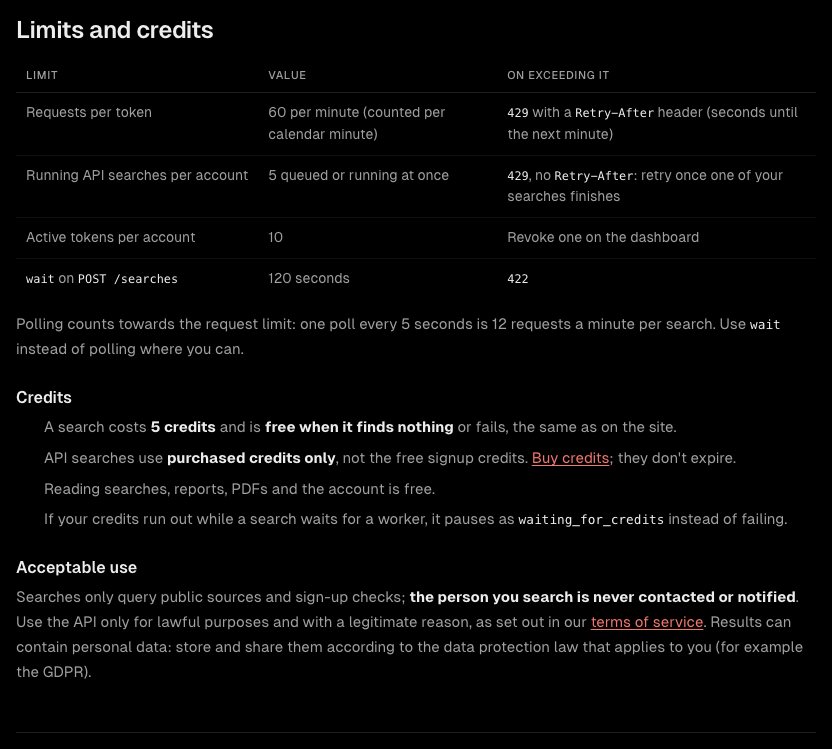
The two rate limits behave differently. The 60 requests a minute limit returns 429 with a Retry-After header holding the seconds until the next minute. The limit of 5 queued or running searches also returns 429 but with no Retry-After: retry once one of your searches has finished. Because polling uses your request budget, prefer wait over a tight loop wherever you can.
This retry helper treats both cases, and 5xx, the same way:
def call(method, path, **kw):
    for attempt in range(5):
        r = requests.request(method, f"{API}{path}", headers=HEADERS, timeout=130, **kw)
        if r.status_code != 429 and r.status_code < 500:
            break
        time.sleep(int(r.headers.get("Retry-After", 2 ** attempt * 5)))
    if not r.ok:
        raise RuntimeError(f"{r.status_code}: {r.json().get('detail')}")
    return r.json()
Searching a list
With a limit of 5 running searches, a list of usernames needs batching. This sends five at a time and waits for each batch to finish:
const usernames = ['jdoe-dev', 'jane_d', 'jd1990'];
const results = [];
for (let i = 0; i < usernames.length; i += 5) {
  const batch = usernames.slice(i, i + 5).map((query) =>
    fetch(`${API}/searches`, {
      method: 'POST', headers,
      body: JSON.stringify({ type: 'username', query, wait: 120 }),
    }).then((r) => r.json()));
  results.push(...(await Promise.all(batch)));
}
console.table(results.map((s) => ({ query: s.query, status: s.status, hits: s.summary?.hits })));
If you only need to run a spreadsheet through once and do not want to write code, the bulk search page does the same from a CSV.
Create a tokenAccount, then API: name it, choose a scope, copy it once. Read the full reference for every field.
Open the API docsHistory, reports and PDFs
Every search you run, on the site or through the API, is saved as a report. Two endpoints cover it. GET /api/v1/searches lists your recent API searches (limit 1 to 100, default 20), without results. GET /api/v1/reports lists your whole history, newest first: filter by type, page with limit (1 to 50) and offset, and add results=true to include each report's results instead of a result_count.
A single report is at GET /api/v1/reports/{report_id}, and its PDF, the same document as the site's export, is at /reports/{report_id}/pdf. A report from a free trial on an account that has never bought credits comes back as a locked preview ("locked": true, no results), and its PDF returns 402.
r = requests.get(f"{API}/reports/{s['report_id']}/pdf", headers=HEADERS, timeout=60)
r.raise_for_status()
open("report.pdf", "wb").write(r.content)

# export your whole history
reports, offset = [], 0
while True:
    page = requests.get(f"{API}/reports", headers=HEADERS,
                        params={"limit": 50, "offset": offset, "results": "true"}).json()["reports"]
    reports += page
    if len(page) < 50:
        break
    offset += 50
Habits that save credits and trouble
- Use
waitinstead of tight polling - Use one token per tool, with an expiry
- Store
report_idwith your own record - Back off on 429 and 5xx
- Have a lawful reason for each lookup
- Put a token in client-side code
- Fire hundreds of searches at once
- Retry a 400 or 422 unchanged
- Keep results longer than you need them
- Search people you have no reason to look up
Legal: Searches only query public sources and sign-up checks, and the person you search is never contacted or notified. Results can still contain personal data, so use the API only for lawful purposes and store results according to the law that applies to you, for example the GDPR. See the legal and ethical guide.
To see what the three searches return before you write code, read the email OSINT guide and the username OSINT guide. To keep watching a value rather than looking it up once, see breach monitoring and alerts.
Frequently asked questions
How do I authenticate with the TraceFind API?
Send an API token in the Authorization header as a Bearer token. Create tokens under Account, then API. A token is shown once, starts with tf_live_ and can have a search or read scope.
How much does an API search cost?
5 credits, and nothing when the search finds nothing or fails. API searches use purchased credits only, not the free sign-up credits. Reading searches, reports, PDFs and the account is free.
What are the rate limits?
60 requests per minute per token, 5 queued or running API searches per account and 10 active tokens per account. Exceeding the first two returns 429.
Should I poll or use the wait parameter?
Use wait where you can. It holds the request up to 120 seconds until the search finishes, and polling counts towards your 60 requests a minute. If the search is still running afterwards, poll every 3 to 5 seconds.
Can the API return the PDF report?
Yes. GET /api/v1/reports/{report_id}/pdf returns the same PDF as the site export. A free preview report returns 402 until credits have been purchased.
Will the person I search be notified?
No. Searches only query public sources and sign-up checks, and the person is never contacted or notified. You still need a lawful reason for each lookup.
Keep reading
-
 Guides
Is OSINT Legal? Ethics and GDPR for Online Investigations
Where the legal and ethical lines run in open source investigations, and the habits that keep your work defensible.
-
 Guides
How to Find Accounts Linked to an Email Address
Pivot from one email to accounts, breaches, usernames and profiles, then grade every finding. With a worked fraud case.
-
 Guides
Username OSINT: How to Find Accounts From a Username
Enumerate accounts from one handle, weed out false positives and prove that two profiles belong to the same person.