 TraceFind
Map a Company’s Owners, Subsidiaries and Partners
A supplier you have never heard of sends a contract. The website looks fine, but who actually owns it, and who else is it tied to? The company search in TraceFind now answers that with a relationship explorer: parents, subsidiaries, acquisitions, partners and sanctions hits, each connection with the documents it came from.
- Search a company by name or LEI in the search box, and the result now includes a relationship explorer.
- It shows 12 kinds of connection, from subsidiaries and owners to acquisitions, partnerships, supply chain and litigation.
- Every company in the graph is screened against the OFAC and UN sanctions lists.
- Each connection lists its sources, ranked from registers and filings down to news. Check the weak ones before you rely on them.
Why a list of facts is not enough
A company profile tells you what a company says about itself: its legal name, address, register number and website. The risk usually sits one step away. The shell that owns it, the sister company that was fined, the distributor in a sanctioned country. Company OSINT has always been about following those links, and doing it by hand means reading register extracts, annual filings and old press releases one by one.
The explorer does that reading for you and draws the result. You still decide what it means, but you start from a map instead of a blank page.
Where the connections come from
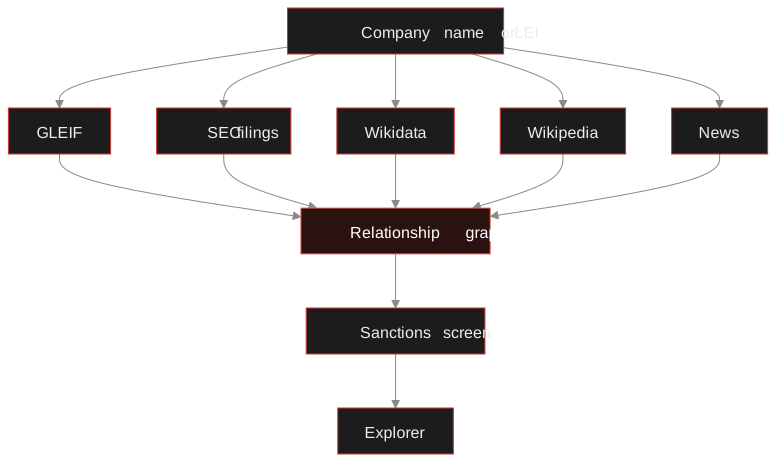
The explorer reads six kinds of source, from the most to the least authoritative, and keeps the kind with every connection it builds:
| Source kind | What it adds | How far to trust it |
|---|---|---|
| Register (GLEIF) | Direct and ultimate parents, and children, as reported by the companies themselves | Highest: legal ownership data |
| Filing (SEC EDGAR) | Subsidiary lists from annual reports, other companies' filings that list this one, and press releases filed with the SEC | High: filed under legal obligation |
| Sanctions list | OFAC and UN listings, and OFAC's "linked to" remarks between listed companies | High, for an exact name and country match |
| Knowledge base (Wikidata) | Owner, parent, subsidiary, investor and partner statements, with their references | Good, check the reference |
| Encyclopedia (Wikipedia) | The infobox, sentences that state a relationship, and merger and acquisition lists | Medium: read the sentence |
| Media | News headlines that state a deal or partnership | Lowest: a lead to confirm |
One rule keeps the text sources in check: a company mentioned in a sentence only becomes a node if it resolves to a Wikidata item that describes an organisation. Free text never creates a company on its own, which is why you will not see "the board" or "the government" as a partner.
A walkthrough
-
Search the company
Type the company name, or its 20-character LEI if you have it, into the search box, or start from the Company card on the search page. If several companies share the name, the explorer asks which one you mean; the LEI skips that question.
-
Read the profile first
The top of the result is the company profile: registers and filings, the website, people, GitHub and news. The relationship explorer sits below it and builds while you read, usually within a minute or two for a large company.
-
Look at the graph, then the list
The searched company is in the middle. Connections are coloured by type, the 14 most important are drawn as named boxes and the rest as dots you can hover. The list view shows the same connections as rows, which is easier to scan for a company with hundreds of subsidiaries.
-
Filter
Narrow by relationship type, sanctions status, country, name or source kind, or set a minimum number of sources. "At least two sources" is a quick way to hide the connections that rest on one news headline.
-
Open a connection
Click a line to see its evidence: which register entry, filing or sentence it came from, with a link to each. Click a company to see its identifiers and sanctions details.
-
Expand, hide, export
"Expand connections" merges a connected company's own graph into yours, which is how you walk from a subsidiary to its sister companies. "Hide from graph" removes noise. Export CSV saves what your filters show.
Try it on a company you know.Search a large listed company first: it has the most sources, so you see every part of the explorer.
Search a companyThe twelve relationship types
Ownership comes first, because it decides who is responsible. The other types describe business ties that matter for due diligence and supply chain checks:
- Subsidiary
- Controlled by
- Investment
- Acquisition
- Joint venture
- Partnership
- Supply chain
- Distribution
- Joint research
- IP licensing
- Litigation
- Sanctions link
Direction matters. "Acquisition" between two companies says one bought the other; the connection details say which way round, and when the source does not say, the explorer does not guess.
Sanctions screening
Every company that ends up in the graph, not just the one you searched, is checked against the OFAC SDN and consolidated lists and the UN Security Council list. A match needs the exact normalised name or a listed alias, and the country must agree, so a common word in a company name does not light up the graph. OFAC's "linked to" remarks become connections of their own, which is often how a harmless-looking supplier turns out to sit next to a listed entity.
Careful: a flag is a reason to look closer, not a verdict. Open the sanctions details, check the programme and the listing on the official site, and remember that a company can be removed from a list. The explorer reads the lists as they stood when it ran.
What it will miss
The explorer is strongest on large and listed companies, because that is where the sources are. Small private companies often have no LEI, no SEC filings and no Wikipedia article, so you will get the register profile and little else. For those, the classic manual steps in the company OSINT guide (national registers, the imprint, the domain's history) still do the work, and a domain lookup of the company's website often tells you more than the company search.
Connections built from sentences are right most of the time, but not always. In our own checks of the text-derived connections, roughly one in ten needed correcting: a long history paragraph that mentions another company's deal, or a regulator described as a partner. That is why every connection carries its source and why the minimum-sources filter exists.
A procurement team checks Example Corp before signing. The register shows a parent in another country, the filing layer adds two sister companies, and one of them carries a sanctions-link connection from an OFAC remark. The team exports the CSV, attaches it to the vendor file, and asks the supplier to explain the ownership before going further. Nothing in the graph proves wrongdoing; it tells them which question to ask.
From the graph to a case
A company is rarely the whole investigation. The people listed on its profile lead to the person search, its domains to the domain lookup, and its staff email pattern to breach monitoring. When the picture gets bigger than one result, put it on the investigation canvas and keep searching from there.
Frequently asked questions
Where does the relationship data come from?
From public sources only: the GLEIF register of legal entities, SEC EDGAR filings, the OFAC and UN sanctions lists, Wikidata, Wikipedia and news headlines. Every connection lists the sources it was built from.
Does a company search cost credits?
No. Company lookups read free public sources, so they cost no credits. You need to be signed in, and there is a per-account rate limit.
Why is a small private company missing connections?
Most of the sources cover companies with a legal entity identifier, SEC filings or a Wikipedia article. A small private firm often has none of those, so the explorer shows its register details but few or no connections.
What does a sanctions flag mean?
The company, or a company connected to it, matches an entry on the OFAC or UN Security Council lists by its exact name or alias, in a country that agrees. Open the sanctions details to see the list and programme, and confirm on the official list before acting on it.
Can I export the graph?
Yes. Export CSV writes every connection that matches your current filters, with its type and sources, so you can keep it in a case file or load it into another tool.
Keep reading
-
 Guides
Company OSINT: Research an Organization From Public Records
Check that a company exists, who is behind it and how long it has traded, from public registers and open data.
-
 Guides
Domain and Website OSINT: Investigate Who Is Behind a Site
Date, host and link a suspicious site using RDAP, DNS, certificate logs, archives and shared tracking IDs.
-
 Investigations
Person Search: What the Web Shows About a Name
Add context to a name, read the results sorted by type, and see possible identities with the reasons behind them.