 TraceFind
Company OSINT: Research an Organization From Public Records
A supplier asks for a prepayment and you have never heard of them. Here is how to check that the company exists, who stands behind it and what its public footprint says, in a few minutes.
- Type a company name or a 20-character LEI into the search box. TraceFind asks public registers and open data sources at once and puts the answers on one profile.
- You get legal name and form, register number, addresses, parent and subsidiaries, officers, founding date, websites and social accounts, filings, news and the company's own website.
- Every name, domain, email and address in the profile is a pivot you can search or take to the canvas.
- Coverage depends on the country. A small company without an LEI or a register we read may come back with the web and the website only. The profile says which sources answered.
- Company lookups are free for signed-in accounts.
A supplier you have never heard of wants a prepayment of 8,000 EUR. Their website looks fine, the invoice has a register number on it, and the sales contact writes friendly emails. Before the money moves, you want to know three things: does this company legally exist, who is behind it, and does its public footprint look like a company that has traded for years or a website from last month? That is what a company lookup is for.
What a company lookup asks
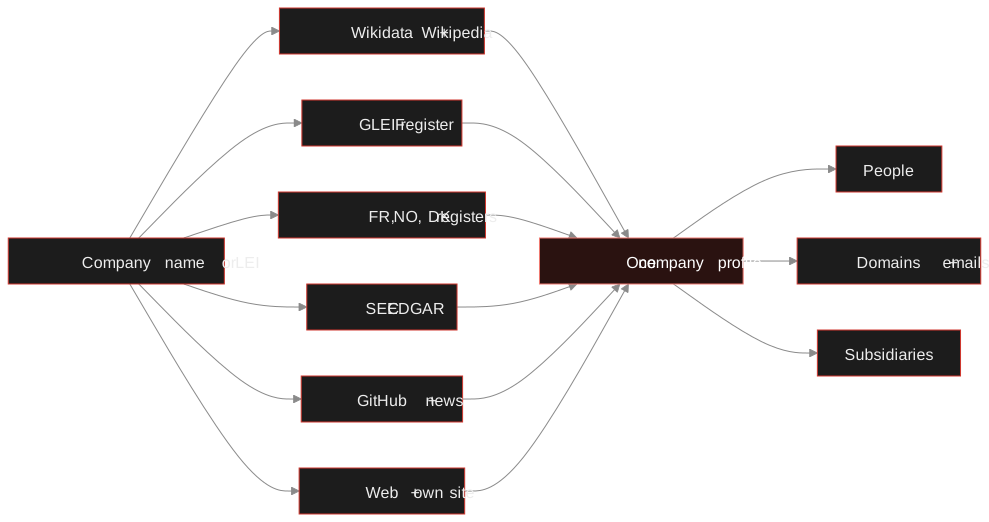
No single register covers the world, so the lookup asks several sources in parallel and keeps each one's answer separate, so you can see where a fact came from.
| Source | What it gives you |
|---|---|
| GLEIF (LEI register) | Exact legal name, jurisdiction, legal form, company register number, registered and headquarters address, direct and ultimate parent, direct subsidiaries |
| Wikidata and Wikipedia | For notable companies: a plain-language summary, founding date, headquarters, industry, employees, revenue, CEO and founders, owners, official website and social accounts |
| SEC EDGAR | For US-registered or US-listed companies: filer number, business address, phone, ticker, former names and the latest filings |
| France, Norway, Denmark | The national registers: number, status, founding date, address, activity code, employees, and the officers or board where the register lists them |
| GitHub | The company's organisation, public members and the names and emails in recent commits to its repositories |
| News | The latest coverage that mentions the name |
| The web and the company's site | Pages that mention the company, its LinkedIn page, and its own website read from the newest archived copy: contacts, social profiles, tracking IDs and technology |
The lookup only accepts a match it is confident about. It compares company names with the legal form removed, so "Siemens AG" and "Siemens Aktiengesellschaft" match, while a different company with a similar name does not get merged in. If no register has a clean match, the profile says so rather than showing the wrong company.
Reading the profile
The page opens with the headline facts: legal name, founding date, headquarters, size, industry, website and register number. Below that, the details are grouped into three blocks.
-
About the company
What it does, when it started, how big it is. For well-known companies this is Wikidata and Wikipedia. For a small one it is often empty, and that is itself information: a company with years of trading history and nothing about it anywhere is unusual.
-
Registers and filings
The official side: legal form, status, register number, incorporation date, addresses, parent and subsidiaries, filings. Check three things against the paperwork you were given: the legal name, the register number and the address. A mismatch on any of them is the first thing to ask about.
-
Web, code and news
The company as it presents itself: pages that mention it, its GitHub account, recent news. For a software company, the emails in its commit history show real staff names and addresses.
The people and the money trail
Registers that list officers give you names with roles: board members in Norway, directors in France. Wikidata adds CEO, founders and owners for notable companies. Those names appear under Connections, grouped by how they relate (director, founder, subsidiary, parent), and each one can be searched or sent to the canvas.
Ownership links are the most useful pivot in a supplier check. If the ultimate parent in the LEI register is a holding company in a jurisdiction you did not expect, or the subsidiaries list shows a dozen near-identical names registered in the same month, you have learned something no website will tell you.
You look up "Example Supplies GmbH". The LEI register has no record, which is common for small companies, so there is no parent or subsidiary data. The web section finds the company's website and its LinkedIn page. The archived copy of the site is from last March, and the first capture of the domain in the Internet Archive is from that same month. The site lists an imprint with a register number and an address. You now have a clear question for the supplier ("your site is eight months old, how long have you traded?") and a register number to check at the German commercial register, which TraceFind does not read.
Tip: if you have the LEI (20 characters, printed on many contracts and invoices from larger companies), search it instead of the name. It resolves to exactly one entity, with no matching guesses.
The company's own website
When a website is known, from Wikidata, a register or the web search, the lookup analyses its newest archived copy. It reads from the Internet Archive, so the site never sees a visit from TraceFind. From the copy it pulls email addresses and phone numbers printed on the page, social profiles, analytics and tracking IDs, and the technology the site uses.
Tracking IDs are a quiet way to tie companies together. An owner who reuses the same analytics account across sites leaves the same ID on all of them, so two "unrelated" shops that share one are probably run by the same people. The domain and website OSINT guide goes deeper on that.
Look up a company. Enter a name or an LEI in the search box. It is free for signed-in accounts.
Open the searchWhat it does not cover
- Many national registers. France, Norway and Denmark are read directly. For other countries you get what the LEI register, Wikidata and the web hold. The profile links to OpenCorporates and OpenSanctions searches so you can continue there by hand.
- Financial statements and credit scores. Those sit with paid providers.
- Private companies without an LEI. Most small firms never register one, so parent and subsidiary data are often missing for them.
- Proof of honesty. A clean registry entry shows that a company exists, not that it will deliver.
Legal: company registers are public by design, but the officers listed in them are private individuals. Use the names for the check you came to do, not to build a file on a person. See our legal and ethical guide.
Related reading: checking a seller or landlord before you pay, whether a website is legit, employee breach monitoring for the company you work for, and person search for the people you find.
Frequently asked questions
Which companies can I look up?
Any company name or LEI. How much comes back depends on the company: listed and larger firms have the most, and small unlisted ones may return only web results and what the register in their country shows.
Is the company lookup free?
Yes for signed-in accounts. Company lookups do not cost credits.
Does the lookup contact the company?
No. It asks public registers, open data services and search engines, and reads the company website from an archived copy, so the company does not see a visit.
What is an LEI?
A Legal Entity Identifier: a 20-character code that identifies one legal entity worldwide and is published in the GLEIF register. Searching by LEI gives exactly one entity with no name matching.
Why is the German commercial register not included?
The Handelsregister has no open interface we can use. The lookup shows the register number from the LEI record when there is one, so you can check it there yourself.
Can I take a company to the canvas?
Yes. The people, domains, emails and subsidiaries in the profile can be searched further or added to the investigation canvas.
Keep reading
-
 Guides
Domain and Website OSINT: Investigate Who Is Behind a Site
Date, host and link a suspicious site using RDAP, DNS, certificate logs, archives and shared tracking IDs.
-
 Guides
Is OSINT Legal? Ethics and GDPR for Online Investigations
Where the legal and ethical lines run in open source investigations, and the habits that keep your work defensible.
-
 Guides
Check Before You Pay: Vetting a Seller, Landlord or Marketplace Contact
A calm ten-minute routine to vet an online seller, landlord or marketplace contact before you send money.