 TraceFind
How to read an email search result
An email search finishes with a wall of findings: a hundred site logos, a red breach card, a mailbox verdict and a row of counters. Each part answers a different question, and each can be misread. This guide walks through a real result, part by part, and ends with how to put them together.
- The three counters are a summary: accounts the address is registered with, breaches it appears in, and what kind of mailbox it is.
- The mailbox verdict tells you whether mail to the address would arrive. "Could not be confirmed" is normal for many providers and is not a bad sign.
- The breach card's "records" figure is the size of those breaches combined, not the number of records about this address.
- Account cards with extra details (a name, a masked phone number, sign-in methods) are your best pivots. A plain logo only says the address is registered there.
- Read the parts together. A long history of registrations and old breaches is what a real, long-used address looks like; none at all is what a new or throwaway one looks like.
The example we will read
Everything below comes from a real search of test@mailinator.com, a public test inbox that anyone in the world can read and that thousands of people have used to sign up for things. It is a deliberately extreme case: a person's own address would usually show fewer accounts and far fewer breaches. That makes it a good teaching example, because every part of the result has something in it.
The counters: a summary, not a score
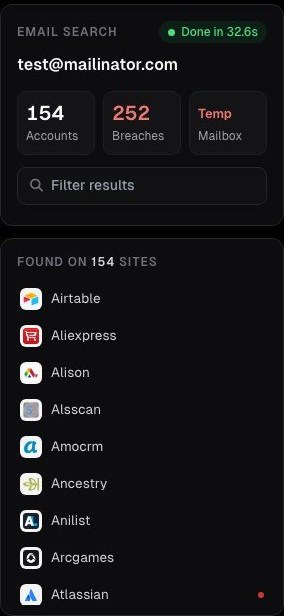
Accounts counts the sites where the address is registered, out of the 493 TraceFind checks. Each site is asked the same question its own sign-up or password-reset form answers: is this address already in use?
Breaches counts known data breaches that contain the address, from an index of more than 16 billion breach records.
Mailbox is a one-word verdict on the mailbox itself: confirmed, rejected, unknown, or, as here, Temp for a disposable provider.
The filter box narrows the site list and the grid as you type, which is the quickest way to answer "is this address on LinkedIn?" in a long result.
None of these numbers is a risk score. 154 accounts does not mean "suspicious" and 3 does not mean "safe". They tell you how much there is to read.
The mailbox verdict: will mail arrive?
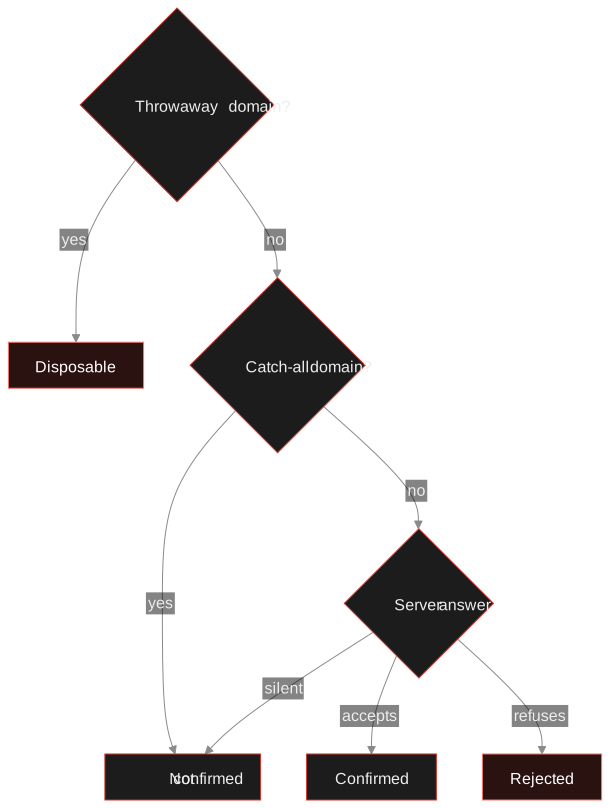
The middle card checks the address the way a mail server would, without sending anything. Its headline is one of four verdicts:
| Verdict | What it means | What to do with it |
|---|---|---|
| Mailbox confirmed | The mail server accepted this exact address. | The mailbox exists today. It says nothing about who reads it. |
| Mailbox rejected | The server refused the address; mail will most likely bounce. | A strong sign the address is mistyped, deleted or invented. |
| Could not be confirmed | The domain accepts mail but would not say whether this mailbox exists. | Normal for many large providers and company servers. Not a bad sign. |
| Disposable address | The domain is a known throwaway or temp-mail provider. | Treat it as shared and short-lived; checks stop here. |
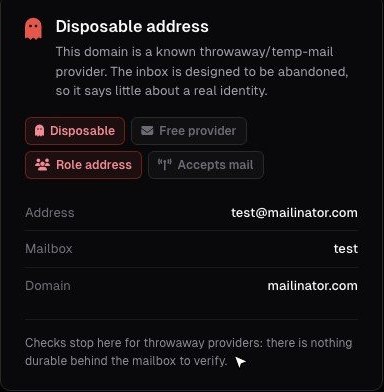
Under the headline are flags. Disposable and Role address (like info@, sales@ or test@, a mailbox shared by a team or a function rather than one person) are shown in red because they change what the address can tell you. Free provider (Gmail, Outlook and the like) and Accepts mail are neutral facts.
Three more can appear: Catch-all domain (the server accepts mail for any address, so a "yes" would be meaningless), Inbox full and Account disabled. The note at the bottom always says why the verdict is what it is.
Our guide to checking whether an email address exists goes deeper into how mail servers answer and why some never will.
The breach card: when, and what leaked
The breach card on the right lists every known breach that contains the address, newest first. At the top are three figures, and the first one is the most often misread.
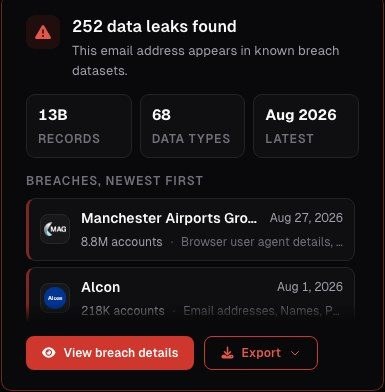
- Records adds up the size of every breach the address is in. It tells you how big those incidents were overall. The address itself is usually one row in each.
- Data types counts the distinct kinds of data across those breaches: email addresses, passwords, names, phone numbers, IP addresses, dates of birth and so on.
- Latest is the date of the most recent breach. For a personal address this is the number that matters most: a recent breach means recent exposure.
Each row in the list names the breached service, its date, how many accounts it affected and which data types it exposed. View breach details opens the full list, with flags on individual breaches: Verified (confirmed by the source), Sensitive, Stealer log and Malware (credentials taken from an infected device, which is worse than a server breach), Fabricated and Spam list (lists of addresses with little else), and Retired.
Careful: a breach entry proves the address was in that dataset, not that the person behind it used the service. People sign up others, typo their own address, and spam lists collect addresses nobody registered. Use the date and the data types; do not use a single breach as proof of anything about a person.
If the address is your own, our data breach guide has the steps to take, ordered by what leaked.
The accounts grid: where it is registered
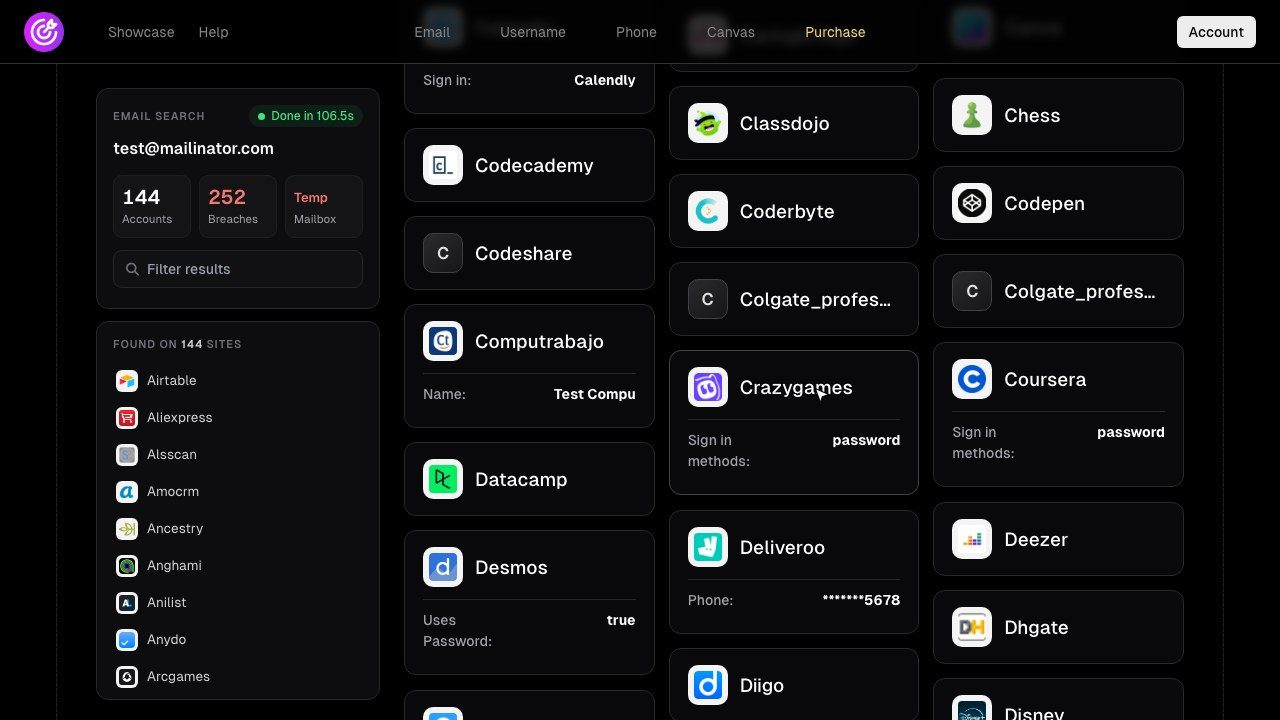
Below the cards is the grid of every site with a hit. A plain card with only a logo and a name means one thing: an account exists there with this address. Cards with extra rows are where the real information is.
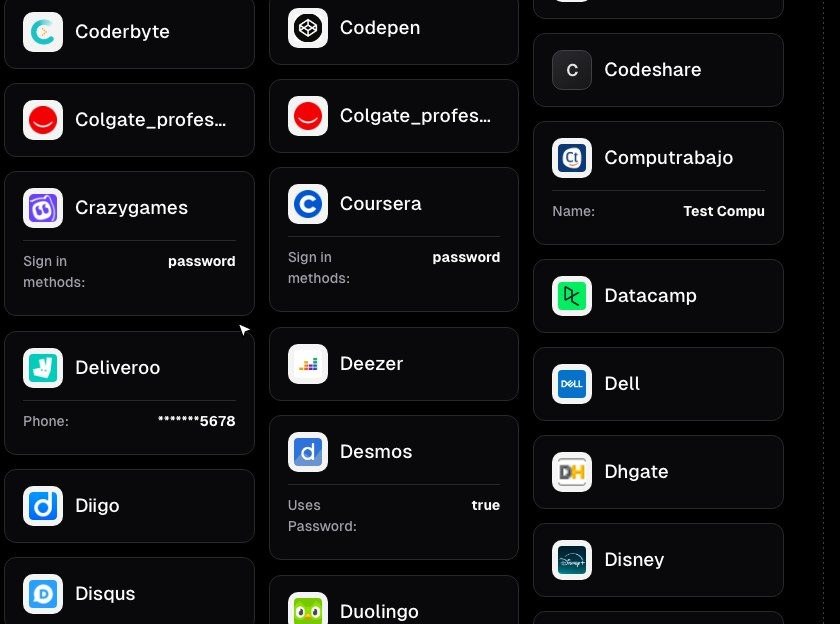
What the extra rows give you:
- A masked phone number (here
*******5678) from a password-reset form. The last digits are not enough to identify anyone, but they can confirm or rule out a number you already have. That is often the single most useful detail in a result. - A name the site shows for the account. On a shared test inbox it is meaningless; on a personal address it is a lead worth checking, never a conclusion.
- Sign-in methods (password, Google, Apple) tell you how the account was set up, which matters for securing your own accounts.
The email OSINT guide has a full section on turning these details into the next search.
Read your own result Run the search on your own address and go through it with this guide. A new account's 3 searches show the counts; credits unlock the records.
Search an email addressPutting it together
The parts make sense in combination. Two questions cover most cases: how long has this address been around, and how much has it been used?
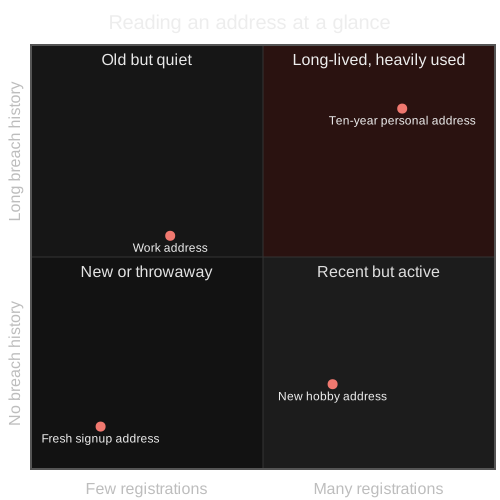
A marketplace buyer writes from jane.doe@example.com. The search finds 23 accounts including a few shopping sites and a recipe forum, 4 breaches from 2016 to 2023, and "could not be confirmed" for the mailbox. That is a boring result, and boring is good: it looks like an address someone has used for years. The unconfirmed mailbox only means the provider does not answer that question.
The same message from an address with no breaches, 1 registration made last week, and a Disposable verdict proves nothing about fraud. It does mean the identity has no history you can see, which is a reason to insist on the platform's own payment and protection. Check before you pay walks through exactly this situation.
Three mistakes to avoid
- Counting instead of reading. 150 accounts on a shared inbox and 150 on a personal address are completely different findings.
- Treating an absence as a fact. Not registered on a site means TraceFind did not find it there. Sites change, rate-limit and hide answers; some are not checked at all.
- Jumping from address to person. A result describes an address. Linking it to a named person needs independent evidence; our investigation workflow shows how to grade that link.
Once you have read the result, Download the data in the bar at the top saves it as a PDF report or as JSON, CSV or TXT, and Open in canvas puts every account and breach on a graph where you can keep going.
Frequently asked questions
What does the records number on the breach card mean?
It is the combined size of all breaches the address appears in, for example 13 billion records across 252 breaches. It is not the number of records about this address, which is usually one row per breach.
Is "Mailbox could not be confirmed" a bad sign?
No. Many providers and company mail servers refuse to say whether a specific mailbox exists, and catch-all domains accept every address. The verdict just means this check cannot answer the question.
Does a registration prove the person uses that site?
It proves an account exists on that site with this address. Someone else may have signed up with it, or the account may be long abandoned. Treat it as a lead and confirm it another way.
Why does a disposable address still show breaches and accounts?
Public test inboxes such as Mailinator are used by thousands of people to sign up for things, so they collect registrations and breach entries. None of them belongs to one identifiable person.
What is the most useful detail in an email result?
Usually the extra rows on account cards: a masked phone number, a display name or the sign-in methods. They are what lets you confirm or rule out a link to other identifiers you already have.
Keep reading
-
 Tutorials
How to Verify an Email Address Exists Without Sending Mail
MX lookups, SMTP RCPT probing, catch-all detection and disposable checks: how email verification works and where it stops being reliable.
-
 Privacy
How to Check If Your Email Was in a Data Breach
Find out which breaches exposed your email, how to read the results, and the exact steps to take afterward.
-
 Guides
How to Find Accounts Linked to an Email Address
Pivot from one email to accounts, breaches, usernames and profiles, then grade every finding. With a worked fraud case.