 TraceFind
What Is OSINT? A Practical Introduction
Someone you have never met wants a deposit for a flat, and you have an email address and a phone number to go on. What you do next, with a clear question and a few public sources, is open source intelligence. This guide explains how professionals do it, and where the limits are.
- OSINT (open source intelligence) means answering a specific question with information anyone can lawfully access. A pile of search results is not OSINT; a checked, sourced answer is.
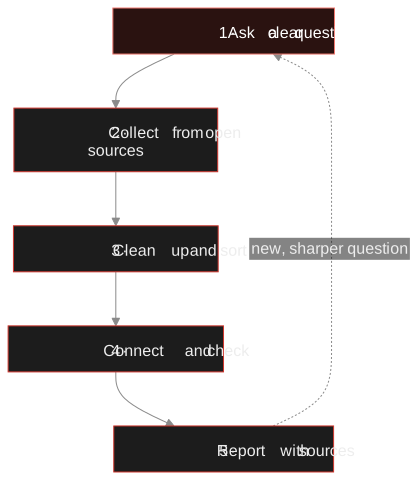
- It runs as a loop: ask, collect, sort, connect and check, report. The question comes first, and the loop starts again with a sharper one.
- Most of the power is in pivoting: one identifier, such as an email address, leads to the next one, such as a username, then a profile, then a website.
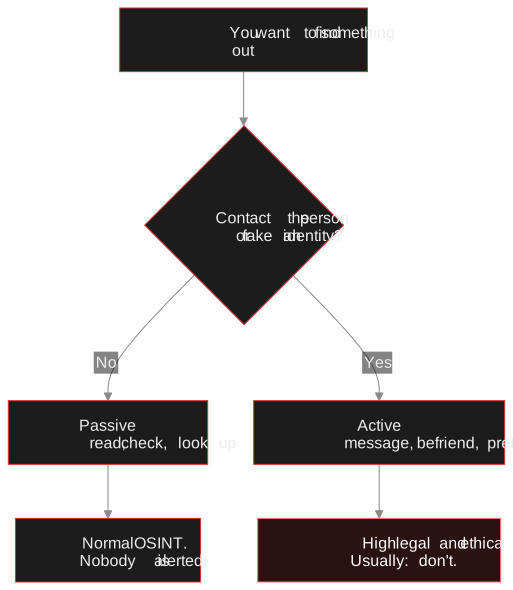
- Passive work (reading, checking, looking up) is the normal case. Contacting people or posing as someone else is where the legal and ethical trouble starts.
- "Public" does not mean "free to use". Public data about a person is still personal data.
The twenty-minute version you have probably already done
Someone you have never met wants a deposit for a flat, and the listing looks a little too good. So you paste their name into a search engine, then the email address from their message, then the phone number. Twenty minutes later you either feel better or you don't. If you did that, you have done OSINT in its smallest form.
The longer definition: OSINT is intelligence produced from publicly available information. The word that matters is intelligence. A fraud analyst asking "is this new customer who they claim to be?", a journalist asking "who registered the domain behind this campaign?" and a security team asking "which of our staff addresses show up in breach data?" are all doing it. What they share is a question someone needs to act on, and an answer they can defend.
"Open" means accessible without special privileges: no hacking, no logging in as someone else, no insider access. It does not mean free of rules, and we get to those further down.
OSINT is not about finding a lot. It is about finding enough to answer one question, and knowing how sure you are.
Where the information comes from
Most investigations draw on a handful of source families. Knowing them helps you pick a sensible starting point instead of searching everything at once.
| Source family | Examples | Typical question |
|---|---|---|
| Online accounts | Social profiles, forums, code hosting, gaming platforms | Does this identifier belong to a real, active person? What do they say about themselves? |
| Identifiers | Email addresses, usernames, phone numbers | Which services is this registered on? Is it disposable? |
| Breach data | Disclosed data breaches and their metadata | Was this address exposed, when, and which data types leaked? |
| Infrastructure | WHOIS/RDAP, DNS records, certificate logs such as crt.sh | Who runs this domain, and when was it set up? |
| Archives | The Wayback Machine, cached pages | What did this page say before it was edited or deleted? |
| Public records | Company registers, court records, official gazettes | Who are the directors? Is this business registered at all? |
| Media | Images, video, documents and their metadata | Where and when was this taken? Has it appeared elsewhere? |
Identifiers are usually the most productive way in, because people reuse them. Our guides on finding accounts linked to an email address and username investigations go through those first hops in detail.
Pivoting: how one clue becomes five
If you remember one technique from this article, make it the pivot. You take a result from one search and use it as the input for the next. Each hop is small and each one rests on evidence, but a few hops can take you a long way from where you started.
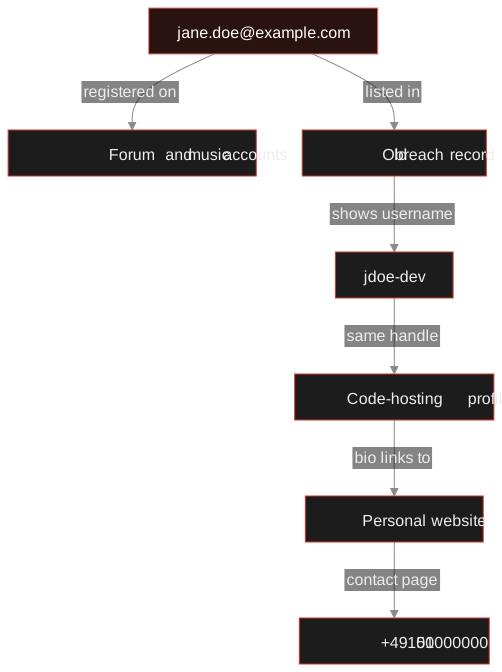
Read it from the top. The address alone says little. The old breach record ties it to a handle, the handle turns up on a code host, and the bio there links to a website with a contact page. None of those steps needed a login, a message or a trick.
Careful: A matching username on two sites is a lead, not a conclusion. Common handles are shared by many unrelated people. Look for one independent second signal, such as the same profile photo, a cross-link between the profiles or the same email in a breach record, before you treat two accounts as one person.
The cycle professionals follow
Analysts work in a loop usually called the intelligence cycle. You can skip the military vocabulary, but the steps prevent the two classic failures: collecting far more than you need, and reporting things you never checked.
-
Ask a clear question
Write down the question, who needs the answer and what you are allowed to do. "Is the seller at jane.doe@example.com plausibly a real person with a history?" is workable. "Find everything about Jane" is not.
-
Collect from open sources
Gather only what serves the question. For every item, note the source, the time and the exact query, because pages change and profiles vanish.
-
Clean up and sort
Remove duplicates, put timestamps in one time zone, and mark each result as confirmed or merely possible.
-
Connect and check
Join the pieces and test the boring explanations too. Two accounts called
jdoe-devmight be one person or two strangers. Look for a shared avatar, a linked URL or a matching bio. -
Report with sources
State the answer, how confident you are and where each claim comes from, so a colleague can check your reasoning without asking you.
Who uses it, and for what
Security teams map their organisation's exposure: leaked staff credentials, forgotten subdomains, impersonation accounts. Fraud and trust and safety teams check whether a sign-up, seller or applicant uses a disposable email or phone number, or an identity with no history at all. Journalists and researchers verify sources and check whether a photo is what it claims to be. Due diligence and compliance analysts confirm that companies and their officers exist and match what they declare.
And then there is the group that gets mentioned least: ordinary people auditing themselves. Searching your own email, username and phone number and reading the results like a stranger would is the fastest way to learn what you have left lying around.
Passive versus active: the line that matters most
Passive collection reads information without interacting with the subject: checking whether an address is registered on a site, reading a public profile, looking up breach records. Active collection involves contact: sending a message, adding someone as a friend, creating a fake persona. Active techniques carry legal and ethical risk, and they can alert the person, which in many cases ends the investigation and sometimes puts people at risk.
TraceFind lookups are passive. An email, username or phone search never notifies the person being looked up. That is a design choice, not a loophole: the point is to learn from what is already public, not to provoke a reaction.
A short worked example
A marketplace's trust and safety team gets a high-value listing from a new seller registered as jane.doe@example.com, phone +49 151 00000000. The question: does this identity have a credible history, or should the listing be held for manual review?
Email. The team runs an email search: is the address disposable or a catch-all, where is it registered, is it in breaches? An address in a breach from several years ago almost certainly existed back then.
Phone. A phone search shows line type, messenger presence and whether the number appears on public receive-SMS sites, which says a lot about throwaways.
Username. Any handle that turned up goes into a username search for related profiles.
Decision. Confirmed links go on the canvas, unconfirmed ones are marked as such, and the conclusion is two lines with a confidence level. The team does not need the seller's life story, only enough to decide.
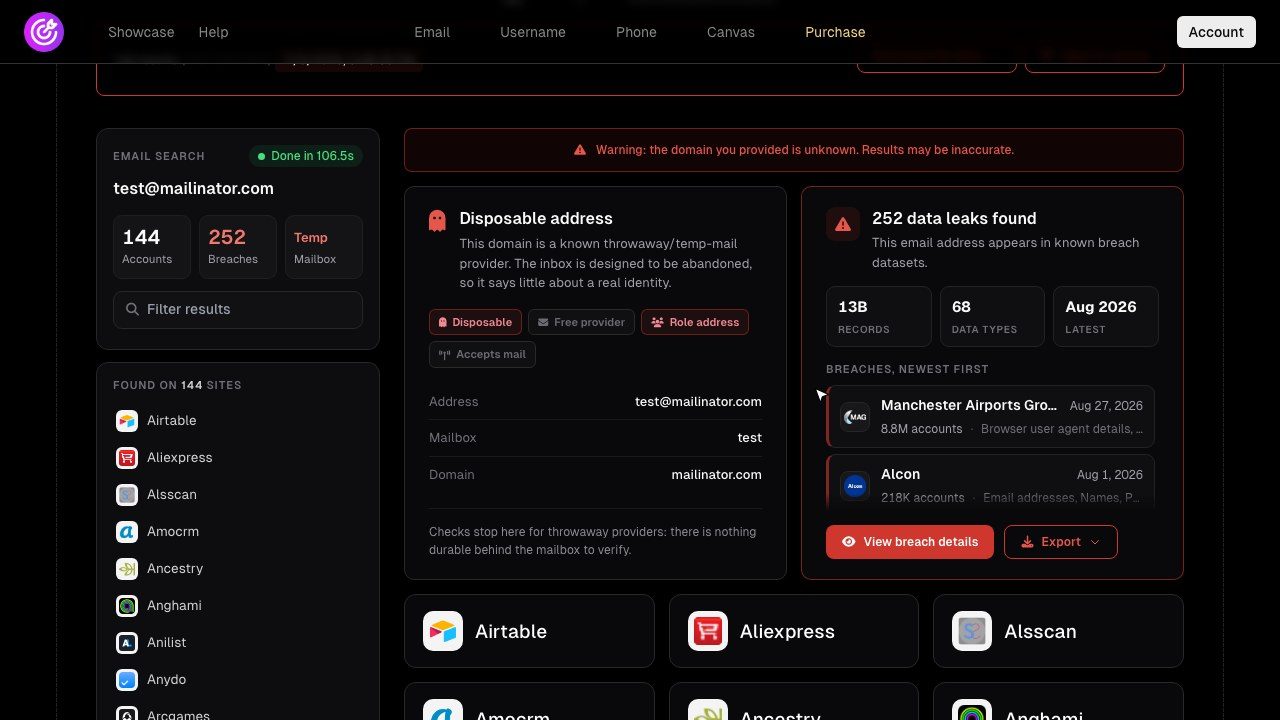
See what an address gives away Registrations on 296 sites, 16B+ breach records and a mailbox check in one search. Free accounts get 3 searches with a preview of the counts.
Open the email searchThe limits that keep it legitimate
Public availability does not make every use lawful. A few principles apply nearly everywhere, and in the EU and UK the GDPR spells them out.
- A purpose and a lawful basis. Fraud prevention, security and journalism are recognised purposes, but you must be able to explain why the processing is necessary.
- Minimise. Collect what answers the question, then stop. No profiles "just in case".
- Stay on the open side. Logging in to someone else's account, guessing passwords or using leaked credentials is unauthorised access, whatever the motive.
- No harassment, no exposure. Stalking, doxxing and publishing private details are harmful and often criminal.
- Write it down. Record what you searched, when and why. It protects you and the person you researched.
Legal: This is general information, not legal advice. Our guide to OSINT law and ethics covers lawful basis, minimisation and documentation in more depth. In a regulated setting, check with your legal or data protection team before you start.
Where to start
Start with yourself. Search your main email address, your usual username and your phone number, then look at the results the way an investigator would: what could a stranger learn, and how sure could they be? It makes the power of open sources concrete, and it explains why the limits above exist. When you want to run a whole case, our investigation workflow shows one from question to report, and the canvas tutorial shows how to keep it organised.
Frequently asked questions
What does OSINT stand for?
OSINT stands for open source intelligence: information collected from publicly available sources and analysed to answer a specific question. The term has nothing to do with open source software.
Is OSINT legal?
Collecting publicly available information is generally legal, but how you use and store it is regulated. In the EU and UK the GDPR requires a lawful basis, a clear purpose and data minimisation. Accessing accounts or harassing people is illegal regardless of where the information came from.
Does a TraceFind search alert the person being looked up?
No. TraceFind lookups are passive. Email, username and phone searches never notify the person being looked up.
What is the best starting point for an OSINT investigation?
Start with a clearly written question and the strongest identifier you have, usually an email address, username or phone number. Identifiers are reused across services, so they tend to lead to further verifiable data points.
What is the difference between OSINT and hacking?
OSINT only uses information that is accessible without special privileges. Hacking means getting past access controls, for example by logging in to an account that is not yours. The first can be lawful; the second is unauthorised access in most countries.
Do I need special tools to do OSINT?
No. A search engine, the Wayback Machine, WHOIS and a notes file will take you a long way. Dedicated tools save time by running many checks at once, but the method matters more than the tool.
Keep reading
-
 Guides
How to Find Accounts Linked to an Email Address
Pivot from one email to accounts, breaches, usernames and profiles, then grade every finding. With a worked fraud case.
-
 Guides
Username OSINT: How to Find Accounts From a Username
Enumerate accounts from one handle, weed out false positives and prove that two profiles belong to the same person.
-
 Guides
Is OSINT Legal? Ethics and GDPR for Online Investigations
Where the legal and ethical lines run in open source investigations, and the habits that keep your work defensible.