 TraceFind
Why Monitor? A Guide to Alerts Instead of Repeat Searches
A clean breach check in March says nothing about a leak published in August. Here is why monitoring beats repeat searches, what to watch, and what to do when an alert arrives.
- Exposure is not a fixed number. Breaches surface months after they happen, new accounts appear, and new pages start mentioning a name. A search shows one day; a monitor shows the change.
- You can monitor an email address, a username, a phone number or a person's name. Each check repeats the normal search and reports only what it has not seen before.
- Pick the schedule by how fast you could act on an alert, not by how nervous you are. Weekly is a good default, monthly for old details.
- An alert is a question, not a verdict. Triage it in one minute: what kind of finding is it, and is it yours?
- Alert emails never contain findings, only a link to your dashboard.
Jane checked her email address for breaches in March and it came back clean. In August a shop she had used once in 2019 disclosed that its customer database had been copied the year before. Her address was in it. She learned about it in November, from a phishing email that quoted her old order number. The check in March was correct on the day it ran. It just could not know what had not been published yet.
Why one search is not enough
Searches describe the past, and the past keeps changing. Three things move the picture after you have looked at it:
- Breaches are published late. The gap between a company being breached and the data becoming searchable is often months, sometimes years. An address that is clean today can be listed next quarter.
- Accounts accumulate. You sign up for a service, or someone else signs up with your address. Either way a new registration appears that was not there before.
- Pages appear. A club results list, a company imprint, a people-search listing. A name that returned five pages last month can return six today.
A monitor does the repeating for you and does the part people skip: the comparison. It keeps what it has already seen and tells you only about what is new.
What to watch, and who it is for
| Watch | Alerts you to | Typical reader |
|---|---|---|
| Email address | New breaches and new account registrations | Anyone with an address that matters: main, work, recovery |
| Username | The handle turning up on a site where you did not create it | Creators, developers, anyone worried about impersonation |
| Phone number | New messenger registrations and web mentions | People whose number is also a login or a business line |
| Person name | New web pages that mention the name | Individuals watching their own name, or an investigator following a case |
A name monitor repeats the web part of the person search, with your context (a city or an employer) if you gave it, and leaves out photos and API sources, which change little. It tells you when a page appears that the earlier checks did not list.
Companies have a related need. Our guide on employee breach monitoring covers watching a whole domain's addresses with a bulk search.
Legal: watch your own details, or someone else's only with a legitimate reason. Repeatedly checking a private person is surveillance, with or without a tool. See the legal and ethical guide.
Choosing a schedule
The right interval is the longest one you can live with. Ask: if something new appeared today, how many days could pass before it matters?
- Your main email address
- A username you publish
- A name you are tracking actively
- Old or secondary addresses
- A phone number that rarely changes hands
- Anything you only want to hear about eventually
Daily is for a live situation: an active investigation, or the first days after you have learned that something leaked. Each check costs 2 credits and is refunded when it finds nothing, and at 0.25 EUR a credit that is 0.50 EUR a check. The figures are in the monitoring setup guide; the short version is that a weekly monitor on an established address costs about 9 credits a month at most, a monthly one 2.
Make the alerts useful
Two settings decide whether you keep reading them. "Only when something new appears" keeps the channel quiet, and is the right long-term choice. "Every check" also reports quiet checks, which is worth switching on for the first few weeks so you can see it working. Email alerts are optional, and an alert email never contains the finding. It contains a link, because an email that said which password leaked would be a second sensitive document sitting in an inbox.
Name your monitors. A list of six masked values is hard to read at a glance, and "Main email" or "Old uni address" tells you in one look which alert deserves a minute.
When an alert arrives
Most alerts take under a minute if you ask the questions in the right order.
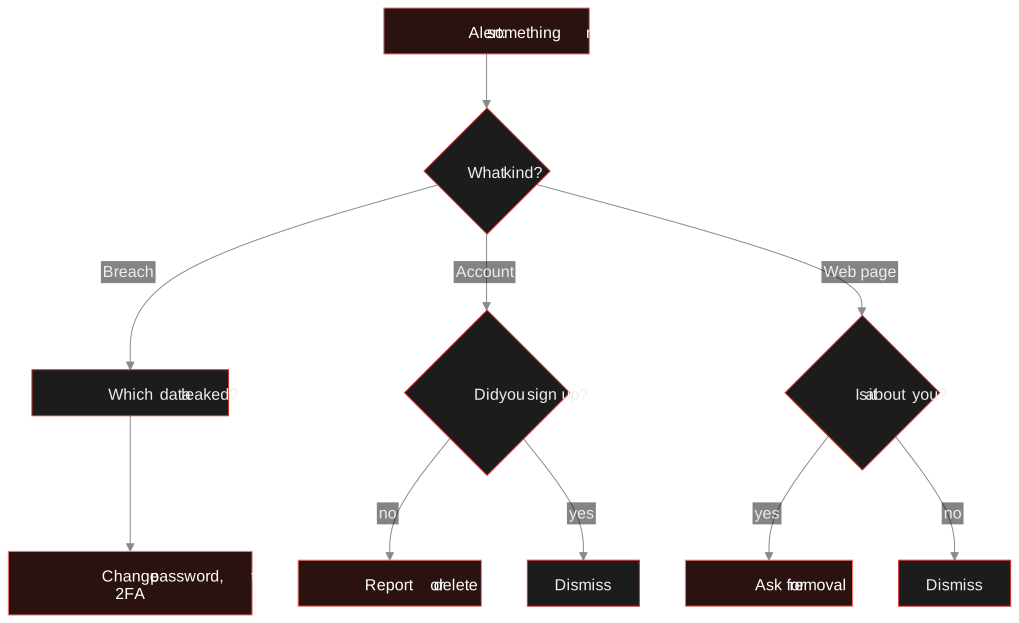
Jane starts a weekly monitor on jane.doe@example.com. The first check records 14 findings as the baseline, with no alert. Three weeks later she is alerted to a new account on a language-learning site. She signed up the same week, so she dismisses it. In week six a breach named ShopLeak appears. She opens the report, sees that passwords were exposed, changes the one she used on that shop and checks that it is not reused anywhere else. From the breach appearing in the data to her acting on it: at most one weekly interval.
What monitoring cannot do
- It cannot see what is not published yet. A monitor shortens the gap between publication and you knowing, nothing more.
- It reports what the search finds. A source that is down on the day produces no alert; a disappearing finding is recorded but never alerts.
- It does not fix anything. The alert tells you to change a password; you change it.
Start with one. Create a monitor for your main email address from the Monitoring section of your dashboard. The first check runs straight away and records the baseline.
Open your dashboardNext: the full setup guide, what to do when a breach lists your email, shrinking your digital footprint and the person search behind name monitors.
Frequently asked questions
What is the difference between a search and a monitor?
A search shows what exists today. A monitor repeats it on a schedule and reports only what is new since the previous checks, so you hear about a breach or a new page without remembering to look.
Which schedule should I pick?
Weekly for a main email or a username you publish, monthly for old addresses and numbers. Daily only while something is happening. Pick the longest interval you could live with.
Can I monitor a person by name?
Yes. A name monitor repeats the web part of the person search, with an optional city or employer, and alerts you when a new page mentions the name. It is meant for your own name or a case you have a legitimate reason to follow.
What does monitoring cost?
Each check costs 2 credits, which is 0.50 EUR, and is refunded when nothing is found. Monitors use purchased credits only and pause when credits run out.
Do alert emails contain my findings?
No. They contain a link to your dashboard so that no sensitive detail sits in an inbox.
Keep reading
-
 Guides
Employee Breach Monitoring: Catch Leaked Logins Early
How leaked employee credentials put company accounts at risk, and how to monitor and respond while respecting employee privacy and GDPR.
-
 Guides
Is OSINT Legal? Ethics and GDPR for Online Investigations
Where the legal and ethical lines run in open source investigations, and the habits that keep your work defensible.
-
 Tutorials
Set Up Breach Monitoring and Alerts for an Email, Username or Phone
Schedule repeat checks of an email, username or phone number, and get told when a new breach or account turns up.